# EdgeTech — full site as Markdown
> EdgeTech is a technology and engineering company in Utrecht that develops and integrates smart energy solutions, with EV charging as a core area: charge controllers, load balancing, Matter modules, GridShield, finished chargers under your name, and the engineering and IP to build your own.
---
# Edge EV Charger controller
Part number: EVSE-C-3x32A
Status: Shipped
Price: € 125 excl. VAT, € 151.25 incl. VAT (per unit excl. VAT, ask for a quote above 5 units)
CE declaration: https://mycharger.edgetech.nl/CE_ChargerController.pdf
Canonical: https://edgetech.eu/electronics/evse-c-3x32a
Updated: 2026-10-27
AC charge controller board for one Mode 3 charge point, up to 3×32 A (22 kW), with integrated relay drive, per-phase current and voltage metering, and Modbus RTU control. The board inside most EdgeTech-based chargers since 2021.
## Specifications
| Specification | Value |
|---|---|
| Charging | IEC 61851-1 Mode 3, 1-phase or 3-phase, 6–32 A continuous, max 3×32 A (22 kW) |
| Advertised maximum | 16 A without jumper, 32 A with jumper; remotely limited per second over Modbus (register 0x0201) |
| Microcontroller | 8-bit microcontroller, 16 MHz, bare-metal C firmware |
| Metering | On-board per-phase current and voltage measurement, session and lifetime energy in 1/256 kWh steps. Not MID certified. |
| Switching | Relays on the board switch the charging current, so no separate contactor is needed; stuck-relay detection; earth, neutral and L1 self-test at every boot |
| Fieldbus | Modbus RTU slave over RS485, 9600 8N1 (19200 with EVSE-SC-02), factory address 1 (answers only after a state change) |
| Bus cable | 3 × 0.75 mm² multi-core (stranded). No solid-core cable and no raw Ethernet cable in the terminals; Ethernet only with RJ45 connectors (adapter board on request) |
| Failsafe | No Modbus message for 2 s → safe mode; internal temperature 62 °C → limit to 10 A, higher → charging off |
| DC leakage protection | 6 mA DC-to-PE sensor (EVSE-X-DCD, IEC 62955) included with every controller; trip reported as error bit 5 (value 32) |
| Cable and lock | Fixed cable or Type 2 socket; PP resistor read for cable rating; lock port for the EVSE-X-CL cable lock driver, with lock/unlock feedback |
| Signalling | Onboard RGB LED or addressable LED strip (36 LEDs); CP disconnect for EV wake-up per IEC 61851-23 Ed. 2 |
| Supply | 90–300 V AC, 50 Hz, 3 W |
| Dimensions | 168 × 122 × 25 mm |
| Enclosure rating | IP00 (bare board, for installation in an enclosure), Class I |
| CE | Declaration 2022-001 EVSE-C-01: LVD 2014/35/EU, EMC 2014/30/EU, RoHS 2011/65/EU. Updated declaration to EN IEC 61851-1:2019 and EN IEC 61851-21-2:2021 soon |
| Made in | Europe |
| evcc | Works with evcc: official evcc device "Edgetech Smart EVSE", template maintained by EdgeTech. evcc talks to the charge controller over RS485 and does the load balancing and solar charging itself; no site controller needed |
Interfaces: Modbus RTU RS485, RGB LED / addressable LED strip, cable lock, CP disconnect, SPI ISP for firmware
Standards: IEC 61851-1, IEC 61851-23 Ed. 2 (wake-up), IEC 62955 (with EVSE-X-DCD), Modbus RTU
## What it is
One board, one charge point. The EVSE-C-3x32A talks to the car over the control pilot, switches the charging current with its own relays, measures current and voltage on each phase, and reports everything over Modbus RTU. Put it in an enclosure with an MCB, an RCD and (for DC leakage) the EVSE-X-DCD module, and you have a Mode 3 AC charger.
It runs on its own, at a static limit of 16 A or 32 A. Connected to a site controller it becomes a dynamically limited charge point: the controller writes a new current limit every second, and the board falls back to a safe state if those writes stop.
## What is on the board
- Control pilot generation and measurement (states A, B, C, D per IEC 61851-1), proximity pilot reading for cable rating.
- Relays on the board that switch the charging current on all three phases (no separate contactor), with stuck-relay detection and a boot-time self-test on earth, neutral and L1.
- On-board per-phase current and voltage measurement, giving session energy, lifetime energy and per-phase session energy.
- RS485 transceiver, Modbus RTU slave.
- Lock port for socket variants: the [cable lock driver EVSE-X-CL](/electronics/evse-x-cl) drives the socket lock and reports its position.
- CP disconnect output. Used to wake cars that go into deep sleep after a long pause, per IEC 61851-23 Edition 2. Shipped in firmware 2.10.17.
- Temperature sensor. Above 62 °C the board limits to 10 A; above that it stops.
- LED output: the onboard RGB LED, or an addressable LED strip of up to 36 LEDs.
- SPI header. The site controller can reflash the board's firmware in the field. What changed in each version: [firmware release notes](/docs/firmware#charge-controller-evse-c-3x32a).
## Integration notes
- The controller must answer Modbus requests within 40 ms. Modbus over Ethernet (a TCP gateway) works in principle, but answers too slowly for EdgeTech site controllers; wireless Modbus does not work. Use a bus topology with 3 × 0.75 mm² multi-core (stranded) cable. No solid-core cable and no raw Ethernet cable in the terminals; Ethernet cable only with RJ45 connectors fitted (adapter board with RJ45 socket on request). See [installation](/docs/installation#rs485-bus).
- The charger leaves the factory at Modbus address 1. Address 1 is special: after boot the charger does not answer there, only after a state change. A site controller moves each new charger to its own address, so all chargers can be reached; with your own controller, write an address of 2 or higher to register 0x0200 after a state change.
- All analog registers are in 1/256 units: 5632 in a current register means 22.0 A.
- A 1-phase to 3-phase switch during a session upsets most cars. Stop the session, wait 10 s, switch, restart.
The protocol is open and documented: [Modbus registers](/docs/modbus-registers). Load-balancing behaviour: [Load balancing](/docs/load-balancing).
## Build your own
The board is a Modbus slave, so anything that speaks Modbus RTU can drive it. Our GitHub repository [edge-tech-eu/SmartEVSE](https://github.com/edge-tech-eu/SmartEVSE) has working examples with development boards you can buy: reading the charger state, a touch-screen controller with a current slider and a 1/3-phase button, load balancing on a smart meter, and charging on the cheapest hours. It also has the [register map](https://github.com/edge-tech-eu/SmartEVSE/blob/main/docs/en/modbus-registers.md), the installation guide and the [3D-printable brackets](https://github.com/edge-tech-eu/SmartEVSE/tree/main/hardware/brackets). Or let [evcc](/docs/evcc-home-assistant) drive it.
## Buying
€ 125 per board excl. VAT and shipping. Above 5 units, ask for a quote. Volume customers get the board on a reel-to-enclosure basis with their own firmware defaults (address, LED type, lock type, 1P/3P) preloaded. [Contact us](/contact).
## Installation
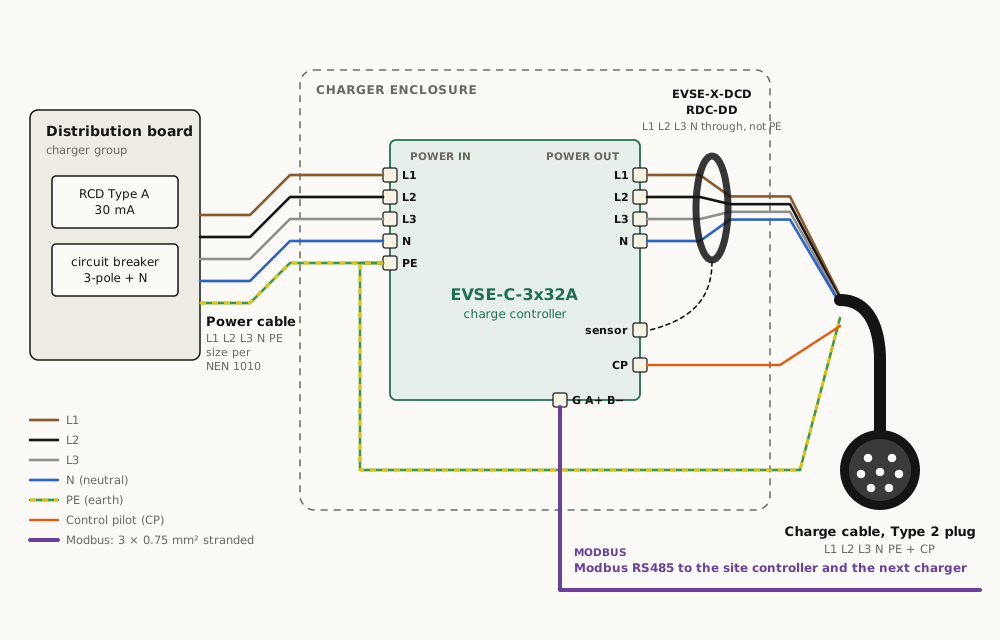
Charge controller: power cable from a charger group (Type A RCD + 3-pole + N breaker) to POWER IN; POWER OUT through the RDC-DD into the charge cable; PE straight to the charge cable; Modbus to the site controller. Rules: https://edgetech.eu/docs/installation#charge-controller
## CAD and drawings
- 3D model (STEP): https://edgetech.eu/cad/evse-c-3x32a.step
- Drawing (PDF, A3): https://edgetech.eu/cad/evse-c-3x32a.pdf
- Drawing (SVG): https://edgetech.eu/cad/evse-c-3x32a.svg
For fit and installation only, not for manufacture. Outline, mounting holes, connector positions and component height envelopes; dimensions marked ≈ are estimated.
## Questions
**Does it work with evcc?**
Yes. The charge controller is an official evcc device, listed as "Edgetech Smart EVSE"; EdgeTech maintains the template. You only need the charge controller, a small Linux computer with evcc and a USB-RS485 adapter. evcc then does the load balancing, solar charging and dynamic tariffs, fully local, without a site controller or subscription. Setup is on the docs page "evcc and Home Assistant".
**Can I control the charge current from my own controller?**
Yes. Write the maximum current in amps to Modbus register 0x0201 at least once per second. Writing 0 stops charging. If the board receives nothing for 2 s it falls back to its static limit.
**Is the built-in meter MID certified?**
No. The metering is accurate enough for load balancing and consumption overviews, but it is not a legal billing meter. Add an external MID meter if you bill by kWh.
**Does it support ISO 15118 or Plug & Charge?**
Not today. The board does basic PWM signalling per IEC 61851-1. ISO 15118 is on the roadmap as an add-on module; see the standards page.
**What is on GitHub?**
The register list, installation guide, 3D brackets, wiring diagram and working examples with development boards you can buy are on GitHub at edge-tech-eu/SmartEVSE.
---
# RDC-DD (DC residual-current detector)
Part number: EVSE-X-DCD
Status: Shipped
Canonical: https://edgetech.eu/electronics/evse-x-dcd
Updated: 2026-10-26
The 6 mA RDC-DD (residual direct current detecting device) A separate product, and standard with every EdgeTech charger, charge controller and DIY kit. It lets a Type A RCD be used upstream instead of a Type B (IEC 62955).
## Specifications
| Specification | Value |
|---|---|
| Standard | IEC 62955 (RDC-DD), 6 mA DC residual current detection |
| Trip level | > 6 mA DC |
| Disconnect time | ≈ 300 ms, via the charge controller relay |
| Wiring | Neutral and all phases through the toroid; protective earth stays outside |
| Dimensions | Board 64 × 35 mm; sensor ring Ø34 mm, 13.75 mm high, conductor aperture Ø13.5 mm; no mounting holes, held by its edges |
| Configuration | None. No adjustable parameters. |
| Failsafe | Loss of communication with the charge controller blocks charging; trip reported as error bit 5 (value 32) in the error byte of register 0x0103 |
| When required | Every Mode 3 charge point on a Type A RCD (NEN 1010 / IEC 60364-7-722) |
| Made in | Europe |
Interfaces: connector to EVSE-C-3x32A
Standards: IEC 62955
## What it is
A residual DC current detector that is delivered with every EVSE-C-3x32A and built into every finished charger. The car's onboard charger can leak DC current back into the installation; a normal Type A RCD does not see it, and its core can even be saturated by it, so that it no longer trips on a normal fault current either. The installation standard (IEC 60364-7-722; in the Netherlands NEN 1010) asks for protection against DC leakage of 6 mA and more: either a Type B RCD, or a Type A RCD together with an RDC-DD to IEC 62955 in the charge point. This module is that RDC-DD.
Not only chargers can leak DC current to PE. Solar and battery inverters without galvanic separation, and some heat-pump drives, can do the same. The installation rule is the same for all of them (IEC 60364-5-53, NEN 1010 clause 531.3.3): choose the residual-current protection by the leakage current the equipment can produce. Where smooth DC can occur, that means a Type B RCD, unless the equipment already has its own DC leakage detection or galvanic separation. For a charge point, the RDC-DD with a Type A RCD is the accepted alternative (IEC 60364-7-722).
The module has no settings. When it trips, the charge controller opens its relays within about 300 ms, sets error bit 5 (value 32), and the MyCharger app or your own controller sees the fault in the socket status.
## Installation
Route neutral and all connected phases through the toroid. Do not route the protective earth through it. Connect the module to the DCD header on the charge controller. If the controller loses communication with the module, charging is blocked until it is restored, so the module must be present when the DCL_MUST_BE_PRESENT setting is on, which is the shipped default.
## CAD and drawings
- 3D model (STEP): https://edgetech.eu/cad/evse-x-dcd.step
- Detailed 3D model (STEP): https://edgetech.eu/cad/evse-x-dcd-detailed.step
- Drawing (PDF, A3): https://edgetech.eu/cad/evse-x-dcd.pdf
- Drawing (SVG): https://edgetech.eu/cad/evse-x-dcd.svg
For fit and installation only, not for manufacture. Outline, mounting holes, connector positions and component height envelopes; dimensions marked ≈ are estimated.
## Questions
**Do I still need a Type B RCD?**
No. With the EVSE-X-DCD detecting DC residual current above 6 mA, the charge point may be protected by a Type A RCD (30 mA) upstream, which is what NEN 1010 asks for.
**Can two charge controllers share one module?**
No. One module per charge controller. A two-socket cabinet uses two controllers and two modules.
---
# Cable lock driver
Part number: EVSE-X-CL
Status: Shipped
Canonical: https://edgetech.eu/electronics/evse-x-cl
Updated: 2026-10-13
Drives the lock of a Type 2 charge socket from the charge controller's lock command, with position feedback. Reserve capacitors keep enough energy on board to release the lock after a power failure, so a car is never held on a dead charger.
## Specifications
| Specification | Value |
|---|---|
| Function | Locks and unlocks the charge-socket lock actuator on command of the charge controller and reports its position |
| Controller connection | P1, 3-pin: lock signal, +12 V and GND from the lock port of the EVSE-C-3x32A |
| Lock connection | J3, 4-pole push-in terminal with levers: actuator drive (both directions) and position feedback |
| Power-failure release | 3 × 2200 µF reserve capacitors keep enough energy to release the lock after loss of supply |
| Dimensions | Board 122 × 22.5 mm; tallest parts 20 mm above the board; keep 4 mm free below; no mounting holes, held by its edges |
| Wiring clearance | Leave 20 mm above P1 and above J3 for the plug, the wires and opening the levers |
| Lock compatibility | Socket lock actuators differ. We test each locking mechanism before supply: tell us which socket and lock you use |
| Control over Modbus | Through the charge controller: lock state in register 0x0010, lock with 0x0015, unlock with 0x0016; lock behaviour set by bit 1 of the settings (0x0204) |
| Made in | Europe |
Interfaces: lock port of the EVSE-C-3x32A, socket lock actuator
Standards: IEC 61851-1
## What it is
A small driver board between the charge controller and the lock of a Type 2 charge socket. The EVSE-C-3x32A gives the lock command; the cable lock driver turns it into a motor drive in the right direction, reads back whether the lock is open or closed and reports that to the controller.
The board stores energy in three reserve capacitors. If the supply fails while a cable is locked in, there is still enough energy to release the lock, so the car is never held on a charger without power.
## Installation
1. Connect P1 to the lock port of the charge controller with the 3-wire lead (lock signal, +12 V, GND).
2. Connect the socket's lock actuator to J3: the drive wires and the position-feedback wires.
3. Fit the board by its edges, with 4 mm free below it and 20 mm free above P1 and J3.
4. Make sure CP disconnect on the lock port is off (bit 3 of the settings register 0x0204).
Shipped in limited quantities. Each type of socket lock is tested with the driver first, so tell us which socket you use when you order.
The [CAD and drawings](#cad) give the outline and the keep-out areas for fitting it in an enclosure.
## CAD and drawings
- 3D model (STEP): https://edgetech.eu/cad/evse-x-cl.step
- Detailed 3D model (STEP): https://edgetech.eu/cad/evse-x-cl-detailed.step
- Drawing (PDF, A3): https://edgetech.eu/cad/evse-x-cl.pdf
- Drawing (SVG): https://edgetech.eu/cad/evse-x-cl.svg
For fit and installation only, not for manufacture. Outline, mounting holes, connector positions and component height envelopes; dimensions marked ≈ are estimated.
## Questions
**Does it work with my socket's lock?**
Probably, but lock actuators differ in drive time, current and feedback. We test every locking mechanism with the driver before we supply it for that socket. Tell us which socket and lock you use via the contact page.
**Do I need it with a fixed charging cable?**
No. A fixed cable cannot be pulled out of the charger, so there is nothing to lock. The cable lock driver is for chargers with a Type 2 socket.
**Can I use the lock port for CP disconnect at the same time?**
No. The charge controller's lock port is used either for the cable lock or for CP disconnect (EV wake-up), set by bit 3 of the settings (0x0204). With a cable lock fitted, keep that bit off. Registers 0x0010, 0x0015 and 0x0016 return 0xFFFF when the port is set to CP disconnect.
**What happens during a power failure?**
The reserve capacitors hold enough energy to drive the lock open once more, so the cable can be removed.
---
# NFC card reader (Modbus)
Part number: EVSE-X-NFC
Status: Shipped
Canonical: https://edgetech.eu/electronics/evse-x-nfc
Updated: 2026-10-13
An optional card reader that mounts inside the charger box, with its antenna side against the lid, so cards are read through the lid. It reads ISO/IEC 14443 cards and connects to the Modbus line with four wires. Use it with any card as a local lock and unlock, or with a Dutch laadpas over OCPP.
## Specifications
| Specification | Value |
|---|---|
| Function | Reads NFC cards through the lid of the charger box and passes the card ID over Modbus |
| Cards | ISO/IEC 14443 (NFC-A); identified by the card's UID |
| Connection | 4-pole terminal: +12 V, A, B, GND (marked + A B −), on the Modbus RS-485 line of the charger |
| Mounting | Inside the box, flat antenna side against the inside of the plastic lid; no hole in the lid needed; 4 × Ø3.2 mm corner holes |
| Dimensions | Board 76 × 42 mm; 12 mm high overall |
| Wiring clearance | Leave 25 mm free in front of the terminal for the wires |
| Modes | Local whitelist (no back-office), or Dutch laadpas over OCPP 1.6J (authorisation and billing by a back-office) |
| Whitelist | Managed by the owner in the app; number of cards to be confirmed |
| OCPP path | Depends on OCPP 1.6J being finished into a product for your project (working implementation, not yet deployed) |
| Made in | Europe |
Interfaces: Modbus RS-485 line of the charger, +12 V supply
Standards: ISO/IEC 14443, OCPP 1.6J (laadpas mode)
## Where it fits
Flats and VvE car parks where each user pays for their own kWh; company car parks that should not charge the neighbours' cars; Plaza Charge poles; and any charger that must accept a public charge card.
## Installation
1. Hold the reader with its flat antenna side against the inside of the lid, and fix it with four screws through the corner holes.
2. Connect the 4-pole terminal to the Modbus line: + to +12 V, A to A, B to B, − to GND.
3. Leave 25 mm free in front of the terminal for the wires.
The [CAD and drawings](#cad) give the outline, the holes, the 12 mm height and the wiring keep-out for fitting it in an enclosure. Hole and terminal positions are within about 1 mm.
## The card-less alternative
With the ISO 15118 module the vehicle identifies itself, and no card is needed. For most sites the NFC reader is the cheaper answer.
## CAD and drawings
- 3D model (STEP): https://edgetech.eu/cad/evse-x-nfc.step
- Drawing (PDF, A3): https://edgetech.eu/cad/evse-x-nfc.pdf
- Drawing (SVG): https://edgetech.eu/cad/evse-x-nfc.svg
For fit and installation only, not for manufacture. Outline, mounting holes, connector positions and component height envelopes; dimensions marked ≈ are estimated.
## Questions
**Does the reader need a hole in the lid?**
No. It mounts inside the box with its flat antenna side against the inside of the lid, and cards are read through the lid. The box must have a plastic lid.
**Which cards work?**
ISO/IEC 14443 (NFC-A) cards and tags, identified by their UID. Dutch laadpassen are such cards.
**How is it connected?**
With four wires to the charger's Modbus line, +12 V, A, B and GND, the same 3 × 0.75 mm² line the charge controller and site controller use, plus +12 V.
---
# ISO 15118 communication module
Part number: PLC-15118
Status: Implemented, on order
Canonical: https://edgetech.eu/electronics/iso15118-module
Updated: 2026-10-14
An add-on for the smart charger: HomePlug GreenPHY on the control pilot for ISO 15118 digital communication with the vehicle. With 15118-20 vehicles it shows the state of charge while charging on AC and identifies the vehicle for authorisation. Price on request; V2G under investigation.
## Specifications
| Specification | Value |
|---|---|
| Function | ISO 15118 digital communication over the control pilot (HomePlug GreenPHY), next to the IEC 61851 PWM signalling |
| State of charge on AC | Available with ISO 15118-20 vehicles; -2 vehicles do not report SoC on AC |
| Vehicle identification | EVCCID at SLAC, or the vehicle certificate with Plug & Charge; usable for card-less authorisation and billing |
| Fallback | Analog IEC 61851 per ISO 15118-3 when the vehicle does not speak 15118 |
| V2G / bidirectional | Under investigation. Needs a bidirectional on-board charger in the vehicle, a grid-code path for feed-in and 15118-20 bidirectional power transfer. Nothing claimed until investigated. |
| Plug & Charge | Needs a certificate backend (CPO / PKI); to be confirmed |
Interfaces: Control pilot PLC (HomePlug GreenPHY), connection to the charge controller
Standards: ISO 15118-2, ISO 15118-3, ISO 15118-20
## Why it exists
Two things a plain Mode 3 charger cannot do: know how full the battery is, and know which car is plugged in. With ISO 15118 on the pilot, both become possible, and a charger can start for a known vehicle without a card and stop when the battery is at the level the user asked for.
## Status
A working design on the roadmap, delivered as a product when a customer orders it. Price on request. V2G is a separate investigation, technical and regulatory, and is not part of this module today.
## Questions
**Which vehicles report state of charge on AC?**
Only vehicles with ISO 15118-20. Older vehicles with -2 or without digital communication do not. Ask for the current list before you promise SoC to a customer.
---
# Simple charger
Part number: EDGE-CH-S
Status: Shipped
Lead time: Produced to order; confirmed with the quotation
Canonical: https://edgetech.eu/products/simple-charger
Updated: 2026-10-27
Our electronics in a generic grey box with a fixed charging cable. Mode 3, up to 3×32 A, RDC-DD included, open Modbus protocol. Option: three-colour status lights. The charger for installers and wholesalers who want a reliable unit without a brand story.
## Specifications
| Specification | Value |
|---|---|
| Electronics | EVSE-C-3x32A charge controller with RDC-DD; optional site controller (wired or Matter) for load balancing |
| Power | 1-phase 16 or 32 A, or 3-phase up to 32 A (22 kW) |
| Cable | Fixed Type 2 cable; length options to be confirmed |
| Enclosure | Generic grey box; dimensions and IP rating to be confirmed |
| Option: status lights | Three-colour indication of the charging state |
| Protection | 6 mA RDC-DD on board (IEC 62955); Type A RCD and MCB upstream |
| CE | Declared by EdgeTech for the standard unit |
| evcc | Works with evcc: official evcc device "Edgetech Smart EVSE", template maintained by EdgeTech. evcc talks to the charger over RS485 and does the load balancing and solar charging itself; no site controller needed |
## What is configurable
| Option | Choices |
|---|---|
| Phases | 1-phase 16/32 A, 3-phase 32 A |
| Site controller | None (stand-alone), EVSE-SC-01 clamps, EVSE-SC-02 P1, Matter over Thread |
| DC leak sensor (RDC-DD) | Standard, included |
| Status lights | With or without |
| NFC reader | With or without |
## What you get
A finished, tested charger with the same boards that sit inside thousands of OEM chargers, in a box that does not pretend to be anything else. Installers hang it, plug in the RS485 or pair the Matter set, and the platform does the rest.
## Installation

Charge controller: power cable from a charger group (Type A RCD + 3-pole + N breaker) to POWER IN; POWER OUT through the RDC-DD into the charge cable; PE straight to the charge cable; Modbus to the site controller. Rules: https://edgetech.eu/docs/installation#charge-controller
## CAD and drawings
- 3D model (STEP): https://edgetech.eu/cad/simple-charger.step
- Drawing (PDF, A3): https://edgetech.eu/cad/simple-charger.pdf
- Drawing (SVG): https://edgetech.eu/cad/simple-charger.svg
For fit and installation only, not for manufacture. Outline, mounting holes, connector positions and component height envelopes; dimensions marked ≈ are estimated.
## Questions
**Does it work with evcc?**
Yes. The charger is an official evcc device, listed as "Edgetech Smart EVSE"; EdgeTech maintains the template. You only need the charger, a small Linux computer with evcc and a USB-RS485 adapter. evcc then does the load balancing, solar charging and dynamic tariffs, fully local, without a site controller or subscription. Setup is on the docs page "evcc and Home Assistant".
**Who installs and services it?**
Any qualified electrician can install it; the installation manual is on this site. We also work with a group of certified installers across the Netherlands who install and service our chargers. Ask us and we put you in touch.
**What is the difference with the display charger?**
The box and the electronics are the same; the display charger has a transparent lid with a display behind it. Everything else, including the app, is identical.
---
# Charger with display
Part number: EDGE-CH-D
Status: Shipped
Lead time: Standard: produced to order, confirmed with the quotation. Own shroud: first batch 8–12 weeks after design freeze (indicative); repeat batches 4–6 weeks
Canonical: https://edgetech.eu/products/display-charger
Updated: 2026-10-26
Our main charger: the same grey box and electronics as the simple charger, with a transparent lid and a display behind it that shows charging state, current and energy. Use it as it is, or with your own shroud or front: a white-label charger under your name, with the MyCharger app under your name if you want it. From there it is a short way to your own enclosure and electronics through engineering.
## Specifications
| Specification | Value |
|---|---|
| Display | Behind a transparent lid; shows state, current per phase, session energy; content to be confirmed |
| Shroud / front | Standard grey box, or your own shroud or front on the same box |
| Charge points per unit | 1 or 2, each on its own EVSE-C-3x32A and EVSE-X-DCD |
| Power | 1-phase 16 A or 32 A, or 3-phase up to 32 A (22 kW) per charge point |
| Connector | Type 2 socket with lock, or fixed Type 2 cable (5 m or 7.5 m) |
| Protection | DC leakage 6 mA (RDC-DD, IEC 62955) on board; upstream Type A RCD 30 mA and MCB per charge point supplied by the installer or built in |
| Load balancing | Dynamic per-second limiting with EVSE-SC-02 (P1) or EVSE-SC-01 (clamps), or wireless with GridShield |
| App and platform | MyCharger app (iOS, Android): start/stop, off-peak schedules, solar modes, consumption overview, automatic invoicing. Installer diagnostics and OTA updates. |
| Signalling | RGB status LED or addressable LED light ring, colours configurable |
| Authorisation | Plug and charge, app start, scheduled. RFID on request. |
| Metering | On-board metering (not MID). MID meter as an option for billing. |
| CE | Charge controller and site controller carry their own EU declarations of conformity; updated declarations (EN IEC 61851-1:2019, EN IEC 61851-21-2:2021, RED with EN 18031) soon. The assembled unit is declared by the party placing it on the market; we supply the technical file. |
| Manufactured | Boards and assembly in the Netherlands / EU |
| evcc | Works with evcc: official evcc device "Edgetech Smart EVSE", template maintained by EdgeTech. evcc talks to the charger over RS485 and does the load balancing and solar charging itself; no site controller needed |
## What is configurable
| Option | Choices |
|---|---|
| Shroud | Standard grey box, your own shroud or front, or your own enclosure |
| Branding | Front label, LED colours, app name and icon (white-label MyCharger), splash and support contact |
| DC leak sensor (RDC-DD) | Standard, included with every charge point |
| Charge points | 1 or 2 per unit; up to 10 per site controller |
| Connector | Socket with lock; fixed cable 5 m or 7.5 m |
| Phases | 1-phase 16/32 A, 3-phase 32 A; per-socket 1P/3P switching for solar |
| Site measurement | P1 (SC-02), CT clamps (SC-01), GridShield wireless, or none |
| Firmware defaults | Modbus address, lock type, LED type, CP disconnect behaviour, min/max current |
| Metering | On-board, or external MID meter |
| Platform | EdgeTech-hosted platform, or your own instance of the charging platform (on-premise deployable) |
| NFC reader | With or without |
## Who it is for
Sites where the user wants to see what the charger is doing without opening the app: company car parks, VvE garages, and installers who prefer to read the state at the box.
## Your own shroud
The display charger is also the base for a charger under your own name. Keep the box and electronics, and put your own shroud or front on it, with or without status lights. The MyCharger app can carry your name too.
It is the same charger that is already in the field in several thousand charge points under other brands: the same charge controller, RDC-DD and site controller, assembled and tested, with your name on it.
You do not need to know anything about control pilots, contactors, DC leakage, Modbus or over-the-air updates. You need to know what shroud you want, how many charge points, and whether you want the app under your own name.
## The reference build
| Part | Function |
|---|---|
| EVSE-C-3x32A | Charge controller: pilot, switching relays on the board, metering, Modbus |
| EVSE-X-DCD | 6 mA DC leakage detection |
| Type 2 socket with lock, or fixed cable | Vehicle connection |
| EVSE-SC-02 (per site) | P1 site controller: load balancing, WiFi, platform |
| Enclosure | Wall box or pole, IP54 or better |
Every part in this table is specified, sourced and tested. The bill of materials, wiring diagram and assembly instructions are part of the technical file you receive.
## Lead times
Indicative. First batch 8 to 12 weeks after the design is frozen, of which most is enclosure tooling and the assembled-unit tests. Repeat batches 4 to 6 weeks. Boards are stocked; the enclosure is usually the long pole.
## From white-label to your own
Most OEM customers start with the reference build. When volumes grow, they take the [engineering](/engineering) route and design their own enclosure and electronics around the same boards. The boards, firmware and platform stay the same, so nothing in the field has to change.
## Installation

Charge controller: power cable from a charger group (Type A RCD + 3-pole + N breaker) to POWER IN; POWER OUT through the RDC-DD into the charge cable; PE straight to the charge cable; Modbus to the site controller. Rules: https://edgetech.eu/docs/installation#charge-controller
## CAD and drawings
- 3D model (STEP): https://edgetech.eu/cad/display-charger.step
- Drawing (PDF, A3): https://edgetech.eu/cad/display-charger.pdf
- Drawing (SVG): https://edgetech.eu/cad/display-charger.svg
For fit and installation only, not for manufacture. Outline, mounting holes, connector positions and component height envelopes; dimensions marked ≈ are estimated.
## Questions
**Does it work with evcc?**
Yes. The charger is an official evcc device, listed as "Edgetech Smart EVSE"; EdgeTech maintains the template. You only need the charger, a small Linux computer with evcc and a USB-RS485 adapter. evcc then does the load balancing, solar charging and dynamic tariffs, fully local, without a site controller or subscription. Setup is on the docs page "evcc and Home Assistant".
**Who installs and services it?**
Any qualified electrician can install it; the installation manual is on this site. We also work with a group of certified installers across the Netherlands who install and service our chargers. Ask us and we put you in touch.
**What is the minimum order?**
There is no hard minimum for the reference enclosures. A custom enclosure or a white-labelled app is worth it from roughly 50 units a year; below that we recommend the reference build with your label.
**Who signs the CE declaration of the finished charger?**
The company that places the charger on the market under its name. EdgeTech supplies the declarations of the boards, the technical documentation of the reference build, and if wanted, does the assembled-unit testing with you.
**Can we run the backend ourselves?**
Yes. The charging platform can be deployed on a single server inside your own network, with no dependency on our cloud. It was built for telecom customers who run their own vulnerability scans and cannot depend on external services.
---
# Plaza Charge
Part number: PLAZA
Status: Implemented, on order
Lead time: On request
Canonical: https://edgetech.eu/products/plaza-charge
Updated: 2026-10-14
Up to 12 cars on one shared 3×35 A connection. Up to 12 plugs per pole between 6 + 6 parking spaces, or spread over more poles. Every car plugged in for at least 8 hours gets at least 50 km added, even with all 12 plugs in use (cars that charge on three phases). Cars can stay plugged in, and charging can follow a flexible energy contract.
## Specifications
| Specification | Value |
|---|---|
| Plugs | Up to 12 per pole, between 6 + 6 parking spaces; the 12 plugs can also be spread over more poles, for example 6 poles with 2 plugs |
| Grid connection | One 3×35 A connection, a standard size in the Netherlands, shared by all cars |
| Guaranteed minimum | At least 50 km added for every car plugged in for at least 8 hours, with all 12 plugs in use; more when fewer cars are charging. Guaranteed for cars that charge on three phases |
| Smart charging and grid congestion | The site never draws more than a set limit, which can be lowered at peak hours; with GridShield the grid operator can lower it in an emergency |
| Use | Overnight top-up for residents, employees, fleets; not fast charging |
| Always plugged in | Cars can stay plugged in after they are charged; nobody has to move their car to free the plug |
| Flexible energy contracts | Charging can follow the hours when energy is cheap, within the guaranteed minimum |
| Sites | Car parks, VvE garages, company lots, and DC fast-charging sites that want cheap overnight AC charging for taxis, vans and buses |
| Metering and authorisation | Per plug; NFC reader as the standard authorisation; details to be confirmed |
## The idea
Charging infrastructure is expensive because it is sized for the fastest case. Plaza Charge is sized for the common case: a car that stands still for many hours. One 3×35 A connection is shared by up to twelve cars. A car plugged in for at least 8 hours gets at least 50 km added, even when all twelve plugs are in use; this is guaranteed for cars that charge on three phases.
Because the cars share the connection, they can stay plugged in: there is no need to move a car when it is charged. And because a parked car has time, charging can follow a flexible energy contract and use the hours when energy is cheap.
The site never draws more than a set limit, and that limit can be lowered at peak hours. That keeps Plaza Charge clear of grid congestion: it does not ask for a bigger connection, and with [GridShield](/products/gridshield) the grid operator can lower the limit in an emergency.
## Two concept designs
The pictures are concept renders, not final products. Both show the same site of 12 plugs: two rows of six bays nose to nose, with the charging points on a 2.4 m island between them. Drivers use their own cable and reverse in, so the charge port is at the island.
| | Design A: one column | Design C: six dual poles |
|---|---|---|
| Shape | One 12-sided column, 700 mm across, about 1.75 m tall, with a sun cap | Slim anthracite poles, 240 × 200 mm, 1.4 m tall, one between each pair of facing bays |
| Sockets | 12 Type 2 sockets at 1.0 m, one per face, each facing its own bay | 2 Type 2 sockets per pole at 0.95 m, one toward each row |
| Cable reach | Middle bays about 2–3 m; the outer bays (1, 6, 7, 12) need a 7.5 m cable | Every bay about 2–3 m |
| Suits | One installation point; long cables or charge ports in unusual places | Short cables for every car |
## Details to come
Current per plug, phases, how the twelve plugs share the feed, pole dimensions, price per pole and lead time are being finalised. Ask for this and we will send the current specification.
## Questions
**Who installs and services it?**
Any qualified electrician can install it; the installation manual is on this site. We also work with a group of certified installers across the Netherlands who install and service our chargers. Ask us and we put you in touch.
**Is 50 km enough?**
For most daily trips, yes, and it is the minimum, not the maximum. A car that needs more one night gets more when its neighbours are full or absent.
**Do I have to move my car when it is charged?**
No. Plaza Charge is made for cars that stay plugged in. A charged car simply stops drawing current, and the rest goes to the other cars.
---
# DIY smart charging kit
Part number: EDGE-DIY-KIT
Status: Shipped
Price: from € 350 excl. VAT, € 423.50 incl. VAT (per kit excl. VAT, depending on the options; ask for a quote above 5 kits)
Lead time: From stock
Canonical: https://edgetech.eu/products/diy-kit
Updated: 2026-10-23
Everything to build one smart, load-balanced charger: charge controller with 6 mA DC leak detection (RDC-DD), enclosure, 5 m 3-phase charging cable with Type 2 plug, and a site controller for your smart meter or with clamp-on current sensors. You only need a wall and a power connection. For DIY builders and installers.
## Specifications
| Specification | Value |
|---|---|
| Contents | EVSE-C-3x32A charge controller, EVSE-X-DCD DC earth-leak sensor, enclosure, 5 m 3-phase charging cable (20 A) with Type 2 plug, lever connector for the earth, 2 cable glands, 2 brackets the charge controller slides into, site controller (see options), wiring diagram |
| Not included | MCB and Type A RCD in the distribution board, and the supply cable to the charger. The wiring diagram lists suitable parts. |
| Power | 3-phase 16 A (11 kW) as delivered, which is what most cars take; 1-phase also possible. The supplied cable is rated 20 A. The board itself goes up to 32 A (22 kW) with the jumper and a 32 A cable |
| Load balancing | Dynamic against the main fuse and solar surplus, via the P1 port of the smart meter (EVSE-SC-02) or three clamp-on current sensors (EVSE-SC-01) |
| App | MyCharger (iOS, Android) with a free trial of the platform subscription; 60 days |
| Installation | By or under supervision of a qualified electrician; NEN 1010 applies. Dutch manual and a video walk-through are provided. |
| evcc | Works with evcc: official evcc device "Edgetech Smart EVSE", template maintained by EdgeTech. evcc talks to the charge controller over RS485 and does the load balancing and solar charging itself; no site controller needed |
## What is configurable
| Option | Choices |
|---|---|
| Enclosure | Small (the same box as our charger), or larger with room for a MID kWh meter |
| Site controller | Smart meter: EVSE-SC-02 with P1 cable; or clamps: EVSE-SC-01 with 3 clamp-on current sensors |
## What it is
The same boards that go into commercial chargers, packed with the enclosure, the charging cable and everything to mount and connect them. You only need a wall and a power connection.
The kit exists because the first EdgeTech customers were installers who wanted to build their own charge points instead of buying a black box. The build instructions, brackets and wiring diagram are open on GitHub, and this kit is the fastest way to get the matching hardware.
## What you build
1. Slide the charge controller into the two brackets and fix them in the enclosure with double-sided tape or glue. The relays that switch the charging current are on the board, so no separate contactor is needed. Mount the DC leak sensor.
2. Fit the two cable glands: one for the supply, one for the charging cable. Route N and the phases through the DC leak sensor and connect the earth with the lever connector.
3. Mount the site controller: the EVSE-SC-02 on the smart meter with the P1 cable, or the EVSE-SC-01 in the distribution board with the three clamps around the incoming phases. Connect it to the charge controller with the RS485 cable.
4. The jumper is set to 16 A on delivery; leave it there with the supplied 20 A cable. Power up: the controller self-tests earth, neutral and L1 and blinks green.
5. Install MyCharger, pair the site controller over WiFi, set your main fuse and solar mode.
Installation: [Installation and wiring](/docs/installation), with the wiring diagrams. Want spare brackets? They are [3D-printable from our GitHub](https://github.com/edge-tech-eu/SmartEVSE/tree/main/hardware/brackets). The DIY build guide is on GitHub at [edge-tech-eu/SmartEVSE](https://github.com/edge-tech-eu/SmartEVSE/blob/main/docs/en/diy-chargepoint.md).
## Only the board
Building your own and only need the charge controller? The [EVSE-C-3x32A](/electronics/evse-c-3x32a) is sold on its own, one at a time: € 125 excl. VAT, with the 6 mA DC leak sensor included. Use it stand-alone at 16 A or 32 A, or with [evcc](/docs/evcc-home-assistant) for load balancing and solar charging.
## Installation

Charge controller: power cable from a charger group (Type A RCD + 3-pole + N breaker) to POWER IN; POWER OUT through the RDC-DD into the charge cable; PE straight to the charge cable; Modbus to the site controller. Rules: https://edgetech.eu/docs/installation#charge-controller
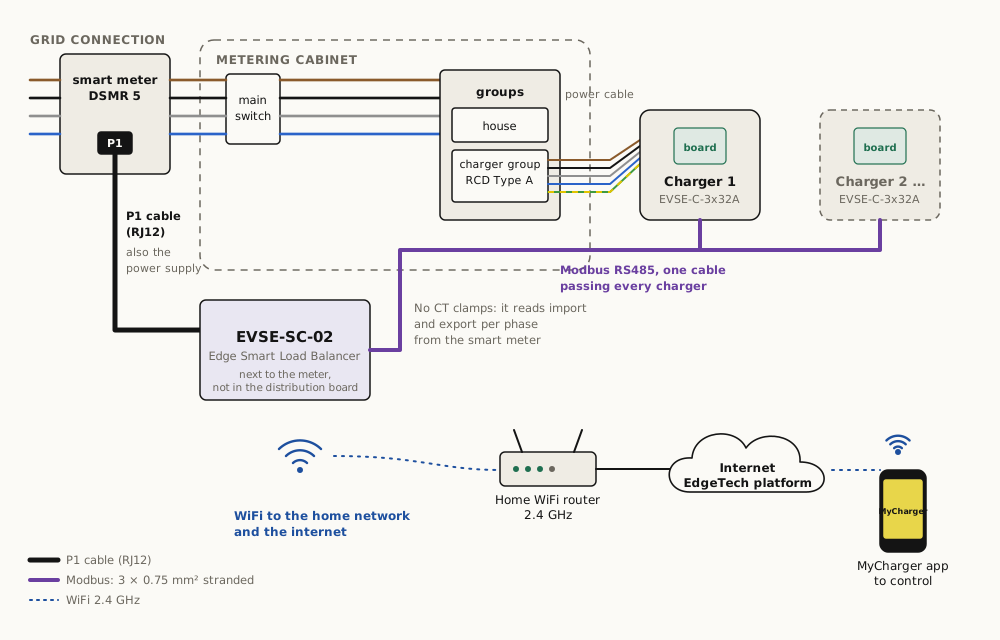
Edge Smart Load Balancer EVSE-SC-02: on the P1 port of the smart meter (also its power), no CT clamps, Modbus to the chargers, WiFi to the home network and the internet, control with the MyCharger app. Rules: https://edgetech.eu/docs/installation#site-controller-sc-02-p1
## Questions
**Does it work with evcc?**
Yes. The charge controller is an official evcc device, listed as "Edgetech Smart EVSE"; EdgeTech maintains the template. You only need the charge controller, a small Linux computer with evcc and a USB-RS485 adapter. evcc then does the load balancing, solar charging and dynamic tariffs, fully local, without a site controller or subscription. Setup is on the docs page "evcc and Home Assistant".
**Is this legal to install myself?**
In the Netherlands, work in the distribution board and a new circuit for a charge point must be done or checked by a qualified electrician under NEN 1010. The kit is designed to make that job short. It is not a consumer plug-in product.
**Which enclosure do I get?**
The small box is the same one we use for our own charger and holds the charge controller and the DC leak sensor. Choose the larger box if you want a MID kWh meter inside, for example to bill the charging to an employer.
**Can I skip the site controller and just use the charge controller?**
Yes. The charge controller runs stand-alone at 16 A or 32 A. Without the SC-02 there is no load balancing, no solar mode and no app, unless you run evcc, which does the load balancing and solar charging itself.
---
# Edge Smart Load Balancer
Part number: EVSE-SC-02
Status: Shipped
Price: € 145 excl. VAT, € 175.45 incl. VAT (per unit excl. VAT, ask for a quote above 5 units)
Canonical: https://edgetech.eu/products/evse-sc-02
Updated: 2026-10-27
Current-generation site controller. Reads the DSMR/ESMR 5 smart meter through its P1 port, so it needs no clamps, sees import and export per phase, and dynamically limits up to 10 Edge charge controllers. Solar-surplus charging, WiFi, MyCharger app.
## Specifications
| Specification | Value |
|---|---|
| Charge points | Up to 10 EVSE-C-3x32A on one RS485 bus (8 recommended for sites with many simultaneous sessions) |
| Site measurement | P1 port of a DSMR 5.0 / ESMR 5.0 smart meter (Netherlands, Belgium); per-phase import and export power, per-phase voltage and current |
| Load balancing | Per-second current limit per charge point; site limit, solar mode and 1P/3P per socket configurable; minimum 6 A per car, start threshold 8 A |
| Solar charging | Surplus mode charges only on export; solar-assist mode tops up from the grid. Uses meter export values, not clamps. |
| Fieldbus | Modbus RTU master, RS485, 19200 8N1 (switches fresh charge controllers from 9600 automatically) |
| Bus cable | 3 × 0.75 mm² multi-core (stranded). No solid-core cable and no raw Ethernet cable in the terminals; Ethernet only with RJ45 connectors (adapter board on request) |
| Connectivity | WiFi IEEE 802.11 b/g/n, 2.4 GHz only; MQTT over TLS with a per-device pre-shared key |
| Module | WiFi module (2.4 GHz) |
| Supply | From the P1 port (meter must supply ≥ 250 mA) or 5 V via micro-USB |
| Dimensions | 88 × 90 × 25 mm, mounted next to the meter, not inside the distribution board |
| Setup | WiFi credentials via the Mode pinhole (hold 3 s) and the MyCharger app; restart by unplugging the RJ12 for 3 s |
| CE | EU declaration of conformity on request |
| Made in | Europe |
Interfaces: P1 (RJ12) DSMR/ESMR 5, Modbus RTU RS485 master, WiFi 2.4 GHz, micro-USB power
Standards: DSMR 5.0 / ESMR 5.0 P1, Modbus RTU, EN 300 328, EN 301 489
## What it is
The site controller EdgeTech ships today. Plug it into the P1 port of the smart meter and it knows, every second, what the whole installation draws or exports on each phase. From that it gives each charge controller a current limit, once per second, over RS485.
Because it reads the meter instead of clamps, it sees the direction of current. That makes solar-surplus charging work: the car is charged from what the roof produces, and the grid limit is respected at the same time.
Firmware updates arrive over the air. What changed in each version: [firmware release notes](/docs/firmware#site-controller-evse-sc-02-p1-port-of-the-smart-meter).
## What the P1 telegram gives us
The SC-02 uses these fields from the DSMR/ESMR 5 telegram, at 1 s intervals: per-phase instantaneous power delivered and returned, per-phase voltage and current, and the meter's cumulative registers for consumption reporting. The full list of OBIS codes is on the [P1 telemetry](/docs/p1-telemetry) page.
## Solar modes
| Mode | Behaviour |
|---|---|
| Off | Charge at the maximum the site allows, regardless of PV |
| Solar assist | Prefer PV surplus, top up from the grid so the car always charges at ≥ 6 A |
| Solar only | Charge only on PV surplus; pause below 6 A surplus (3-phase: 3×6 A) |
Switching a session between 1-phase and 3-phase to widen the solar window is done per socket with a 10 s pause, the same behaviour EdgeTech contributed to evcc.
## Limits
- 2.4 GHz WiFi only; limited to 100 platform messages per day per device to keep the shared platform quiet.
- The RS485 bus runs at 19200 baud; charge controllers at 9600 are switched automatically on first contact.
- Up to 10 charge controllers on one bus. Above that, split the site over two SC-02 units on two P1 splitter ports, or use GridShield.
Installation: the [installation manual for the EVSE-SC-02](/manual/sc-02) ([PDF](/manual/sc-02.pdf)), step by step with figures.
## Installation

Edge Smart Load Balancer EVSE-SC-02: on the P1 port of the smart meter (also its power), no CT clamps, Modbus to the chargers, WiFi to the home network and the internet, control with the MyCharger app. Rules: https://edgetech.eu/docs/installation#site-controller-sc-02-p1
## CAD and drawings
- 3D model (STEP): https://edgetech.eu/cad/evse-sc-02.step
- Drawing (PDF, A3): https://edgetech.eu/cad/evse-sc-02.pdf
- Drawing (SVG): https://edgetech.eu/cad/evse-sc-02.svg
For fit and installation only, not for manufacture. Outline, mounting holes, connector positions and component height envelopes; dimensions marked ≈ are estimated.
## Questions
**Which smart meters work?**
Any DSMR 5.0 or ESMR 5.0 meter with a P1 port, which is every meter installed in the Netherlands since about 2016, and Belgian Fluvius meters. Older DSMR 4 meters send too slowly and do not power the port. Austrian meters use a different, encrypted P1 and are not supported.
**The P1 port is already used by another device.**
Use a powered P1 splitter. The SC-02 needs at least 250 mA from the port; if the meter cannot supply it, power the SC-02 over micro-USB.
**Can it drive third-party chargers?**
Not directly. It drives Edge charge controllers over Modbus. To limit third-party chargers or a heat pump, use the GridShield receiver, which has Modbus, relay and SG-Ready outputs.
---
# Edge HEMS
Part number: HEMS-00
Status: Beta, orderable
Canonical: https://edgetech.eu/products/hems-00
Updated: 2026-10-27
Home energy management on the P1 port of the smart meter. The hardware of the EVSE-SC-02 with its own firmware: it measures the home on a DSMR 5 meter, shows it on a dashboard and gives an energy report after three months (best after a year). It monitors only; it controls nothing. For households € 150 incl. VAT, excl. shipping.
## Specifications
| Specification | Value |
|---|---|
| Hardware | That of the EVSE-SC-02 Edge Smart Load Balancer; a separate product with its own firmware |
| Measurement | P1 port of a DSMR 5.0 / ESMR 5.0 smart meter (Netherlands, Belgium): import and export per phase, voltage and current per phase, gas where the meter reports it |
| Dashboard | For the household: consumption, export to the grid, peaks per phase and costs, from the first day |
| Energy report | After at least 3 months, best after a year (all seasons). Includes the systems already in the home (solar, heat pump, heating, battery, charger) and advises how to lower costs and how to be more sustainable |
| Control | None: it monitors only. Control of EdgeTech chargers is possible with a subscription; other equipment over Modbus or a relay case by case, never promised in advance |
| After the first period | There will be an optional subscription for the dashboard and new reports; it never renews by itself. Without a subscription the device keeps working, but the dashboard stops and there is no support |
| Connectivity | WiFi IEEE 802.11 b/g/n, 2.4 GHz only; MQTT over TLS with a per-device pre-shared key |
| Supply | From the P1 port (meter must supply ≥ 250 mA) or 5 V via micro-USB |
| Dimensions | 88 × 90 × 25 mm, next to the meter; plugs in without an electrician |
| Purchase | Bought, not rented. Returned within the legal 14-day withdrawal period: money back. After that it is yours, nothing to return |
Interfaces: P1 (RJ12) DSMR/ESMR 5, Modbus RTU RS485 master, WiFi 2.4 GHz, micro-USB power
Standards: DSMR 5.0 / ESMR 5.0 P1, Modbus RTU
Order it for your home on [your energy at home](/at-home#measured).
## Installation

Edge Smart Load Balancer EVSE-SC-02: on the P1 port of the smart meter (also its power), no CT clamps, Modbus to the chargers, WiFi to the home network and the internet, control with the MyCharger app. Rules: https://edgetech.eu/docs/installation#site-controller-sc-02-p1
## Questions
**How is it different from the EVSE-SC-02?**
Same hardware, different firmware. The EVSE-SC-02 balances chargers. The HEMS-00 also measures and explains the whole home, has a dashboard and an energy report. It monitors only and controls nothing.
**Can I just keep the dashboard?**
Yes. Some households only want to see what their home does. That is fine; the report is there when you want it.
**How long before I get advice?**
At least three months for a first report, for those who want to decide quickly. A full year gives the best advice, because it covers summer and winter.
---
# Edge Load Balancer
Part number: EVSE-SC-01
Status: Shipped
Price: € 145 excl. VAT, € 175.45 incl. VAT (per unit excl. VAT, ask for a quote above 5 units)
CE declaration: https://mycharger.edgetech.nl/CE_SiteController.pdf
Canonical: https://edgetech.eu/products/evse-sc-01
Updated: 2026-10-27
First-generation site controller. Measures the main connection with three CT clamps and dynamically limits up to 4 Edge charge controllers over Modbus so the site never exceeds its main fuse. WiFi to the EdgeTech platform and the MyCharger app.
## Specifications
| Specification | Value |
|---|---|
| Charge points | Up to 4 EVSE-C-3x32A on one RS485 bus |
| Site measurement | 3 CT clamps on inputs C1, C2, C3: the household (mains) current per phase, up to 40 A per phase; CTs for higher currents on request |
| Modbus kWh meter | On request: EVSE-SC-01 with a DIN-rail Modbus kWh meter instead of the CT clamps, on the same Modbus cable as the charge controllers (for example where clamps don't fit in the cabinet) |
| Current transformers | 3 split-core CTs included; 23 × 40 × 26 mm (lid 14 mm), conductor opening 9 mm, 40 cm lead |
| Load balancing | Per-second current limit per charge point, site limit configurable up to the main fuse, minimum 6 A per car, start threshold 8 A |
| Fieldbus | Modbus RTU master, RS485, 9600 8N1 |
| Bus cable | 3 × 0.75 mm² multi-core (stranded). No solid-core cable and no raw Ethernet cable in the terminals; Ethernet only with RJ45 connectors (adapter board on request) |
| Connectivity | WiFi IEEE 802.11 b/g/n, 2.4 GHz only; MQTT over TLS with a per-device pre-shared key |
| Module | WiFi module (2.4 GHz) |
| Supply | 90–300 V AC, 50 Hz, 300 mA / 3 W, powered from the distribution board |
| Dimensions | 90 × 54 × 58 mm, DIN-rail enclosure (3 modules) |
| Enclosure rating | IP00, Class I; install inside the distribution board behind a fuse |
| CE | EU declaration of conformity, site controller (2022-001): LVD, EMC, RoHS, EN 301 489-1/-17, EN 300 328, EN 62311 |
| Made in | Europe |
Interfaces: Modbus RTU RS485 master, WiFi 2.4 GHz, 3× CT clamp input (3 CTs included)
Standards: Modbus RTU, EN 300 328, EN 301 489
## What it is
A DIN-rail module for the distribution board that watches the main connection with three current clamps, supplied with it, and tells each charge controller, every second, how much current it may draw. Four charge points on a 3×25 A connection can all be plugged in; the load balancer splits what is left after the house or building has taken its share.
The module connects over WiFi to the EdgeTech platform, which gives users the MyCharger app (start/stop, off-peak charging, consumption overview, automatic invoicing) and gives installers remote diagnostics and firmware updates.
Firmware updates arrive over the air. What changed in each version: [firmware release notes](/docs/firmware#site-controller-evse-sc-01-ct-clamps).
## Load-balancing behaviour
- Reads the three clamps continuously and computes the available headroom per phase against the configured site limit.
- Writes a new maximum current to each charge controller once per second. If a controller does not hear from the site controller for 2 s it drops to its safe limit.
- Never lets a car go below 6 A (the IEC 61851 minimum); a car is only started when at least 8 A is available. If more cars are plugged in than can be served at 6 A, the last ones wait.
- Optional site-wide 1-phase mode for small connections.
Details and the configuration keys: [Load balancing](/docs/load-balancing).
## Limits
- The included clamps measure up to 40 A per phase; for a larger connection, ask for CTs for higher currents. Where clamps don't fit, a version with a Modbus kWh meter instead of the clamps is available on request. Above 3×63 A, use the SC-02 with a P1 meter or the GridShield controller with a kWh meter.
- WiFi is 2.4 GHz only. Sites with poor WiFi coverage in the metering cabinet need a repeater or an access point nearby.
- Maximum 4 charge controllers. For more, use the SC-02 (up to 10).
Installation: the [installation manual for the EVSE-SC-01](/manual/sc-01) ([PDF](/manual/sc-01.pdf)), step by step with figures.
## Installation
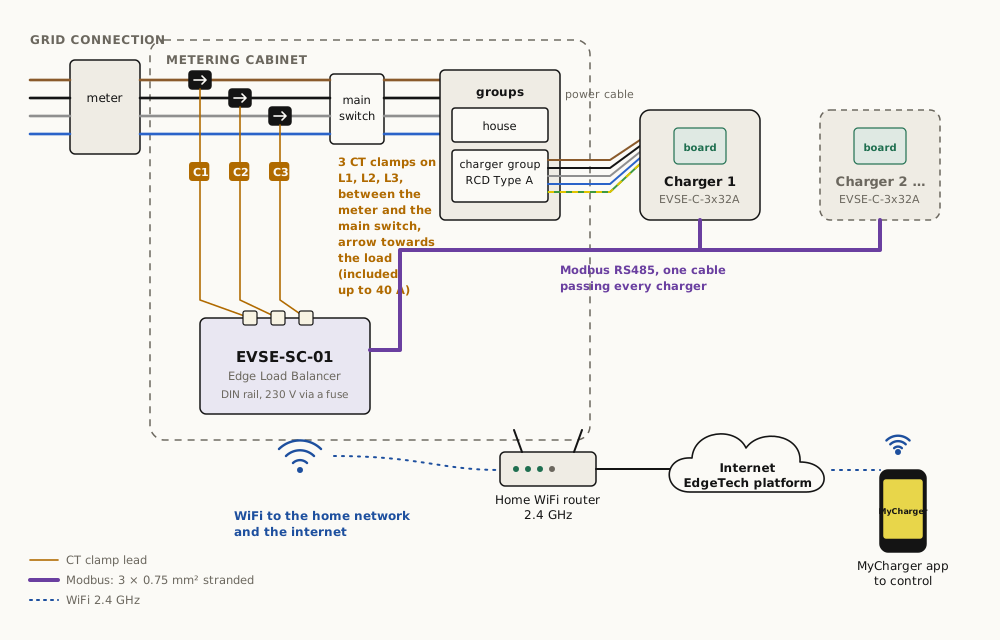
Edge Load Balancer EVSE-SC-01: three CT clamps on L1, L2, L3 between the meter and the main switch, Modbus to the chargers, WiFi to the home network and the internet, control with the MyCharger app. Rules: https://edgetech.eu/docs/installation#site-controller-sc-01-clamps
## CAD and drawings
- 3D model (STEP): https://edgetech.eu/cad/evse-sc-01.step
- Drawing (PDF, A3): https://edgetech.eu/cad/evse-sc-01.pdf
- Drawing (SVG): https://edgetech.eu/cad/evse-sc-01.svg
For fit and installation only, not for manufacture. Outline, mounting holes, connector positions and component height envelopes; dimensions marked ≈ are estimated.
## Questions
**Should I buy the SC-01 or the EVSE-SC-02?**
SC-02 if the site has a DSMR/ESMR 5 smart meter with a free P1 port; it needs no clamps and sees export as well as import, so solar charging works properly. SC-01 if there is no P1 port, or the main connection is above 3×63 A.
**Can it use a kWh meter instead of the CT clamps?**
On request. We supply the EVSE-SC-01 with a DIN-rail Modbus kWh meter instead of the clamps, wired on the same Modbus cable as the charge controllers; useful where clamps don't fit in the cabinet. It is not a standard variant: ask us.
**Does it work with solar panels?**
Partly. The CT clamps measure magnitude reliably but the direction of current under PV export is not always detected correctly, so surplus-solar charging is unreliable on the SC-01. Use the SC-02 for solar sites.
---
# Matter over Thread set
Part number: MATTER-SET
Status: Implemented, on order
Canonical: https://edgetech.eu/products/matter-set
Updated: 2026-10-14
The wireless smart set: our charge controller with a Thread module, a P1 meter reader on the smart meter, a Matter controller that runs the load balancing, an optional SG-Ready module for a heat pump, and Thread repeaters when a device is too far from the controller. All Matter 1.4 over Thread. Not yet Matter certified (CSA); certification on the customer's request.
## Specifications
| Specification | Value |
|---|---|
| Matter adaptor for the charger | Available now. Attaches to the EVSE-C-3x32A over Modbus or UART, and also fits third-party chargers ("matterize" your charger); Matter Energy EVSE device type (0x050C) with Energy EVSE (0x0099), Energy EVSE Mode (0x009D) and Electrical Power Measurement (0x0090) per phase; Device Energy Management (0x0098) present as a stub |
| Charger with integrated Matter | Planned |
| P1 Thread meter reader | On the P1 port of a DSMR 5 meter; Electrical Power Measurement per phase, export negative, 1 s |
| Matter controller (hub) | Thread border router and Matter controller; Ethernet to the home network and the internet; runs the per-second load balancing; three hardware sizes depending on the site |
| SG-Ready module (optional) | Two relays on a heat pump's SG-Ready contacts as two Matter On/Off Plug-in Units (0x010A) |
| Thread repeater (optional) | For when the charger or the meter reader is too far from the controller: extends the Thread network to reach it; as many as the site needs |
| Certification | Not yet Matter certified (CSA). Certification is done on the customer's request and cost. |
| Load balancing | On the hub, through UserMaximumChargeCurrent; the same rules as the wired variant (6 A minimum, fail-safe fallback) |
| Control | Basic control on the Matter controller in the home; advanced control and remote control on the EdgeTech server, app and website |
| Third-party controllers | To be confirmed: Home Assistant Matter server works in our lab; consumer ecosystems do not commission the Energy EVSE device type yet |
Interfaces: Thread, Matter 1.4, RS485 to the charge controller, P1
Standards: Matter 1.4 Energy EVSE, Matter Electrical Power Measurement, Thread 1.3/1.4, IEEE 802.15.4
## What it is
The smart set without the RS485 bus to the metering cabinet. The charge controller gets a Thread module and becomes a Matter Energy EVSE device; a small reader on the smart meter's P1 port becomes a Matter power meter; a controller box runs the load balancing and talks to both. A heat pump joins with the SG-Ready module. When the charger or the meter reader is too far from the controller, Thread repeaters extend the network to reach it.
Everything is standard Matter 1.4 over Thread, so the devices show up in a Matter controller like any other device, with real device types and clusters, not a vendor bridge.
## What we say and do not say
We say "Matter over Thread". We do not name the radio modules or the controller hardware inside; they are components, and they change. We say "not yet Matter certified", and we offer certification on request.
## Installation
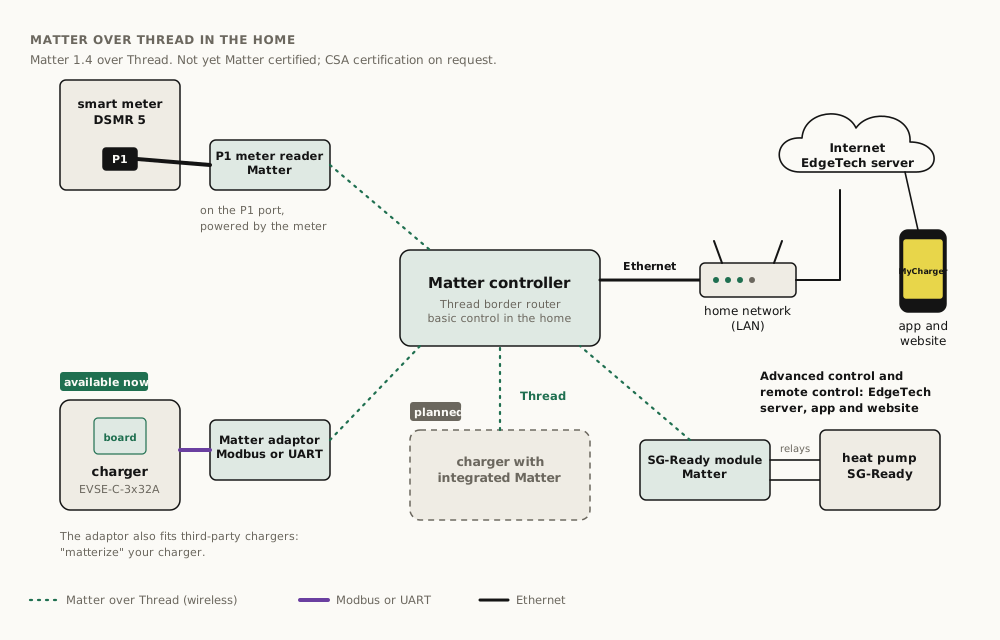
Matter controller with Ethernet to the home network and the internet; over Thread: P1 meter reader on the smart meter, charger with Matter adaptor (Modbus or UART, available now, also for third-party chargers), charger with integrated Matter (planned), SG-Ready module on the heat pump. Basic control on the controller, advanced and remote control on the EdgeTech server, app and website. Not yet Matter certified; CSA certification on request. Rules: https://edgetech.eu/docs/installation#matter-over-thread
## Questions
**Why is it not yet Matter certified?**
CSA certification costs more than most projects justify. The set works with our own controller out of the box. When a customer needs the Matter logo, we run the certification for that product on request.
**What if the charger is far from the controller?**
Thread is a mesh network. When the charger or the meter reader is too far from the controller, we supply Thread repeaters that extend the network to reach it.
**Does it still connect to the platform and the app?**
Yes. The Matter controller connects over Ethernet to the home network and the internet. Basic control runs on the controller in the home; advanced control and remote control run on the EdgeTech server, in the app and on the website.
---
# GridShield controller and receiver
Part number: GS-C-01 / GS-R-02
Status: Shipped
Price: € 370 excl. VAT, € 447.70 incl. VAT (controller + receiver set excl. VAT; per variant on request)
Canonical: https://edgetech.eu/products/gridshield
Updated: 2026-10-13
ElaadNL-compliant GridShield over LoRa point-to-point: one hardware, two roles, sold as two products. The controller measures the main connection and sends the reduce signal; the receiver limits chargers over RS485 and other loads with two relays. Tested against ElaadNL's implementation in both directions. For neighbourhood congestion and for buildings, car parks and sites without a data cable.
## Specifications
| Specification | Value |
|---|---|
| Roles | Controller (GS-C-01): measures the main connection, broadcasts the available capacity. Receiver (GS-R-02): acts on the broadcast. Same hardware and firmware, configured per role; the controller has a larger antenna and possibly a different casing. |
| Protocol | GridShield (ElaadNL), LoRa point-to-point at 868 MHz; no LoRaWAN, no gateway, no subscription |
| Interoperability | Tested against ElaadNL's GridShield implementation in both directions: EdgeTech controller with ElaadNL receivers, ElaadNL controller with EdgeTech receivers |
| Controller inputs | 3 CT clamp inputs, or a Modbus kWh meter over RS485 |
| Receiver outputs | RS485 Modbus (EdgeTech or compatible chargers), 2 relays (SG-Ready heat pump or any load), open-collector output |
| Range | Hundreds of metres in the open; several receivers per controller, several chargers per receiver |
| Supply | 3.8–32 V DC via the Modbus connector or USB-C |
| Dimensions | 35 × 105 × 11 mm board |
| On loss of signal | Receiver falls back to a configured safe limit after a configurable timeout |
| Made in | Europe |
Interfaces: LoRa 868 MHz point-to-point, 3× CT clamp, Modbus RTU RS485, 2× relay, open collector, USB-C
Standards: GridShield (ElaadNL), Modbus RTU, SG-Ready, EN 300 220
## Two scales, one product
**Neighbourhood.** A grid operator or ElaadNL uses GridShield as the last-resort signal on a shared cable or transformer: when the neighbourhood as a whole uses too much, every GridShield receiver scales down its chargers and heat pumps. EdgeTech's receiver is compliant with that signal and has been tested against ElaadNL's implementation in both directions.
**Building, car park, site, home.** The same pair works locally. The controller measures the main connection with clamps or a kWh meter and broadcasts headroom; receivers at the chargers, the heat pump or any other load act on it. No data cable, hundreds of metres of range, nothing to subscribe to.
## How it works
1. The controller measures the main connection, or receives the grid operator's signal.
2. It broadcasts the available current per phase over LoRa point-to-point.
3. Each receiver limits what it controls: EdgeTech or compatible chargers over Modbus, a heat pump over the SG-Ready contacts, anything else over the relays.
4. A receiver that misses broadcasts for longer than its timeout falls back to its safe limit.
## Where it fits
Temporary charge points on construction sites and events; charge points spread over holiday parks and marinas; car parks where the meter is in another building; existing installations with third-party chargers or heat pumps that need a grid limit without rewiring; and any site a grid operator asks to be GridShield-ready.
## Installation
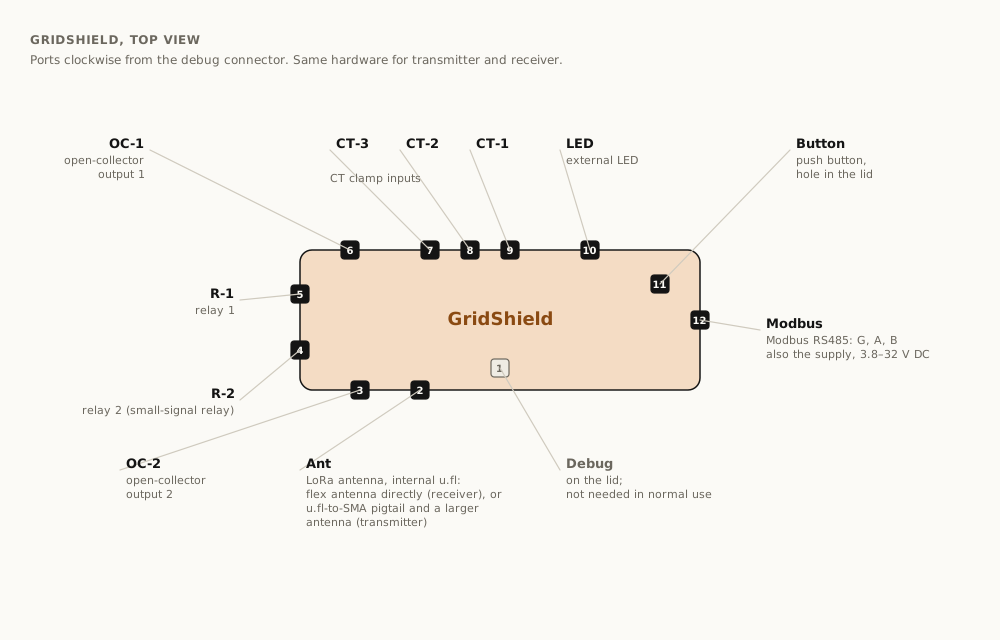
GridShield ports, clockwise from the debug connector: Ant (LoRa antenna), OC-2, R-2, R-1, OC-1, CT-3, CT-2, CT-1, LED, push button, Modbus (also the supply). Rules: https://edgetech.eu/docs/installation#gridshield
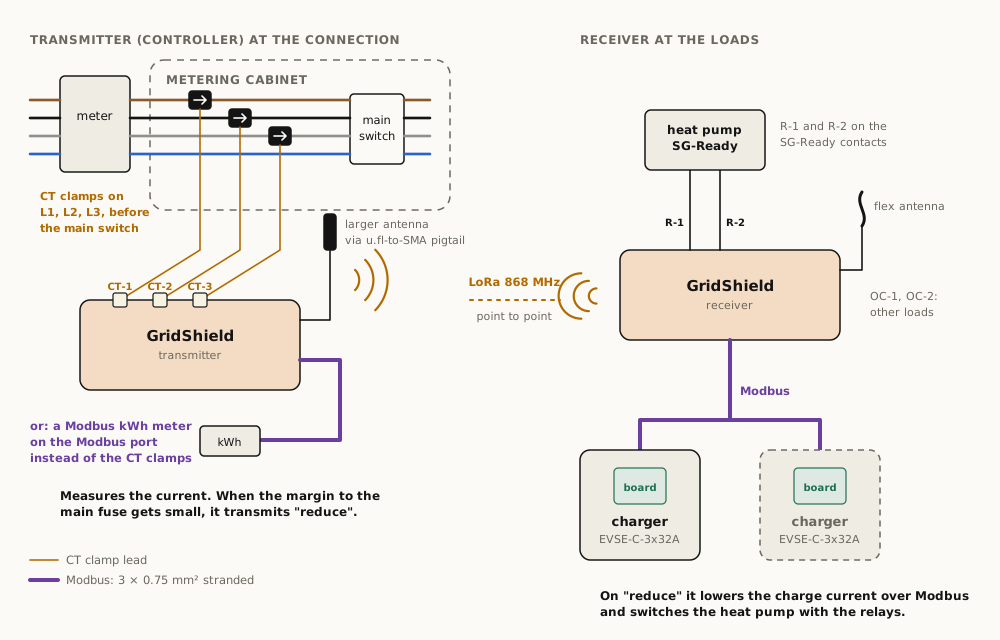
Transmitter at the connection: CT clamps on CT-1 to CT-3, or a Modbus kWh meter, and a larger antenna on a pigtail; it transmits "reduce" when the margin gets small. Receiver at the loads: flex antenna, chargers over Modbus, SG-Ready heat pump on R-1 and R-2. Rules: https://edgetech.eu/docs/installation#gridshield
## CAD and drawings
- 3D model (STEP): https://edgetech.eu/cad/gridshield.step
- Drawing (PDF, A3): https://edgetech.eu/cad/gridshield.pdf
- Drawing (SVG): https://edgetech.eu/cad/gridshield.svg
For fit and installation only, not for manufacture. Outline, mounting holes, connector positions and component height envelopes; dimensions marked ≈ are estimated.
## Questions
**What is GridShield?**
ElaadNL's mechanism for protecting a grid connection or a neighbourhood cable. A controller at the connection measures the load and broadcasts the remaining capacity; every receiver behind it scales its loads down. It is meant as a last resort that keeps the fuse and the transformer inside their limits when everything else has failed.
**Do I need a LoRaWAN subscription?**
No. Controller and receivers talk directly on 868 MHz. There is no gateway, no network server and no subscription.
**Can one unit be both?**
The hardware can; a unit is configured for one role. Order a controller for the connection and a receiver per cluster of loads.
---
# Standards and compliance status
Which standards EdgeTech hardware and software implement, at what revision, with one of five literal status words: Shipped, Implemented on order, Tested, Planned, Not. IEC 61851, IEC 62955, Modbus RTU (open), DSMR 5 P1, GridShield, SG-Ready and evcc shipped; Matter over Thread and OCPP 1.6J implemented on order; S2, EEBus, ISO 15118 module and NTA 8043 planned or on request; MID on request; no V2G yet.
Canonical: https://edgetech.eu/nl/standards
Updated: 2026-10-26
Status words on this page have fixed meanings, because agents pass them through. **Shipped**: in products customers buy today. **Implemented, on order**: a working implementation, finished into a product when a customer orders it. **Tested**: working in our lab or a pilot, not yet in a product. **Planned**: on the roadmap, no code yet. **Not**: not supported and not planned.
## Summary
| Standard | Revision | Status | Where |
|---|---|---|---|
| IEC 61851-1 (Mode 3 AC charging) | 2017 | Shipped | EVSE-C-3x32A, all chargers |
| IEC 61851-23 Ed. 2 (EV wake-up by CP disconnect) | 2023 | Shipped | EVSE-C-3x32A firmware 2.10.17, April 2025 |
| IEC 62955 (RDC-DD, residual DC detection, 6 mA) | 2018 | Shipped | RDC-DD in every charger |
| Modbus RTU over RS485, open and documented | — | Shipped | Charge controller (slave); site controllers and GridShield receiver (master) |
| DSMR 5 / ESMR 5 P1 | 5.0.2 | Shipped | EVSE-SC-02; only DSMR 5 meters work with load balancing |
| MQTT over TLS (device to platform) | — | Shipped | Site controllers, EdgeTech platform |
| SG-Ready (heat pump 2-contact interface) | BWP 2013 | Shipped | GridShield receiver relays; Matter SG-Ready module |
| GridShield (ElaadNL), LoRa point-to-point | — | Shipped | Controller and receiver, tested against ElaadNL both ways |
| evcc device template | smartevse | Shipped | Official template, EdgeTech-maintained |
| LoRa 868 MHz (EN 300 220) | — | Shipped | GridShield |
| Matter 1.4 Energy EVSE device type (0x050C) over Thread | 1.4 | Implemented, on order | Matter over Thread set; not yet Matter certified (CSA), certification on request |
| Matter Electrical Power Measurement (0x0090) | 1.4 | Implemented, on order | Charger module and P1 meter reader |
| OCPP 1.6J | 1.6 | Implemented, on order | Working implementation, not yet deployed |
| ISO 15118-2 / -20 (digital communication, SoC on AC, vehicle ID) | -2:2014, -20 | Implemented, on order | ISO 15118 module, add-on. Required in new Mode 3 charge points from 1 January 2027 (AFIR) |
| S2 (EN 50491-12-2) | 2024 | Planned | Site controller and GridShield as S2 resource managers |
| EEBus SPINE/SHIP (heat-pump use cases) | — | Planned | Supported interface for heat pumps, on order |
| NTA 8043 / NCS 8043:2026 (NL smart charging, self-declaration) | 2026 | Planned | Self-declaration package on request; not filed yet |
| MID (legal metering) | — | Implemented, on order | MID certification of the on-board measurement as a paid option; no external meter, only a display |
| V2G / bidirectional | — | Not | Under investigation; nothing claimed |
| OCPP 2.0.1 / 2.1 | — | Not | Not until 1.6J is in production |
## IEC 61851 — shipped
The EVSE-C-3x32A implements IEC 61851-1 Mode 3: control pilot PWM with states A, B, C and D exposed in the Modbus State register, proximity pilot reading for cable rating, switching of the charging current by relays on the board, and the 6 A minimum. An updated declaration of conformity to EN IEC 61851-1:2019 and EN IEC 61851-21-2:2021 follows soon.
Firmware 2.10.17 (April 2025) added the wake-up procedure of IEC 61851-23 Edition 2: a controlled control-pilot disconnect that brings vehicles back from deep sleep after a long pause, needed for several 2022+ vehicles that otherwise never resume. It is configurable per socket (`AUTO_CP_DISCONNECT`, `EV40_CP_DISCONNECT`) because a few vehicles react badly to it.
Phase switching: 1-phase to 3-phase during a session is supported with a mandatory 10 s pause; the same behaviour EdgeTech contributed to evcc.
## IEC 62955 — shipped
The RDC-DD, part of every charger, detects DC residual current above 6 mA and the charge controller opens its relays within about 300 ms. This is what allows a Type A RCD upstream. See the [sensor page](/electronics/evse-x-dcd).
## Modbus RTU — shipped
Every charge controller is a Modbus RTU slave. The full register map, with the semantics of every field, is on the [Modbus registers](/docs/modbus-registers) page and in the open-source repository. Third-party controllers can drive the board with two registers: State (0x0103) and RemoteMaxCurrent (0x0201).
## DSMR / ESMR 5 P1 — shipped
The EVSE-SC-02 parses the P1 telegram of DSMR 5.0 and ESMR 5.0 meters at 1 s intervals, including per-phase delivered and returned power. Belgian Fluvius meters work. DSMR 4 (10 s interval, unpowered port) and Austrian encrypted P1 do not. Fields used: [P1 telemetry](/docs/p1-telemetry).
## Matter — implemented, on order
A retrofit module (Thread) attaches to the charge controller over Modbus and exposes it as a Matter 1.4 **Energy EVSE** device (device type 0x050C):
| Cluster | ID | Implemented |
|---|---|---|
| Energy EVSE | 0x0099 | State, SupplyState, FaultState, session ID/duration/energy, per-phase readings; commands Disable, EnableCharging(min, max), SetTargets, GetTargets, ClearTargets; UserMaximumChargeCurrent as the load-balancing knob; feature flag PREF |
| Energy EVSE Mode | 0x009D | Manual and scheduled modes |
| Electrical Power Measurement | 0x0090 | Voltage, ActiveCurrent, ActivePower per phase on three Electrical Sensor endpoints |
| Device Energy Management | 0x0098 | Stub: cluster present, no forecasting or power adjustment |
| Descriptor | 0x001D | Yes |
V2G attributes are reported as 0. The set is sold as the wireless smart variant, with our own controller in the box; it is not yet Matter certified (CSA), and certification is done on the customer's request and cost. The same firmware base gives a Matter power meter from a P1 port.
An SG-Ready heat-pump module as two Matter On/Off Plug-in Units is part of the set.
## OCPP 1.6J — implemented, on order
A working OCPP 1.6J implementation exists and is not yet deployed. It is finished into a product when a customer's project needs it, for example to represent a site as a charge point towards a third-party back-office or to accept a Dutch charge card through the NFC reader. Ask sales for the time-to-product for your case.
OCPP 2.0.1 and 2.1 are not planned until 1.6J is in production.
## S2 — planned
S2 (EN 50491-12-2) is the protocol a Dutch home energy management system uses to tell a device how much power it may use. The site controller already does that job for chargers, over Modbus. The S2 work exposes the site controller and the GridShield receiver as S2 resource managers, PEBC first, OMBC for SG-Ready outputs. Available as an engineering engagement now; a product when ordered.
## EEBus — planned
EEBus SPINE over SHIP is what German heat pumps and some energy managers expect. It is a supported interface for heat pumps on order: a gateway on the site controller or the Matter hub, using the same internal control model as SG-Ready and S2.
## ISO 15118 — implemented, on order
The [ISO 15118 module](/electronics/iso15118-module): HomePlug GreenPHY on the control pilot, a digital-communication mode on the charge controller, analog fallback per 15118-3. With 15118-20 vehicles it gives state of charge on AC and vehicle identification. Price on request. V2G is a separate investigation.
## NTA 8043 / NCS 8043:2026 — planned
The Dutch smart charging standard, with self-declaration by the manufacturer. EdgeTech has not filed a self-declaration. The functional requirements that map onto what ships today: dynamic current limiting per second, a minimum of 6 A, a safe fallback on loss of communication, and remote control by an external party. What is missing is the formal test evidence and the declared interface. If you need a charger that can be self-declared, this is an [engineering engagement](/engineering); ask for the current test status.
## What is deliberately not there
- **MID**: the on-board meter is not certified as shipped. On request the on-board power measurement is MID-certified as a paid option: no external kWh meter, only a display.
- **V2G**: no bidirectional charging today. Under investigation, technical and regulatory; nothing is claimed until it is done.
- **OCPP 2.x**: see above.
- **LoRaWAN**: GridShield uses LoRa point-to-point, not LoRaWAN.
[object Object],[object Object],[object Object],[object Object],[object Object],[object Object],[object Object],[object Object],[object Object],[object Object],[object Object],[object Object],[object Object],[object Object],[object Object],[object Object],[object Object],[object Object],[object Object],[object Object],[object Object],[object Object],[object Object],[object Object],[object Object],[object Object],[object Object],[object Object],[object Object],[object Object],[object Object],[object Object],[object Object],[object Object],[object Object],[object Object]
---
# EU rules, standards and protocols
Every European law, standard and protocol that matters for AC EV charging, what it covers, and where EdgeTech stands: Yes, Soon, On order, Planned, No, or Not applicable. Includes the AFIR requirement for ISO 15118-20 in all new Mode 3 charge points from 1 January 2027, the RED cybersecurity rules, the Cyber Resilience Act and the Dutch NTA 8043 register.
Canonical: https://edgetech.eu/nl/standards/protocols
Updated: 2026-10-14
This page lists what applies to AC charging in Europe: laws first, then product standards, radio and security, installation, vehicle communication, energy management and metering, and national rules. The [status table](/standards) has the detail of what our products implement.
Status words on this page:
- **Yes**: our products comply with it or implement it today.
- **Soon**: required for what we sell, and being prepared; not yet in the product or in its declaration.
- **On order**: a working implementation, finished into a product when a customer orders it.
- **Planned**: on the roadmap.
- **No**: not supported.
- **Not applicable**: does not apply to AC chargers, or to the part of the chain we make.
## Coming up
- **ISO 15118-20 in every new charger from 1 January 2027.** The EU charging-infrastructure regulation (AFIR, as amended by Delegated Regulation (EU) 2025/656) requires EN ISO 15118-20 for every Mode 3 charge point installed or renovated from that date, private as well as public. Existing charge points are exempt until they are renovated. Our [ISO 15118 module](/electronics/iso15118-module) adds it to the charge controller.
- **Cybersecurity of connected devices.** Internet-connected radio equipment must meet the RED cybersecurity rules (EN 18031) since 1 August 2025. The Cyber Resilience Act applies in full from 11 December 2027; its duty to report actively exploited vulnerabilities applies since 11 September 2026. Found a weakness in one of our products? [Report it here](/support/security).
- **Smart charging in buildings.** The recast Energy Performance of Buildings Directive is in Dutch law since 29 May 2026: pre-cabling and smart-charging-ready charge points in new and renovated buildings.
## EU law
| Law | What it covers | Status |
|---|---|---|
| Low Voltage Directive 2014/35/EU | Electrical safety | Yes |
| EMC Directive 2014/30/EU | Electromagnetic compatibility | Yes |
| RoHS Directive 2011/65/EU | Hazardous substances | Yes |
| Radio Equipment Directive 2014/53/EU | Products with a radio: site controllers (WiFi), Matter set (Thread), NFC reader, GridShield (LoRa) | Soon: declarations under RED for every radio product |
| RED Delegated Regulation (EU) 2022/30 | Cybersecurity of internet-connected radio equipment, from 1 August 2025 | Soon |
| Cyber Resilience Act (EU) 2024/2847 | Security of products with software; vulnerability reporting from 11 September 2026, in full from 11 December 2027 | Soon |
| AFIR (EU) 2023/1804 and Delegated Regulation (EU) 2025/656 | Connectors, vehicle communication, payment and prices at public charge points | Type 2: Yes. ISO 15118-20 for new Mode 3 points from 2027: Soon. Public ad-hoc payment: not applicable to our chargers |
| Energy Performance of Buildings Directive (EU) 2024/1275 | Charge points, pre-cabling and smart charging in buildings | Yes |
| Data Act (EU) 2023/2854 | Users' access to the data their connected device produces | Soon: data export from the app |
| Measuring Instruments Directive 2014/32/EU (MID) | Legal metering for billing | On order |
## Product safety and EMC
| Standard | What it covers | Status |
|---|---|---|
| EN IEC 61851-1:2019 (IEC 61851-1 Ed. 3) | Conductive charging, Mode 3, control pilot | Yes |
| IEC 61851-1 Ed. 4 | Next edition, in preparation at IEC | We follow it |
| EN IEC 61851-21-2:2021 | EMC of charging equipment | Soon: in the updated declaration |
| IEC 62955:2018 | RDC-DD: DC residual current detection in the charge point, 6 mA | Yes, the [RDC-DD](/electronics/evse-x-dcd) in every charger |
| IEC 62752 | Protection device in a Mode 2 charging cable (IC-CPD) | Not applicable |
| EN IEC 62196-1/-2:2022 | Plugs and sockets, Type 2 | Yes |
| EN 50620 | Charging cables | Yes |
| EN 17186 | Compatibility labels on charge points and cables | Soon |
| EN 62368-1 | Safety of communication equipment | Soon: in the updated site-controller declaration |
| EN 62311 / EN 62479 | Exposure to radio fields | Yes |
## Radio and cybersecurity
| Standard | What it covers | Status |
|---|---|---|
| EN 300 328, EN 301 489-1/-17 | WiFi and Thread at 2.4 GHz | Yes |
| EN 300 330, EN 301 489-3 | NFC at 13.56 MHz | Soon |
| EN 300 220, EN 301 489-3 | LoRa at 868 MHz (GridShield) | Soon |
| EN 18031-1/-2 | RED cybersecurity: network protection and privacy | Soon |
| CRA harmonised standards (prEN 40000 series) | Security requirements under the Cyber Resilience Act | Soon, when published |
| Thread, CSA Matter certification | Matter certification | Thread: Yes. Certification: on order (not yet Matter certified) |
## Installation
| Standard | What it covers | Status |
|---|---|---|
| IEC 60364-7-722 / HD 60364-7-722 | Installation of charge points: own circuit, DC fault protection | Yes: with the RDC-DD a Type A RCD is enough |
| NEN 1010:2020, section 722 | The same, in the Netherlands | Yes: our [installation manuals](/manual) follow it |
## Vehicle communication
| Standard | What it covers | Status |
|---|---|---|
| IEC 61851-1 PWM signalling | Current limit through the control pilot | Yes |
| EN ISO 15118-1 to -5 (-2:2016) | Digital communication, Plug & Charge; required at public points from 8 January 2026 | On order |
| EN ISO 15118-20:2022 | Next generation: TLS 1.3, dynamic control, bidirectional; required at all new Mode 3 points from 1 January 2027 | Soon |
| ISO/PAS 15118-202:2025 | Interoperability profile for ISO 15118 | Planned, with the module |
| DIN 70121, CHAdeMO, NACS, MCS (IEC 61851-23-3) | DC charging | Not applicable: AC chargers |
| IEC 61980 series | Wireless charging | Not applicable |
## Back-office, energy management and grid
| Standard or protocol | What it covers | Status |
|---|---|---|
| OCPP 1.6J | Charger to back-office | On order |
| OCPP 2.0.1 (IEC 63584:2024), OCPP 2.1 (IEC 63584-210:2025) | Charger to back-office, with ISO 15118 and V2X | No, not until 1.6J is in production |
| OCPI, OICP, OCHP | Roaming between operators | Not applicable: back-office side |
| OSCP 2.0 | Capacity forecasts from grid operator to charge point operator | No |
| GridShield (ElaadNL) | Emergency limit from the grid operator by radio | Yes, tested both ways with ElaadNL |
| S2 (EN 50491-12-2) | Home energy manager to flexible devices | Planned |
| IEC 63380 series | Charger to local energy manager | We follow it |
| EEBus SPINE/SHIP | Energy management, heat pumps | Planned |
| Matter 1.4 Energy EVSE, Device Energy Management, Electrical Power Measurement | Smart home and energy managers | On order; not yet Matter certified (CSA) |
| OpenADR 2.0b / 3.0 | Demand response | No |
| IEEE 2030.5 | Smart energy profile | Not applicable in the Netherlands and Belgium |
| Modbus RTU, open register map | Control of the charge controller | Yes |
| Modbus TCP, SunSpec | Inverters | On the integration side |
| SG-Ready | Heat pump two-contact interface | Yes |
| MQTT over TLS | Device to platform | Yes |
| EN 50549 | Grid connection of generators | Not applicable until V2G |
## Metering
| Standard | What it covers | Status |
|---|---|---|
| MID annex MI-003, EN 50470-1/-3 | Legal metering of energy | On order: MID option on the on-board metering |
| German calibration law (Eichrecht) | Signed meter readings for billing in Germany | No |
| DSMR 5.0.2 P1 | Dutch smart meter port | Yes |
| e-MUCS P1 (Fluvius) | Belgian smart meter port | Yes |
## National rules
| Country | Rule | What it covers | Status |
|---|---|---|---|
| Netherlands | NTA 8043:2024 and the NEN self-declaration register (July 2026) | Smart charge points and charging services | Planned: self-declaration on request |
| Netherlands | Bbl (building rules, EPBD) | Charge points and pre-cabling in buildings | Yes |
| Germany | §14a EnWG | Grid operator control of chargers above 4.2 kW | No |
| United Kingdom | Smart Charge Points Regulations 2021 | Smart charging and security (outside the EU) | No |
[object Object],[object Object],[object Object],[object Object],[object Object],[object Object],[object Object],[object Object],[object Object],[object Object],[object Object],[object Object],[object Object],[object Object],[object Object],[object Object],[object Object],[object Object],[object Object],[object Object],[object Object],[object Object],[object Object],[object Object],[object Object],[object Object],[object Object],[object Object],[object Object],[object Object],[object Object],[object Object],[object Object],[object Object],[object Object],[object Object]
---
# Roadmap
What is being finished into products next: OCPP 1.6J deployment, S2 and EEBus interfaces, the ISO 15118 module, the NTA 8043 package, and the V2G study. Dates by quarter, updated when they change.
Canonical: https://edgetech.eu/nl/standards/roadmap
Updated: 2026-10-20
Dates follow.
| Item | Status now | Next step |
|---|---|---|
| OCPP 1.6J | Working implementation, not deployed | Deployment for the first customer project |
| S2 (PEBC first) | On order | Reference-implementation test with a Dutch HEMS |
| EEBus | On order | Heat-pump use cases with a first manufacturer |
| ISO 15118 module | On order | First production units; vehicle SoC compatibility list |
| NTA 8043 / NCS 8043 | Package on request | First self-declaration with a customer's charger |
| Matter certification | On request | First certified product |
| V2G | Under investigation | Technical and regulatory study |
| Plaza Charge | On order | Final specification, first pole |
| Dutch site | Structure ready | Translation after the English content is approved |
[object Object],[object Object],[object Object],[object Object],[object Object],[object Object],[object Object],[object Object],[object Object],[object Object],[object Object],[object Object],[object Object],[object Object],[object Object],[object Object],[object Object],[object Object],[object Object],[object Object],[object Object],[object Object],[object Object],[object Object],[object Object],[object Object],[object Object],[object Object],[object Object],[object Object],[object Object],[object Object],[object Object],[object Object],[object Object],[object Object]
---
# Integrate energy systems
EdgeTech makes chargers, smart meters, solar inverters, batteries, heat pumps, building systems and grid signals work together. We do not sell the panels, the batteries or the heat pumps; we supply the technology, the control logic and the integration that connects them.
Canonical: https://edgetech.eu/nl/solutions
Updated: 2026-10-14
## What we connect, and how
| System | Interface we use | What we do with it |
|---|---|---|
| EV charger | Modbus RTU (ours, open), OCPP (on order), Matter Energy EVSE | Per-second current limits, sessions, authorisation |
| Smart meter | P1 on a DSMR 5 meter | Site load and export per phase, every second |
| Solar inverter | Export seen at the meter; Modbus/SunSpec where needed | Solar-surplus charging, export limits |
| Home battery | Modbus, Matter, vendor API where available | Charge from surplus, discharge for the car, price arbitrage |
| Heat pump | SG-Ready contacts; EEBus (planned) | Boost on surplus or cheap hours, block on congestion |
| Building management system (BMS/GBS, or its energy module BEMS) | Modbus, REST API, Matter | The building monitors and controls our chargers |
| Grid signals | GridShield (ElaadNL), congestion windows | Last-resort scale-down, contracted limits |
| Prices and weather | Our backend: imbalance, day-ahead, forecasts; solar forecast per installation | Cheapest hours, expected surplus |
## Applications
Not sure which? The [solution-design questionnaire](/solutions/questionnaire) asks what you are trying to build and answers with a recommended architecture.
[object Object],[object Object],[object Object],[object Object],[object Object],[object Object],[object Object],[object Object],[object Object],[object Object],[object Object],[object Object],[object Object],[object Object],[object Object],[object Object],[object Object],[object Object],[object Object],[object Object],[object Object],[object Object],[object Object],[object Object],[object Object],[object Object],[object Object],[object Object],[object Object],[object Object],[object Object],[object Object],[object Object],[object Object],[object Object],[object Object]
---
# Home
One or more chargers on a household connection, charging on solar surplus and in the cheapest hours, without ever blowing the main fuse when the heat pump and the induction hob start.
Canonical: https://edgetech.eu/nl/solutions/home
Updated: 2026-10-16
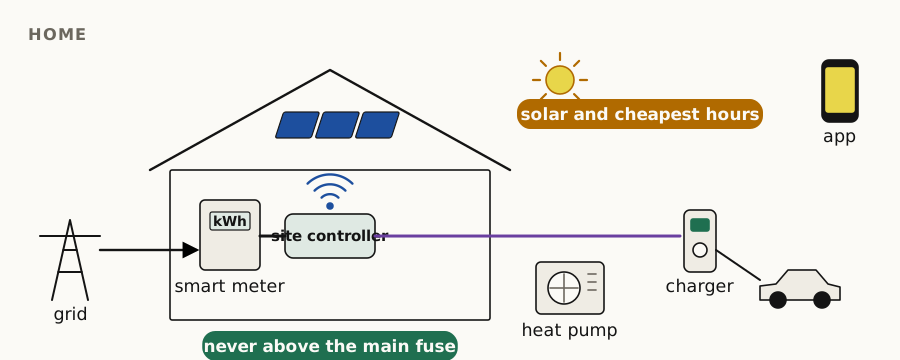
## The typical home
A 3×25 A connection, a DSMR 5 smart meter, solar panels, one or two cars, and increasingly a heat pump. The site controller on the P1 port sees what the house draws and exports on each phase, every second, and gives each charger the current that is left. With two cars, the second waits until the first is done or shares when there is room.
## What the household gets
- Charging on solar surplus, or solar-assisted with a grid top-up so the car is always ready.
- Charging in the cheapest hours with a schedule, or by telling the app "have the car at 80 % by 7:00".
- The MyCharger app, warnings before something goes wrong, and firmware updates in the field.
- A second charger later without a new connection.
## Parts
Simple charger or charger with display (also with your own shroud); the smart set with EVSE-SC-02 on the P1 port, or the Matter over Thread set; the SG-Ready module when a heat pump joins. See [electronics](/electronics) and [chargers](/products).
For households: [your energy at home](/at-home), with free advice from your bill and the € 100 energy scan on the P1 port that stays as the controller.
[object Object],[object Object],[object Object],[object Object],[object Object],[object Object],[object Object],[object Object],[object Object],[object Object],[object Object],[object Object],[object Object],[object Object],[object Object],[object Object],[object Object],[object Object],[object Object],[object Object],[object Object],[object Object],[object Object],[object Object],[object Object],[object Object],[object Object],[object Object],[object Object],[object Object],[object Object],[object Object],[object Object],[object Object],[object Object],[object Object]
---
# Flats, VvE and offices
Many chargers on one shared connection: fair sharing per second, per-user metering and billing, card authorisation, and the building's own management system (BMS/GBS) monitoring or controlling the chargers.
Canonical: https://edgetech.eu/nl/solutions/flats-vve-offices
Updated: 2026-10-14
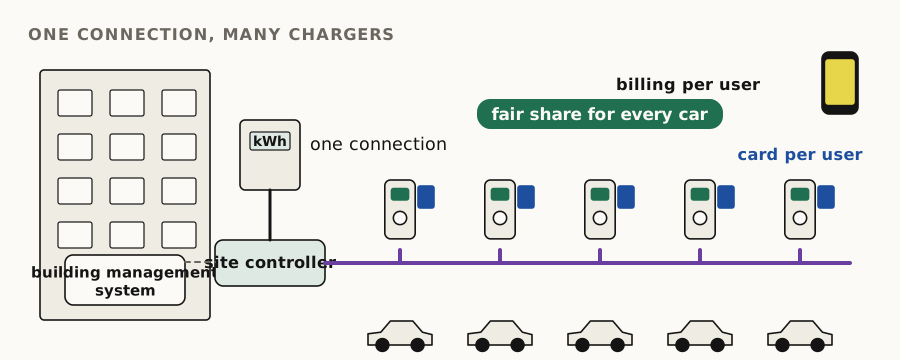
## The problem
A VvE garage or an office car park has one connection and a growing number of residents or employees with a car. Upgrading the connection is slow and expensive. Load balancing on the existing connection is not.
## What we do
- One site controller on the P1 port drives up to 10 chargers per bus; larger garages use several buses or GridShield.
- Every charger meters its own sessions; the platform assigns them to users and produces the overviews the VvE administrator or the employer needs for billing.
- NFC cards or the app decide who may charge; guests can be given a code.
- The building's **building management system (BMS or GBS, or its energy module, BEMS)** can monitor and control the chargers over Modbus, the REST API or Matter, so charging becomes one more system the building manages.
## Parts
Chargers of any tier; EVSE-SC-02 or GridShield; NFC readers; the platform with per-user reporting. A Dutch page for VvE administrators is planned.
[object Object],[object Object],[object Object],[object Object],[object Object],[object Object],[object Object],[object Object],[object Object],[object Object],[object Object],[object Object],[object Object],[object Object],[object Object],[object Object],[object Object],[object Object],[object Object],[object Object],[object Object],[object Object],[object Object],[object Object],[object Object],[object Object],[object Object],[object Object],[object Object],[object Object],[object Object],[object Object],[object Object],[object Object],[object Object],[object Object]
---
# Building sites
Temporary charging on construction sites: chargers that go up and come down with the site, a temporary connection, no data cabling, load management over the air with GridShield, and an outlet box that turns a charger into a 230 V or three-phase power point.
Canonical: https://edgetech.eu/nl/solutions/building-sites
Updated: 2026-10-28
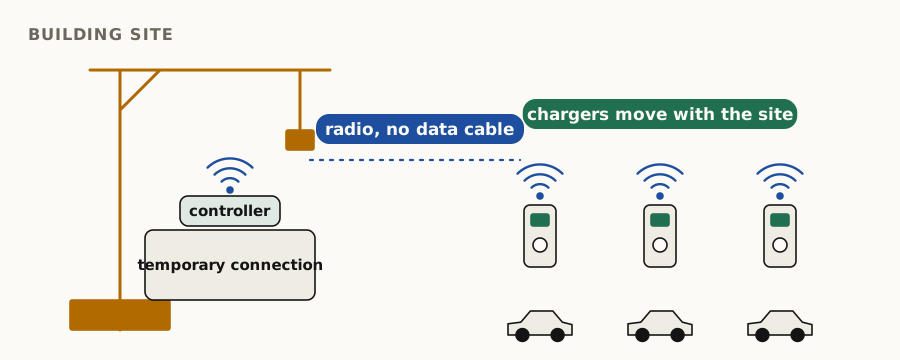
## What is different on a site
The connection is temporary and often small, the chargers move, nobody wants to pull data cables through a site, and the equipment has to survive the site. The requirements list for this application is being written; ask for the current one.
## What we do
GridShield controller at the site connection, receivers at the chargers, all over LoRa point-to-point. Chargers are simple grey-box units that can be moved. The platform gives the site manager the overview and the warnings.
## Power outlets from a charger
The same charger that charges the site's vans can power the tools. Our outlet box is made for public chargers: its cable has a Type 2 plug, the same plug a car cable has, so it fits any charger with a socket. It gives you sockets with current limiting:
- **230 V:** ordinary wall sockets, for tools, lights and site huts;
- **3 × 230 V:** a red three-phase socket, for heavier equipment.
The box obeys the current the charger advertises, just as a car does. If the tools draw more than that, the box switches off, so the charger's load management keeps the site connection safe. Built for construction sites. [Ask us](/contact?about=building-sites) about versions and prices.
## Parts
Simple chargers; the outlet box; [GridShield](/products/gridshield) controller and receivers; the platform.
[object Object],[object Object],[object Object],[object Object],[object Object],[object Object],[object Object],[object Object],[object Object],[object Object],[object Object],[object Object],[object Object],[object Object],[object Object],[object Object],[object Object],[object Object],[object Object],[object Object],[object Object],[object Object],[object Object],[object Object],[object Object],[object Object],[object Object],[object Object],[object Object],[object Object],[object Object],[object Object],[object Object],[object Object],[object Object],[object Object]
---
# Car parks and DC sites
Density and cost per plug: Plaza Charge puts up to twelve plugs on one shared 3×35 A connection for overnight top-ups. DC fast-charging sites use it to add cheap overnight AC charging for taxis, vans and buses.
Canonical: https://edgetech.eu/nl/solutions/car-parks-dc-sites
Updated: 2026-10-14
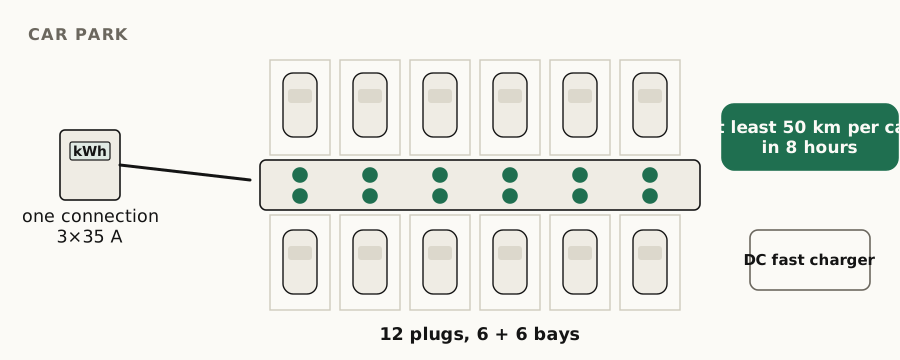
## Car parks
Residents, employees and fleets park for the night. They do not need 22 kW; they need enough for tomorrow. [Plaza Charge](/products/plaza-charge) gives every car plugged in for at least 8 hours at least 50 km (cars that charge on three phases) on one shared 3×35 A connection. Cars can stay plugged in, and charging can follow a flexible energy contract.
## DC and fast-charging sites
A fast-charging site has the grid connection and the traffic. Fleets that return at night, taxis and delivery vans, want to charge slowly and cheaply while parked. Plaza Charge poles next to the DC chargers use the same connection at night when the fast chargers are idle.
## Parts
Plaza Charge poles; NFC readers; the platform with per-user or per-fleet reporting.
[object Object],[object Object],[object Object],[object Object],[object Object],[object Object],[object Object],[object Object],[object Object],[object Object],[object Object],[object Object],[object Object],[object Object],[object Object],[object Object],[object Object],[object Object],[object Object],[object Object],[object Object],[object Object],[object Object],[object Object],[object Object],[object Object],[object Object],[object Object],[object Object],[object Object],[object Object],[object Object],[object Object],[object Object],[object Object],[object Object]
---
# Grid operators
GridShield, ElaadNL's last-resort signal to scale down consumption on a congested cable or transformer, with an EdgeTech controller and receiver tested against ElaadNL's implementation in both directions.
Canonical: https://edgetech.eu/nl/solutions/grid-operators
Updated: 2026-10-14
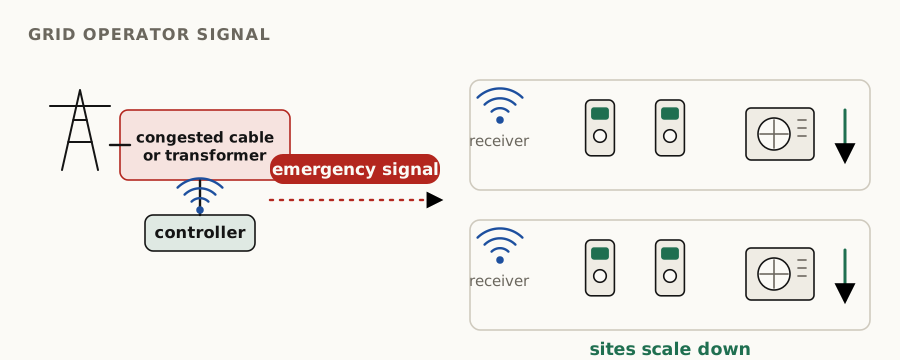
## What GridShield does
When a neighbourhood on one cable or transformer draws too much, the grid operator's controller broadcasts a reduce signal over LoRa point-to-point. Every GridShield receiver behind it scales its chargers and heat pumps down. It is the last resort that keeps the network inside its limits when contracts and prices have not.
## What EdgeTech supplies
- A **controller** that measures the connection and sends the signal, or forwards the grid operator's signal.
- A **receiver** that limits EdgeTech and compatible chargers over Modbus and other loads over two relays, including SG-Ready heat pumps.
- Interoperability tested against ElaadNL's implementation in both directions.
- Chargers and site controllers that respect contracted limits and congestion windows through the platform.
See [GridShield](/products/gridshield) for the specifications.
[object Object],[object Object],[object Object],[object Object],[object Object],[object Object],[object Object],[object Object],[object Object],[object Object],[object Object],[object Object],[object Object],[object Object],[object Object],[object Object],[object Object],[object Object],[object Object],[object Object],[object Object],[object Object],[object Object],[object Object],[object Object],[object Object],[object Object],[object Object],[object Object],[object Object],[object Object],[object Object],[object Object],[object Object],[object Object],[object Object]
---
# Heat pumps and HEMS
A home energy management system with two layers: a local, deterministic safety layer that never exceeds the fuse and that the AI cannot touch, and a policy layer whose control loops the AI adjusts when you tell it what you want.
Canonical: https://edgetech.eu/nl/solutions/heat-pumps-hems
Updated: 2026-10-14
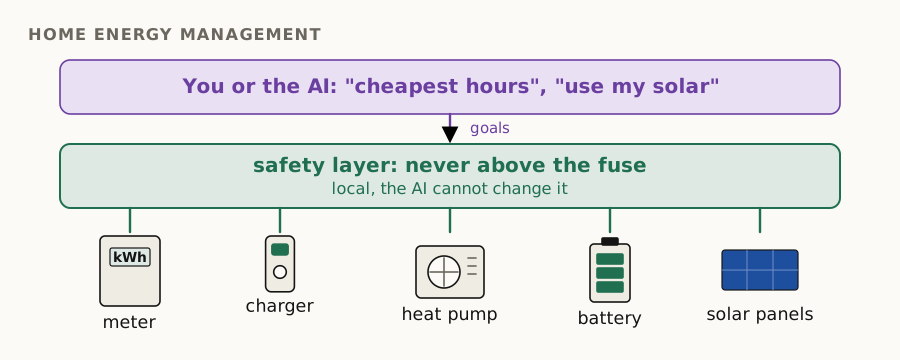
## Two layers
**The safety layer** runs locally, every second, whatever else happens: the main fuse is never exceeded when the heat pump and the induction hob start while the car charges; every charger keeps its 6 A minimum or stops; on loss of communication everything falls back to a safe limit. No cloud, no language model, no exceptions.
**The policy layer** decides what to do inside that envelope: when to charge, when to boost the heat pump, whether to export. Its parameters can be set in the app, and they can be set by telling the HEMS what you want in plain language. The agent changes policies; it never sits in the control loop.
## What you can tell it
| You say | The HEMS does | It will not |
|---|---|---|
| "Use the cheapest energy" | Shifts car, battery and heat-pump boost to the cheapest day-ahead hours | Exceed the fuse to catch a cheap hour |
| "Never supply energy to the grid" | Caps export at zero: surplus goes to the car, the battery, the boiler; curtails the inverter if it can | Curtail below what the safety layer needs |
| "Have the car at 80 % by 7:00" | Plans the session backwards from 7:00 within the site limit | Promise 80 % if the connection cannot deliver it, it says so |
| "Prefer my own solar for the car" | Solar-surplus mode with a grid top-up only below 6 A surplus | Stop the car mid-session below 6 A without telling you |
| "Keep the house under 3×16 A from 17:00 to 20:00" | Applies a congestion-window limit | Forget the limit when the window ends |
| "Boiler only from solar or below 10 ct/kWh" | Relay on the boiler on surplus or cheap hours | Let the boiler go cold beyond its minimum |
| "Prices are negative tonight: fill everything" | Charges the battery and the car, runs the heat-pump boost | Exceed device limits |
| "Guests this weekend: second charge point first" | Changes socket priority for the weekend | Keep it after the weekend |
| "Holiday mode" | Minimum heating, no charging, sell surplus | Turn off frost protection |
| "What did you do last night, and why?" | Shows the decisions and the prices, solar and limits behind them | Invent a reason |
## Interfaces
SG-Ready contacts today, through the [SG-Ready module](/products/matter-set) or a GridShield receiver; EEBus as a supported interface for heat pumps on order; S2 for Dutch HEMS on order. Status of each on the [standards page](/standards).
## Details still open
The product name of the HEMS, which devices are controllable today versus planned, and where the policy layer runs (the Matter hub or the cloud) are being finalised.
[object Object],[object Object],[object Object],[object Object],[object Object],[object Object],[object Object],[object Object],[object Object],[object Object],[object Object],[object Object],[object Object],[object Object],[object Object],[object Object],[object Object],[object Object],[object Object],[object Object],[object Object],[object Object],[object Object],[object Object],[object Object],[object Object],[object Object],[object Object],[object Object],[object Object],[object Object],[object Object],[object Object],[object Object],[object Object],[object Object]
---
# Solution-design questionnaire
Tell us what you are trying to build or integrate and we answer with a recommended EdgeTech architecture. We answer by email, usually within one working day.
Canonical: https://edgetech.eu/nl/solutions/questionnaire
Updated: 2026-10-14
## What happens next
You receive a recommended architecture: which electronics or chargers, which site controller, which interfaces to the rest of the installation, and what is standard versus engineering. If it is a fit, we set up a call. The same logic is available to agents through the MCP server's compatibility check.
[object Object],[object Object],[object Object],[object Object],[object Object],[object Object],[object Object],[object Object],[object Object],[object Object],[object Object],[object Object],[object Object],[object Object],[object Object],[object Object],[object Object],[object Object],[object Object],[object Object],[object Object],[object Object],[object Object],[object Object],[object Object],[object Object],[object Object],[object Object],[object Object],[object Object],[object Object],[object Object],[object Object],[object Object],[object Object],[object Object]
---
# Engineering, consulting and IP
OEM development, special projects, firmware, software, IP and engineering in the grid-edge field. Named engagements with indicative durations and rates. We prove a capability, you buy it, then we finish it as a product.
Canonical: https://edgetech.eu/nl/engineering
Updated: 2026-10-28
We take engineering work in the field of our products: charger electronics and firmware, load balancing and site control, smart-meter and P1 handling, Matter, S2 and EEBus integration, device fleets on MQTT, and the platform behind them. If your question is one of those, we have usually solved a version of it.
Every product tier connects to this offer. A customer can start with a board, a charger or an integration and go deeper, because the same two engineers designed the whole stack, from architecture down to debugging.
## How we work now
We no longer finish products before anyone has asked for them. We make sure we can build something, we show it works, and we finish it into a product when it is sold. Development is fast; sales cycles are long. That is why this site marks capabilities as "implemented, on order" rather than promising a shipping date.
## Engagements
Rates are indicative for 2026, excl. VAT, confirmed in a quote.
| Engagement | What you get | Duration | Indicative price |
|---|---|---|---|
| Architecture review | Written assessment of your charger, controller or HEMS design: electronics, firmware, protocol choices, certification path, what will break in the field. Read-out meeting. | 2 weeks | € 6,000–9,000 fixed |
| Design-to-CE for an AC charger | From schematic or concept to a CE-declared Mode 3 charger: electronics (or our boards), firmware, enclosure integration, EMC/LVD test coordination, technical file. | 4–6 months | € 45,000–90,000 |
| NTA 8043 / NCS 8043 readiness | Gap analysis against NCS 8043:2026, the missing control behaviour, test evidence, the self-declaration package. | 8–12 weeks | € 15,000–30,000 |
| S2 or EEBus integration | Your heat pump, battery or charger as an S2 resource manager or EEBus device, tested against the reference implementations. | 6–10 weeks | € 18,000–35,000 |
| Matter integration and certification | Your device as a Matter 1.4 device over Thread or WiFi, commissioned into a controller we run; CSA certification on request (fees pass-through). | 6–10 weeks | € 20,000–40,000 |
| OCPP 1.6J for your project | The working implementation finished into a product for your CPMS. | on request | on request |
| Fleet platform | MQTT device platform with per-device keys, OTA, telemetry with units defined, admin UI; on your hosts or ours. | 6–8 weeks | € 25,000–45,000 |
| Test equipment and simulators | A [simulator, test automation or pilot and power measurement](/engineering/test-equipment) for your charger, load balancer or energy controller, or a test run on our bench with a report. | on request | on request |
| Firmware and bus troubleshooting | A field problem nobody can reproduce: Modbus timing, vehicle wake-up, WiFi in metering cabinets, P1 variants. | by the day | € 1,150 per day |
## Also on these pages
- [Our IP in your product](/engineering/ip): what can be licensed or transferred.
- [Test equipment and simulators](/engineering/test-equipment): site and EV simulators, automated test sessions, pilot-signal and power logging, battery tests, remote voltage and current logging, as equipment or as a test service.
- [Data services](/engineering/data-services): prices, weather and solar forecasts from our backend.
- [Example cases](/engineering/cases): typical projects, written so you can judge the fit.
- [Certification on request](/engineering/certification): Matter, MID, NTA 8043.
## Can EdgeTech take my charger from schematic to NTA 8043 self-declaration, and what does it cost?
Yes: the design-to-CE engagement plus the NTA 8043 readiness engagement, in sequence or overlapping. For a charger on our boards, expect 5 to 7 months and roughly € 60,000 to € 110,000 in engineering, excluding test-house fees and enclosure tooling. Indicative. The [questionnaire](/solutions/questionnaire) tells us what we need for a real number.
[object Object],[object Object],[object Object],[object Object],[object Object],[object Object],[object Object],[object Object],[object Object],[object Object],[object Object],[object Object],[object Object],[object Object],[object Object],[object Object],[object Object],[object Object],[object Object],[object Object],[object Object],[object Object],[object Object],[object Object],[object Object],[object Object],[object Object],[object Object],[object Object],[object Object],[object Object],[object Object],[object Object],[object Object],[object Object],[object Object]
---
# Our IP in your product
The charger hardware designs, the firmware, the load-balancing control loops, P1 handling, the Matter modules, the platform and the data services are available to customers: licensed, transferred with support, or built into a product for you.
Canonical: https://edgetech.eu/nl/engineering/ip
Updated: 2026-10-23
## What exists
| Asset | What it is | Open or licensed |
|---|---|---|
| Charge controller | Schematics, layout, bill of materials, test procedure of the EVSE-C-3x32A | Register map, installation guide and examples open on GitHub; firmware and hardware design licensed |
| Site controllers | Designs and firmware of the clamp and P1 controllers | Licensed |
| Control loops | The per-second load-balancing loop, the 6 A rules, fail-safes, solar modes, 1P/3P switching | Licensed; the behaviour is documented publicly |
| P1 handling | DSMR 5 parsing, per-phase import and export, meter quirks | Licensed |
| Matter modules | Charger Thread module, P1 reader, hub, SG-Ready module firmware | Licensed |
| Platform | The charging platform: users, sites, sockets, subscriptions, scheduling, OTA, notifications; deployable on a single host inside your network | Licensed, with a signed licence file and grace period |
| Data services | Prices, weather and solar forecast feeds | Licensed, subject to the sources' terms |
| Support and diagnostics | Fleet monitoring rules, the trouble list, the chat's knowledge base | With the platform |
## Forms
- **Licence:** you build your product on our design and firmware; one-off, per unit or royalty, to be agreed.
- **Design files with support:** you receive the files and we stay available while your team takes over.
- **Full transfer:** for a customer who wants to own a variant outright.
Terms, exclusivity with existing OEM customers, and which parts are open versus licensed per case are settled in the quote.
[object Object],[object Object],[object Object],[object Object],[object Object],[object Object],[object Object],[object Object],[object Object],[object Object],[object Object],[object Object],[object Object],[object Object],[object Object],[object Object],[object Object],[object Object],[object Object],[object Object],[object Object],[object Object],[object Object],[object Object],[object Object],[object Object],[object Object],[object Object],[object Object],[object Object],[object Object],[object Object],[object Object],[object Object],[object Object],[object Object]
---
# Test equipment design and build: simulators, automation and measurement
We design and build test equipment, from electronics and firmware to automation and reports, for our own chargers, load balancers and firmware and for your products: simulators that imitate what surrounds a device (chargers on Modbus, a smart meter on P1, the car on the control pilot), automation that runs test sessions day and night, and measurement that logs and analyses the pilot signal, the voltage and current going to the car, and the charge, discharge and capacity of batteries, on the bench or remotely. As equipment, as a test service, or built for your product.
Canonical: https://edgetech.eu/nl/engineering/test-equipment
Updated: 2026-10-28
Chargers fail in the field on things a bench never showed: a car that falls asleep during a pause, a meter that sends its telegram a little differently, a bus that answers 10 ms too late. We build the equipment to provoke those cases on the bench, because our own boards, load balancers and firmware have to survive them. The same equipment can test yours, and we design and build new equipment for your product.
## We design and build test equipment
We started making test equipment for our own use, because nothing on the market could imitate our sites, our meters and the cars we see in the field. It worked well enough that we now build it for others too. Test equipment is a product in its own right, and we make it the way we make our chargers: designed, built and documented in house, by the same engineers.
- **Electronics.** Our own circuit boards and interfaces: RS485, P1, control pilot, isolated inputs, power stages to charge and discharge.
- **Firmware.** Embedded software that imitates a device down to its timing, because a simulator that is a few milliseconds off tests the wrong thing.
- **Automated instruments.** Every instrument on our bench runs under software control: an automated oscilloscope, an automated programmable power supply, networked meters and an automated vector network analyser (VNA) for antenna tests. Scripts set them up, trigger them and read them out, so a measurement is repeatable and needs nobody at the bench.
- **Automation and data.** Test runs on a schedule, results over MQTT to a server, live dashboards and logs that survive a restart, and reports with the traces and curves.
- **Mechanics and finish.** Compact units on a DIN rail or in a case, with a touchscreen or without, labelled and documented so someone else can use them.
- **Small series.** One bench for your lab, or a series of identical stations for a production line or for partners, and, if you want, the firmware and software maintained after delivery.
## Three building blocks
Every test setup we build combines the same three things, and all three are automated: simulators, instruments, logging and analysis run under software control, day and night, without anyone at the bench. The examples are ours; the method works for any device that talks to a bus, a meter or a car.
1. **Simulate what surrounds the device.** The device under test sees a real-looking world: chargers on the bus, a smart meter on P1, a car on the control pilot. The simulator has to be as strict as the real thing, or the test passes on the bench and fails in the field.
2. **Automate the sessions.** Cars plug in, charge, pause and leave on a schedule or at random, day and night, without anyone at the bench. The result is checked against what the device itself reports, the same way it reports in the field.
3. **Measure what reaches the car.** The control-pilot signal (maximum and minimum voltage, duty cycle, frequency) and the voltage and current to the car, monitored and logged over hours or days, and analysed remotely while the test runs or afterwards, so a fault that happens once a night is still caught. The same logging measures batteries through charge and discharge, and runs on networked meters, so the bench does not have to be ours.
## What we have
| Tool | What it does | Status |
|---|---|---|
| Site simulator (ETSS) | Imitates a complete charging site on one small unit: up to five charge controllers on the RS485 Modbus bus, with the full register map, states A, B and C, 1- or 3-phase charging, a charge current that follows the limit the controller sets, and energy counters; and a DSMR 5 smart meter on P1 whose load follows the simulated cars. A load balancer can be tested end to end, with no car and no charger | In daily use for our own development |
| Automated session runner | Drives the site simulator through idle, one-car and two-car sessions, unattended, every 15 minutes since August 2026. Each step is acknowledged by the simulator and checked against the controller's own telemetry | In daily use |
| EV simulator | The car side of IEC 61851: states A to F, PP cable codes, and the reactions of different cars to a charging pause, scripted so firmware tests run without a car | In use for automated tests |
| Pilot and power monitoring | Monitors and logs the control-pilot signal (maximum and minimum voltage, duty cycle, frequency) and the voltage and current to the car, unattended over long runs; analysed remotely while the test runs, or afterwards | In use |
| Battery cell test | Charges and discharges a battery cell under software control, with an automated power supply, logs voltage, current and power throughout, adds up the energy (Wh) and charge (Ah) it delivers, and stops by itself when the cell is empty; every run ends with a report and a discharge curve | In use |
| Battery system test | For complete storage systems such as a home battery: round-trip efficiency (energy out against energy in), reaction time from a new power setpoint to the battery delivering it, and setpoint resolution (the smallest power step the system really follows) | In use |
| Remote voltage and current logging | Small networked meters that measure voltage, current and power on several channels and send them every few seconds, so a test bench, a battery or an installation is logged and followed from a distance | In use |
| Antenna test | An automated vector network analyser sweeps an antenna from 50 kHz to 6 GHz, calibrated per band (868 MHz, 2.4 GHz, 5 GHz), and stores the return loss as plots and Touchstone files, to compare antennas and their position in a housing or a meter cupboard | In use |
| Modbus tool | Reads and writes every register of the charge controller from a PC, over RS485 or a TCP gateway | Shipped, open source ([GitHub](https://github.com/edge-tech-eu/SmartEVSE)) |
| Firmware flasher | Updates the charge controller's firmware over its Modbus connection | Shipped ([release 2.10.19](https://github.com/edge-tech-eu/SmartEVSE/releases/tag/v2.10.19)) |
| EV wake-up test | Three ways to wake a sleeping car (CP interruption, "charger absent", unplug/replug sequence) with adjustable timing, to find what a given car needs | Shipped, in the charge controller firmware |
| GridShield interoperability | Our GridShield controller and receiver tested against ElaadNL's implementation in both directions | Tested |
## What the bench has caught
### A meter telegram that was too slow, by a few milliseconds
**Seen.** On the site simulator, the controller counted a CRC failure on the smart-meter telegram about every five minutes. On a real meter the same firmware counted none.
**Found.** A real meter sends its whole telegram of about 850 bytes in one burst of roughly 74 ms. The controller decides a telegram is complete when the line has been quiet for 25 ms. Our simulator wrote the telegram in pieces, and when it was briefly busy with something else, the gap was long enough to cut the telegram in two.
**Lesson.** The simulator now sends the telegram in one burst, as a meter does. A simulator that is kinder or harsher than the real device tests the wrong thing.
### A controller that went quiet, and a simulator that forgave it
**Seen.** In the field, charging sometimes stopped while the site controller was reconnecting to its network. On the bench it never did.
**Found.** The real charge controller keeps a current limit from the site controller for 2 seconds and then falls back to zero, so a site controller that stops refreshing stops the charging. The simulator kept the last limit for ever, so a stalled site controller looked healthy.
**Lesson.** The simulator now lets the limit lapse after 2 seconds, like the board, and counts every lapse on its screen. The field fault is now reproducible on the bench, where it can be tested again after every change.
### Supply dips nobody was there to see
**Seen.** A site controller powered from the smart meter's P1 port restarted now and then, too rarely to catch by hand.
**Done.** An automated oscilloscope on the 5 V at the P1 connector, re-armed every minute by software, records every dip below a threshold with its minimum, average and the waveform of the deepest one. Days of logging answer whether the supply sags, how often and how deep, without anyone watching.
### Proving what the car actually saw
**Question.** When a car does not wake up after a pause, did the charger send the wake-up signal, with the right levels and timing, or did the car ignore it?
**Done.** Measuring the control pilot during the wake-up sequence shows the levels and durations the car really received. Together with the EV simulator, the wake-up variants can be checked after a firmware change, before it reaches a car in the field.
## What you can use it for
- **Load-balancing algorithms.** Simulated cars that start, stop and change phase on command, against your controller's limit, without a car park full of cars.
- **Firmware regression.** Run the same sessions after every firmware change and compare the register traces and the pilot recordings.
- **Protocol timing.** The charge controller expects an answer within 40 ms; we measure where a gateway or a slow master breaks that.
- **Smart-meter variants.** P1 telegrams with import, export, 1 or 3 phases and edge cases, for a controller that reads them.
- **Car behaviour.** How your charger handles a car that sleeps, a slow state change or a cable with a lower rating, with the pilot signal recorded.
- **Long-run reliability.** Days of unattended sessions with power and pilot logging, to catch the fault that happens once a night.
- **Battery cells.** Capacity measured, not taken from the datasheet: charge, discharge and capacity tests, repeated to see how a cell ages, and the real consumption of a device that runs on one.
- **Battery systems.** How efficient a storage system really is, how fast it follows a new setpoint and how fine its steps are, the figures an energy controller depends on.
- **Remote monitoring.** Voltage and current logged at a site or on a bench elsewhere, followed live and analysed afterwards.
- **Interoperability.** GridShield both ways, Modbus against our register map, Matter devices commissioned into a controller we run.
- **End-of-line test.** A test station for chargers coming off your assembly line. On request.
## Beyond chargers
The same method fits other devices on the grid edge. A heat pump, home battery or inverter controller also lives between a bus, a meter and a load. We can simulate the meter and the devices around it, run the scenarios automatically, and measure what the device really does, so your controller is tested before it meets a real installation.
## Three ways to work with us
1. **Equipment.** A simulator or test bench, built to order and configured for your site sizes and protocols.
2. **Test service.** You send your charger, load balancer or energy controller; we run it on our bench and report what we found, with the traces.
3. **Engineering.** We build a simulator, test automation or measurement setup for your protocol or product, as part of an [engagement](/engineering#engagements).
Prices and lead times on request. [Contact us](/contact?about=test-equipment) with what you want to test.
## Can EdgeTech test my charger or load balancer without real cars?
Yes. The site simulator imitates the chargers and the smart meter, the EV simulator imitates the car on the control pilot, and the session runner drives both unattended. We record the pilot signal and the voltage and current to the car, and report what we found with the traces.
[object Object],[object Object],[object Object],[object Object],[object Object],[object Object],[object Object],[object Object],[object Object],[object Object],[object Object],[object Object],[object Object],[object Object],[object Object],[object Object],[object Object],[object Object],[object Object],[object Object],[object Object],[object Object],[object Object],[object Object],[object Object],[object Object],[object Object],[object Object],[object Object],[object Object],[object Object],[object Object],[object Object],[object Object],[object Object],[object Object]
---
# Data services
The EdgeTech backend has day-ahead electricity prices, weather forecasts, and a solar production forecast per installation from panel orientation and predicted cloud cover. They feed smart charging, the HEMS and the advice services, and are available to partners.
Canonical: https://edgetech.eu/nl/engineering/data-services
Updated: 2026-10-20
## What is in the backend
| Data | Resolution | Horizon | Coverage | Status |
|---|---|---|---|---|
| Day-ahead electricity prices | 15 min / hourly | next day | NL, BE, DE, FR bidding zones | live |
| Weather forecast (temperature, wind, radiation) | hourly | days | Europe | live |
| Solar production forecast per installation | 15 min | days | any site with known tilt, azimuth and kWp | live |
## What it is used for
- Charging in the cheapest hours and around negative prices.
- Solar-surplus charging that starts before the sun does, because the forecast says it will.
- HEMS policies ("use the cheapest energy") and the energy-advice services.
- Available to partners through the platform's API, and to agents through the MCP server, where the sources allow it.
[object Object],[object Object],[object Object],[object Object],[object Object],[object Object],[object Object],[object Object],[object Object],[object Object],[object Object],[object Object],[object Object],[object Object],[object Object],[object Object],[object Object],[object Object],[object Object],[object Object],[object Object],[object Object],[object Object],[object Object],[object Object],[object Object],[object Object],[object Object],[object Object],[object Object],[object Object],[object Object],[object Object],[object Object],[object Object],[object Object]
---
# Example cases
Typical projects, anonymous until customers allow their names, structured as challenge, existing systems, EdgeTech integration, technical solution and result. EdgeTech supplies the technology, control logic and integration that makes chargers, inverters, batteries, meters and heat pumps work together, not necessarily all the components.
Canonical: https://edgetech.eu/nl/engineering/cases
Updated: 2026-10-13
## Typical projects
Each will be written as *Challenge → Existing systems → EdgeTech integration → Technical solution → Result*. Drafts are in progress for:
1. A European EV charger OEM looking for an open 22 kW charging platform.
2. A residential energy project combining EV charging, solar and dynamic load balancing.
3. A smart-home integration combining charger, smart meter and heat pump.
4. A multi-residential / apartment charging and energy-management project.
5. Temporary charging and local energy management for a construction site.
6. A European OEM requiring a customized white-label charger.
7. A HEMS project integrating EV charging, solar, battery and heat pump.
8. An OEM requiring custom firmware, Modbus, Matter or API integration.
9. An energy-management project where existing third-party components must work together.
## Five engineering cases, already written
### Waking a sleeping EV, on an 8-bit microcontroller
**Constraint.** A 2022 premium EV stopped resuming charging after a pause of more than a few minutes: it went into deep sleep and ignored the pilot signal. The charge controller runs on an 8-bit microcontroller with most of its flash in use, and the fix could not change behaviour for the hundreds of other vehicle models already charging fine.
**What we did.** Implemented the control-pilot disconnect wake-up of IEC 61851-23 Edition 2, made it configurable per socket because two other brands reacted badly to it, and rolled it out over the air to the whole fleet. Shipped as firmware 2.10.17 in April 2025.
### Moving a live fleet off a vendor cloud
**Constraint.** Hundreds of site controllers in the field depended on a third-party IoT cloud for connectivity, OTA and events. The migration had to happen without a site visit, without a firmware version that could brick a device, and with the vendor's cloud switched off per device only after the new path was proven.
**What we did.** Built an MQTT broker with a per-device key derived from the device ID, a forwarder that turned device events into the webhooks the platform already consumed, and a staged rollout with a per-device ledger and an hourly watchdog that enforces the intended state. The fleet moved in the summer of 2026 with no truck rolls.
### Load management without a data cable
**Constraint.** Charge points on holiday parks, construction sites and large car parks need a grid limit, but running RS485 to each of them was impossible or too expensive. The solution had to work without network infrastructure and fail safe when the radio link was lost.
**What we did.** With ElaadNL, built the GridShield controller and receiver over LoRa point-to-point, with Modbus, relay and SG-Ready outputs and a configured safe limit on radio loss, and tested it against ElaadNL's implementation in both directions.
### A charging platform a telecom operator can host
**Constraint.** Corporate customers wanted the charging platform inside their own network, passing their own vulnerability scans, with no dependency on the vendor's cloud.
**What we did.** Made the platform self-contained and deployable inside the customer's network: daily backups, the customer's own TLS certificates, a signed licence with a grace period, and a mobile API compatible with the existing apps. It runs on a single server.
### A Matter charger before ecosystems support it
**Constraint.** Home energy management is moving to Matter, but the Matter Energy EVSE device type was new and no ecosystem could commission it. We wanted a charger ready the day one could, without changing the charge controller.
**What we did.** Built a Thread module that reads the charge controller over Modbus and exposes the Energy EVSE, Energy EVSE Mode and Electrical Power Measurement clusters, commissioned it into our own controllers, and drive it from an agent interface that sets the current limit within the load-balancing envelope.
[object Object],[object Object],[object Object],[object Object],[object Object],[object Object],[object Object],[object Object],[object Object],[object Object],[object Object],[object Object],[object Object],[object Object],[object Object],[object Object],[object Object],[object Object],[object Object],[object Object],[object Object],[object Object],[object Object],[object Object],[object Object],[object Object],[object Object],[object Object],[object Object],[object Object],[object Object],[object Object],[object Object],[object Object],[object Object],[object Object]
---
# Certification on request
Certification is done when a customer needs it: CSA certification of the Matter set, MID certification of the on-board metering, the NTA 8043 self-declaration package. EdgeTech does the work; the customer pays the badge.
Canonical: https://edgetech.eu/nl/engineering/certification
Updated: 2026-10-14
| Certification | What it gives | Status |
|---|---|---|
| CE | The charge controller and the site controllers carry EU declarations of conformity; assembled EdgeTech chargers are declared by EdgeTech; a charger under your name is declared by you with our technical file | Done for every product |
| Matter (CSA) | The Matter logo and listing for the Matter over Thread set in your product | On request; membership and test-house fees pass-through |
| MID | Legal billing per kWh with the on-board power measurement, no external meter, only a display | On request; paid option |
| NTA 8043 / NCS 8043:2026 | The Dutch smart-charging self-declaration for your charger | On request, as an [engineering engagement](/engineering) |
| Radio (RED) | The site controllers' WiFi and the GridShield and Thread radios | Covered per product's declaration |
[object Object],[object Object],[object Object],[object Object],[object Object],[object Object],[object Object],[object Object],[object Object],[object Object],[object Object],[object Object],[object Object],[object Object],[object Object],[object Object],[object Object],[object Object],[object Object],[object Object],[object Object],[object Object],[object Object],[object Object],[object Object],[object Object],[object Object],[object Object],[object Object],[object Object],[object Object],[object Object],[object Object],[object Object],[object Object],[object Object]
---
# We support your customers
For the people who use the chargers you sell, and the installers who service them: the MyCharger app, chat support with live diagnostics by the 10-character code, warnings before the call, firmware updates in the field, and the energy-advice services. Your customers stay yours: they help themselves on this site, and we are your second and third line.
Canonical: https://edgetech.eu/nl/support
Updated: 2026-10-26
**Charger at home not charging or offline?** Start with [My charger does not charge](/support/charger-check): with the code from the QR label in your meter cupboard you see right away what is going on and what you can do yourself.
EdgeTech sells to wholesalers, installers and OEMs. The chargers end up with households, VvEs and companies, and those people need support. We give it, under your name where you want that, so that supporting a charger is not the reason you stop selling them.
## Check a charger by its QR code
For installers, dealers and users: diagnostics by the 10-character code from the QR label on the site controller. Capitals matter.
## What a connected charger gets
| | With subscription | Without |
|---|---|---|
| Charging, plug and charge, dynamic load balancing | yes | yes, locally |
| MyCharger app: start, stop, schedules, solar modes, history, exports | yes | no |
| Chat support with live status of the charger | yes | general questions only |
| Warnings by push or email before something fails | yes | no |
| Firmware updates in the field | yes | no |
| REST API for Home Assistant and DIY | yes | no |
| AI control: "charge my car with 10 kW from midnight" | yes | no |
The [subscription](/support/subscription) is bound to the site controller, not to a phone; one subscription covers a household. It is the same thing wholesalers and OEMs know as the support subscription.
## Installation and service
We work with a group of certified installers across the Netherlands who install and service EdgeTech chargers. If you need one for a new site, or a charger in the field needs a visit, [ask us](/contact) and we put you in touch.
## On these pages
- [My charger does not charge](/support/charger-check): check it by its code, and the most common reasons.
- [For your home](/at-home): for households. Their charger by its QR code, and making the home energy smart, measured with the Edge HEMS or estimated from the bill.
- [Chat](/support/chat): general support, and your charger by its 10-character code.
- [MyCharger app](/support/app): the full feature list.
- [Subscription](/support/subscription): what it covers and what it costs.
- [FAQ](/support/faq): the questions installers and users ask most.
- [Existing customers](/support/existing-customers): the 2026 platform migration, which app to use.
- [Warranty and repair](/support/warranty-repair).
- [Report a security issue](/support/security): found a vulnerability? Tell us here.
[object Object],[object Object],[object Object],[object Object],[object Object],[object Object],[object Object],[object Object],[object Object],[object Object],[object Object],[object Object],[object Object],[object Object],[object Object],[object Object],[object Object],[object Object],[object Object],[object Object],[object Object],[object Object],[object Object],[object Object],[object Object],[object Object],[object Object],[object Object],[object Object],[object Object],[object Object],[object Object],[object Object],[object Object],[object Object],[object Object]
---
# My charger does not charge
Charger not charging or not working, offline or showing a fault? Enter the 10-character code from the QR label on the site controller in your meter cupboard and see right away what your charger is doing, why it does not charge and what you can do yourself. No login needed, day and night.
Canonical: https://edgetech.eu/nl/support/charger-check
Updated: 2026-10-24
Do you use the MyCharger app, or is there a small box with a QR label in your meter cupboard? Then you are in the right place, even if your charger carries another brand name.
Enter the code and you see, within seconds: is the charger online, what each charging point is doing, why it does not charge if it does not, any fault in plain words with what to do about it, and whether its software is up to date (and if not, why not). It works day and night, without logging in. It is often faster than mailing us, because it shows the same live data our support desk looks at.
**Where do I find the code?** On the site controller: the small module in your meter cupboard, not the charger itself. There are two ways to get it:
1. **Read it from the label.** The code is printed on the label with the QR code: 10 letters and digits. Type it in exactly as printed; capitals matter.
2. **Scan the QR code with your phone's camera app.** Tap the link that appears. A page opens with the code at the end of its address, after `id=`. Copy that whole address and paste it in the box above; the check picks out the code itself.
## Why a charger does not charge
These are the reasons we see most often. The check above tells you which one applies to your charger.
### The car is plugged in, but charging does not start.
Most often there is not enough current available to start. The charger shares the capacity of your home connection with everything else in the house; when the heat pump, oven or washing machine is on, there may be too little left to start (at least 6 A, and some older cars need more). Charging starts by itself when there is room again. Other common causes: charging is set to start later (delayed charging or a schedule in the app), "plug and charge" is off so you start charging in the app, or solar charging is waiting for enough sun.
### The charger offers power, but the car does not take it.
Then the charger is fine and the car decides not to charge: the battery is full or at the limit set in the car, a charging schedule in the car or in the car maker's app is active, or the car is asleep. Check the car's charging settings and try again.
### The charger is offline.
The site controller in the meter cupboard has no connection with our server. Charging and load balancing go on, but the app and the check cannot see the charger. Check that it has power and look at its LED. To restart a grey site controller, switch its circuit breaker off for 30 seconds and on again; for a black one on the smart meter, pull its plug out of the P1 port for 3 seconds. If your WiFi changed (new router, name or password), set up WiFi again in the MyCharger app. The [FAQ](/support/faq) explains the LED colours and the restart for each type.
### The charger shows a fault or a red light.
Reset it: unplug the car, switch the charger's RCD off for 3 seconds and on again, then plug the car back in. The check names the fault. If it keeps coming back, a DC leakage fault usually points to the car or the earthing of the house; the [FAQ](/support/faq) explains what to check.
### The charger charges slowly.
The check shows why: the home connection is busy, a maximum current is set, the car takes less (many cars charge on one phase), or the cable limits it.
### My subscription has expired.
Without a subscription the charger still charges and balances the load, but the app, the check and remote support do not work. The check then shows a link to renew.
## Still not solved?
Use the [chat](/support/chat) and type your code: it reads the same data and answers questions. Or mail [support@edgetech.eu](mailto:support@edgetech.eu) with a photo of the QR label on the site controller, what the check said and what you have already tried. We answer within one working day. More ways to reach us are on the [contact page](/contact).
[object Object],[object Object],[object Object],[object Object],[object Object],[object Object],[object Object],[object Object],[object Object],[object Object],[object Object],[object Object],[object Object],[object Object],[object Object],[object Object],[object Object],[object Object],[object Object],[object Object],[object Object],[object Object],[object Object],[object Object],[object Object],[object Object],[object Object],[object Object],[object Object],[object Object],[object Object],[object Object],[object Object],[object Object],[object Object],[object Object]
---
# Chat
One chat, two modes. Ask anything the site knows, in Dutch or English. Enter the 10-character code from the QR label on the site controller and it shows that charger's live status: online, what each charging point is doing and why, faults, WiFi, sessions.
Canonical: https://edgetech.eu/nl/support/chat
Updated: 2026-10-24
## General support
The chat answers from the same documentation that is on this site: products, standards, installation, load balancing, the app. If it does not know, it says so and offers to pass your question to support@edgetech.eu.
## Your charger
Type the 10-character code on the QR label on the site controller, here or in the chat. For a charger with a subscription you see:
- online or offline, and how the WiFi is doing (signal, drops in the last 24 hours);
- per charging point: what it is doing, the current and number of phases, the energy of this session and the last one;
- why it is not charging, or slower than expected: waiting for enough power or for solar surplus, delayed charging or a schedule, the car not taking power, the cable or a maximum that limits it;
- faults in plain words, also ones that cleared in the last days;
- how long your subscription runs.
Installers on site use it to see what the customer sees, without an app account. Without a subscription you only see how to renew it.
## Control (coming soon)
With the ID and an active subscription, and after a confirmation code in the MyCharger app, the chat can also schedule: "charge my car with 10 kW from midnight" becomes a scheduled session at 3×15 A from 00:00, within the site limit, and the chat confirms what it actually set. Status is readable with the printed ID; control needs the account.
## Privacy
Status lookups by ID show operational data only, no names or addresses. The chat's knowledge base is public documentation; conversations are not used to train anything.
[object Object],[object Object],[object Object],[object Object],[object Object],[object Object],[object Object],[object Object],[object Object],[object Object],[object Object],[object Object],[object Object],[object Object],[object Object],[object Object],[object Object],[object Object],[object Object],[object Object],[object Object],[object Object],[object Object],[object Object],[object Object],[object Object],[object Object],[object Object],[object Object],[object Object],[object Object],[object Object],[object Object],[object Object],[object Object],[object Object]
---
# MyCharger app
The app for the charger owner: allow or disallow charging, start now, delayed start, weekly schedules, plug and charge, solar modes, live status, consumption exports for expense claims, a second user, notifications, diagnostics to support, firmware updates. iOS and Android. Can be customized under your name.
Canonical: https://edgetech.eu/nl/support/app
Updated: 2026-10-22
MyCharger, one word. iOS and Android, one codebase. Always use the latest version from the App Store or Google Play. Needs a [subscription](/support/subscription).
Scan with your phone's camera to open the app in the store.
| Area | Features |
|---|---|
| Onboarding | Register the charger by scanning the QR on the site controller; WiFi setup; several sockets per site |
| Users | Invite a second user or phone with a 24-hour code; list and remove users; per-user session registration |
| Control | Allow or disallow charging per socket; start now; delayed start; weekly schedule per socket (add, delete, enable, disable); plug and charge on or off; socket priority; rename sockets |
| Load and phases | Set the main fuse and the site limit; grid connection type; 1-phase or 3-phase per socket; charge softer |
| Solar | Solar mode on or off; charge from solar only; extended mode with a trigger and a condition ("x kWh before hour y") |
| Vehicle | Pick the EV model from a catalogue, used for charging behaviour such as wake-up |
| Insight | Live socket and site status: state, current per phase, temperature, errors; consumption per period; export as CSV or HTML with a configurable kWh price for expense claims |
| Notifications | Car connected or disconnected, session started or stopped, errors (DC leakage, temperature, offline), messages from the platform |
| Support | Send a diagnostics report and logs to support from the app; firmware check and update; force a status refresh; factory reset |
| Subscription | View and extend in the app or through the portal |
| Coming | Natural-language charging instructions through the chat; sessions in your calendar; proactive warnings |
## Under your name
For OEM customers the app can carry your name, icon, colours and support contact. Cost on request.
[object Object],[object Object],[object Object],[object Object],[object Object],[object Object],[object Object],[object Object],[object Object],[object Object],[object Object],[object Object],[object Object],[object Object],[object Object],[object Object],[object Object],[object Object],[object Object],[object Object],[object Object],[object Object],[object Object],[object Object],[object Object],[object Object],[object Object],[object Object],[object Object],[object Object],[object Object],[object Object],[object Object],[object Object],[object Object],[object Object]
---
# Subscription
A charger is connected when its data reaches the EdgeTech platform. That connection is the subscription: app, history and exports, remote support, warnings, new firmware features, REST API and AI control. Without it, charging, plug and charge and load balancing keep working locally. Bound to the site controller, not to a phone.
Canonical: https://edgetech.eu/nl/support/subscription
Updated: 2026-10-25
## What it covers
- The MyCharger app with remote start and stop, schedules and solar modes.
- Charging history and exports for expense claims.
- New features through firmware updates in the field, for the site controller and the charge controller. Fixes and security updates reach every charger, with or without a subscription.
- Remote support: the chat with live status, diagnostics from the app.
- **Warnings before the call:** the platform watches every connected charger and warns by push or email when it goes offline, when WiFi is weak, when Modbus quality drops, when an error bit is set (over-temperature, stuck relay, ground fault, DC leakage, pilot out of range), when an update fails, when the site limit is hit too often or the P1 signal is lost.- **Sessions in your calendar:** start, stop and kWh of every session, live. Coming soon.
- The REST API for Home Assistant and DIY.
- AI control through the chat and the app.
## Without it
Charging, plug and charge and dynamic load balancing keep working, locally, forever. The charger does not stop.
## Terms
Six months for € 32.50 or a year for € 61.50, incl. VAT; also for two or five years. A free trial period applies to new chargers. The subscription belongs to the site controller: a new phone, a second user or a reinstall does not cost subscription days.
## For wholesalers and OEMs
The same subscription, called the support subscription on the commercial side. On request on top: a fleet view, a per-fleet API and a digest of your installed base.
[object Object],[object Object],[object Object],[object Object],[object Object],[object Object],[object Object],[object Object],[object Object],[object Object],[object Object],[object Object],[object Object],[object Object],[object Object],[object Object],[object Object],[object Object],[object Object],[object Object],[object Object],[object Object],[object Object],[object Object],[object Object],[object Object],[object Object],[object Object],[object Object],[object Object],[object Object],[object Object],[object Object],[object Object],[object Object],[object Object]
---
# FAQ
The questions installers and charger owners ask most: faults and diagnosis, the site controller, app and subscription, charging and load balancing, solar charging and the P1 module, vehicle-specific problems, MID and certificates, installation, returns and repair, Home Assistant and evcc.
Canonical: https://edgetech.eu/nl/support/faq
Updated: 2026-10-26
*Customer FAQ, compiled from the full support history 2021–2026. Status: October 2026. Prices are excl. VAT unless stated otherwise and apply as of the date given.*
**Charger not charging or offline?** [Check it yourself by its code](/support/charger-check): you see right away what it is doing and why.
**Contact support**: support@edgetech.eu · https://www.edgetech.eu/
**With every fault report, send right away**: a clear photo of the **QR code on the site controller in the metering cabinet** (not the one on the charger itself!), a short description and what you have already tried.
---
## 1. Faults & diagnosis
### My charger does nothing at all (no lights, no response). What now?
First do the quick reset: **unplug the car → switch the charger's RCD off for 3 seconds and on again → plug the car back in**. (Note: cutting the power for 30 minutes does *not* reset it; a short off/on does.) If that doesn't work, there are three possibilities:
1. **RCD faulty** (have your installer check this). Use a *voltage tester* (only a voltage tester, because of the risk of electric shock — see https://nl.wikipedia.org/wiki/Spanningzoeker) to check whether there is voltage on the brown wire to the large grey terminal marked "L1". Carefully insert the voltage tester into the rectangular slot above the wire. Light on = RCD is fine. Hey!/Luxe Laadpaal: if the LED strip on the charger is lit, the RCD is fine. If it is not lit while the RCD in the distribution board is on, the RCD is broken and must be replaced (installer).
2. **Charge controller (board) faulty** (have your installer check this). Open the charge point's enclosure (with the supplied key if needed). **Don't touch anything**, only look: next to the grey terminal with two orange levers there is a **green LED that should blink briefly every ±3 seconds**. If it doesn't blink, or no LED on the board is lit at all → charge controller faulty, replace it (see section *Returns & repair*).
3. **Fault condition.** If the **red LED** is blinking: (a) unplug the car, (b) switch the RCD off for 3 seconds and on again, (c) check that the red LED is off.
Then send a photo of the site controller's QR code to support. We look along remotely and can restart the installation remotely.
### A red light is blinking / the app shows "DC earth leakage" ("DC-aardlek"). What does that mean?
The charger has a legally required RDC-DD that trips at a DC residual current of **6 mA or more** (a DC leak can saturate the normal AC RCD so that it no longer trips, which is why the charger switches itself off). Reset: **unplug all cars → RCD off for 3–5 seconds → on again → plug the car in**. Just switching the RCD *without* unplugging the car does not work.
If the fault keeps coming back, the cause is almost always external:
- **The car**: test at a *new* public AC charger (fast chargers don't count: DC charging is a separate system, and older public chargers often have no DC detection). If it only happens with one car → have the dealer check the charging system and report "DC leakage current ≥6 mA detected" ("DC-lekstroom ≥6 mA gedetecteerd").
- **The earthing of the house**: with an earth rod, have an installer measure the earth resistance (<30 Ω).
- **Recent changes**: a home battery or extra solar panels can be the trigger. Report this to support.
- **Moisture** in the plug, charging cable or enclosure (do *not* use the rubber protective cap on the plug of the fixed cable: water collects in it).
### The RCD or main fuse trips while charging.
Most common causes:
- **Charge current too close to the circuit breaker rating**: the set charge current must be well *below* the circuit breaker rating (no 32 A on a B32; advice: 3-phase RCBO 3x16A, type B, 30 mA). If the 32A jumper is fitted on the board while there is a 16A circuit breaker → remove the jumper.
- **Load balancing not working** because the data link site controller ↔ charger is broken: restore the link (see section 2). Otherwise the charger charges unbalanced and the main fuse can trip.
- **Two single-phase cars on the same phase** (dual charger): have a different mains phase connected to L1 at one charge point (on the supply side).
- If the RCD trips "for no reason", it can also be a real (DC) earth leak. See the question above.
### I get the message "board error" / "internal error" ("interne fout").
A board error means that the site controller cannot read the charger's internal current measurement unit. Once is harmless: switching the RCD off/on for ~5 seconds (or asking support for a remote restart) almost always solves it. If the message keeps coming back, the charge controller needs replacing.
### I get "car connected/disconnected" ("auto aangekoppeld/ontkoppeld") messages while no car is plugged in.
Ghost messages are caused by a hanging site controller (a restart solves it), water in the plug, a loose CP contact, or, after a board replacement, the old charge controller still being in the configuration (support removes it server-side; reinstalling the app clears what is left).
### The charger only charges at ~10 A and reports a high temperature.
At an internal temperature of 62 °C the charge controller drops back to 10 A. At an even higher temperature, charging stops (with a message in the app). This happens with a charger in full sun and with long single-phase charging. Advice: shade or a sun screen. On a temperature message, unplug all cars and restart the charge point with the RCD.
### The charging cable is stuck in the charger.
Briefly cut the power to the circuit (RCD). That unlocks the cable. Then switch the circuit back on to be able to charge.
---
## 2. Site controller & connection
### The app says "Site controller offline" ("WiFi-module offline"). How do I get it back online?
Standard procedure (grey site controller, EVSE-SC-01):
1. Make sure **no car is plugged in**.
2. Remove the cover of the distribution board. Check the LED: **slowly "breathing" cyan (light blue) = online/OK**.
3. **Restart**: switch the circuit that feeds the site controller off for 30 seconds and on again, *or* briefly press the recessed **"R" button** (next to the LED) with a satay skewer or toothpick (something that does *not* conduct: the wires behind it carry 230 V). The site controller should come back online within ±1 minute (LED breathing cyan again).
4. **Only if your WiFi network has changed** (new router, different name or password): press the button with the **WiFi symbol for ≥3 seconds** until the LED blinks dark blue (setup mode). A site controller that was already connected then restarts by itself: the LED goes off for a moment and blinks dark blue again — wait for that. Then, in the MyCharger app, go to the gear icon top right > General settings ("Algemene instellingen") > WiFi and enter the network and password again. You don't need to reinstall the app for this.
5. If it still doesn't work: delete the app, reinstall it and scan the site controller's QR code **from within the app**.
**Black site controller (new P1 generation, EVSE-SC-02)**: restart = pull the RJ12 plug out of the smart meter's P1 port for 3 seconds (or unplug/replug the splitter plug). Set up WiFi again = press the **"Mode"** hole with a paperclip **for 3 seconds** (the "general" LED blinks dark blue), then pair via the app.
Support can usually also restart the site controller remotely.
### What do the LED colours on the site controller mean?
Grey site controller (EVSE-SC-01), and the "general" LED of the black EVSE-SC-02:
- **Cyan, slowly breathing** (steady on the SC-02) = connected to the EdgeTech server, all OK
- **Cyan, blinking** = not connected to the EdgeTech server yet: WiFi or internet is still connecting, or is down. Load balancing keeps working
- **Steady blue** = a car is plugged in at one of the chargers (SC-01 only)
- **Dark blue, blinking** = setup mode (the module broadcasts its own temporary WiFi network)
- **Green, blinking or breathing** = no active subscription; load balancing keeps working
- **Yellow, blinking slowly** = searching for chargers on the Modbus cable
- **Orange, fading** (yellow blinking on the SC-02) = the charger's software is being updated
- **Magenta, blinking** = software update of the site controller (if it gets stuck: R button)
- **Red, blinking fast** = factory reset armed (the WiFi button was pressed 4 times quickly). Do nothing and it cancels itself after 5 seconds
- **Red, steady** = factory reset in progress
The black EVSE-SC-02 also has five single LEDs: power, network and cloud steady green = all OK; activity flashes green about once a second while all chargers answer, and the red error LED flashes instead when a charger does not answer. The [installation manual](/manual/sc-02) has the full table.
In short: light blue, slow = good; dark blue blinking = set up WiFi; anything else = restart.
### The site controller keeps going offline. What can I do?
The site controller only works on **2.4 GHz WiFi**. Known culprits: separate 2.4/5 GHz bands, mesh systems that keep changing the 2.4 GHz channel (then fix the channel manually), routers with an "eco" or night mode, heavily secured networks, and modem updates from the provider after which devices no longer reconnect automatically (restart the router). With a weak signal all the time: place an extra 2.4 GHz access point with its own network name close to the metering cabinet. Check that everything works: you should get a push notification every time you plug in or unplug the car.
### My charger sometimes stops charging, or doesn't start again.
Charging itself runs locally, but the site controller also keeps a connection open to our server, over your WiFi and your internet. A good WiFi signal alone is not enough: your router must also keep that connection open. If the connection keeps failing, the site controller sets it up again, and after a long outage it restarts itself. Each time, a running charge can be interrupted, and some cars do not start again by themselves (see [section 6](#6-vehicle-specific-problems) for cars that don't wake up). What to do:
1. Restart your router or modem.
2. Check security filters in the router or from your provider ("safe browsing", parental control, ad or malware blocking, DNS filters). Allow the site controller, or switch the filter off for a day as a test.
3. Keep the router's firmware up to date.
4. As a test, connect the site controller to another access point or router.
5. Does it keep happening? Mail [support@edgetech.eu](mailto:support@edgetech.eu) with your code.
The [charger check](/support/charger-check) shows whether the WiFi or the internet connection of your charger is unstable.
### Important: the order when switching off/restarting
The site controller **only searches for charge points while starting up**. So never restart the site controller while the charger has no power (holiday, work in the metering cabinet). The charge point then "disappears" and nothing more is recorded. Correct order: **first power the charger, then (re)start the site controller**. Also don't hard-switch the charger off with the RCD every day; use "allow charging" ("laden toestaan") or schedules in the app.
### Nothing is recorded any more, but charging still works.
Almost always one of these causes: site controller (silently) offline, wrong start-up order (see above), broken data cable between site controller and charger, or an expired subscription. Note: missed individual sessions **cannot** be reconstructed afterwards. The total kWh charged is added automatically at the next session (as one "unknown session"), and support can always read the total counter.
---
## 3. App & subscription
### Which app should I use?
**MyCharger** (one word). Make sure you have the latest version of MyCharger:
- Android: https://play.google.com/store/apps/details?id=eu.edgetech.mycharger
- iOS: https://apps.apple.com/nl/app/mycharger/id1602130655
If you still have an older charging app for this charger on your phone, delete it first. Your settings, subscription and charging history are kept (they belong to the site controller, not to the app).
### How do I pair the app (new phone, reinstall)?
1. Delete the app and reinstall it.
2. On first start, **allow all notifications** (registration works via push messages).
3. Choose "scan QR code" and scan the QR code on the **site controller in the metering cabinet** **from within the app**. So not with the normal camera/QR scanner (that takes you to the payment page) and not the QR code on the charger itself.
4. Only fill in your contact details; everything else is already configured. If the site controller is already online, the WiFi step is skipped.
iPhone tip: if the site controller does need to be set up over WiFi, connect manually via Settings > Wi-Fi to the module's temporary WiFi network and go back to the app (Android does this automatically).
### How do I give a second user/phone access?
With an **invitation code** (valid for 24 hours). In the main user's app: Settings (gear icon) > Charger > **Access** ("Toegang") > add/share user. The new user installs MyCharger and chooses "**enter code**" ("code invoeren") during setup (so not scan QR). If you want sessions recorded per user: switch **Plug & Charge off** (Settings > Charger). Everyone then starts each session from the app and appears by name in the usage overview.
### Is a subscription required? What works without one?
Since **1 January 2025** a subscription is required for: the mobile app (remote start/stop), usage overviews/charging history (expense claims), new features in software updates and remote help. **Without a subscription, charging, plug & charge and dynamic load balancing always keep working.** The charger is never made "dumb"; fixes and security updates remain free. Note: with an expired subscription, session recording stops silently and the site controller is eventually disconnected from the platform. Charging history for that period cannot be recovered.
The subscription belongs to the **site controller**, not to your phone, app or account. So one subscription covers several phones, and a different app or a reinstall costs no subscription days. Existing long-term subscriptions stay valid until their end date. You don't need to cancel (it ends automatically, and you get a push notification beforehand). When you renew, remaining days are always added on, so you never lose days.
### How do I take out or renew a subscription?
Three routes (all current, October 2026):
1. Tap the banner/notification in the MyCharger app, or in the app: gear icon > General settings > details of your site > subscription.
2. Portal: **https://mycharger.edgetech.nl/**. Direct payment page per device: `https://mycharger.edgetech.nl/page-4/index.html?device_code=`.
3. Scan the QR code on the site controller with your phone's normal camera and follow the link (short link: https://evqr.nl/).
Terms: ½, 1, 2 or 5 years; six months € 32.50, a year € 61.50, incl. VAT. If the payment page hangs, you can pay by bank transfer: **€32.50 / €61.50 / €119.80 / €284.00** (½/1/2/5 years) to **Edge-FS B.V., IBAN NL34 BUNQ 2070 3239 00**, quoting your site controller's QR code. Payment link e-mails regularly end up in the spam folder. Old payment links from earlier years no longer work; ask support for a new one if needed.
### What was the 2026 platform migration, and do I need to do anything?
Because the cloud provider's costs have risen sharply, the MyCharger platform moved to a new environment in 2026 (data stays in the EU). You were informed by e-mail (mailing "Important information about your charger" ("Belangrijke informatie over uw laadpaal"), 22 May 2026). **The migration is complete.**
- Site controllers sold now come with the latest firmware and are supported after 1 July 2026 too. Installers and households can buy them.
- The 1 July 2026 date was for older site controllers from before the migration. Without a subscription they were not in the old cloud and could not be migrated. You can still send such a site controller in; we update it for € 50. Mail [support@edgetech.eu](mailto:support@edgetech.eu) with your code first; we reply with the address and how to pay.
### How do I download my charging data for expense claims?
MyCharger: under the plug icon > **Usage** ("Verbruik") > choose a period > download as CSV or HTML, then share/e-mail. Tips: the CSV uses ";" as separator (HTML looks nicer on a phone); a kWh price can be set; sessions only appear **after the car is unplugged** and count in the month of the start time; the times shown are plug-in/unplug times, not pure charging times. The recorded kWh can be up to ~15% higher than what goes into the battery (cable and conversion losses, which is normal).
### The app shows a strange status or behaves oddly.
Standard remedy: delete the app, reinstall it, scan the QR code from within the app. On Android, with persistent problems, first go to Settings > Apps > MyCharger > Storage and clear the cache *and* the data. You send a diagnostic report to support via app > Settings > Expert > **Send report** ("Verzend rapport").
---
## 4. Charging & load balancing
### The car doesn't charge (or stops) as soon as the heat pump/oven/washing machine is on. Is the charger broken?
No, this is **correct behaviour**. Dynamic load balancing measures the consumption of the whole house and only gives the car the remaining current, so your main fuse is never overloaded. Rules of thumb: a car needs at least 6 A (starting current 8 A), many cars only charge from 10–12 A, and large 3-phase cars (Audi e-tron, Porsche Taycan, Renault Zoe) not below ±13–14 A per phase. On a 3x25A connection with a running heat pump, there is sometimes simply too little left on cold days. Solutions: separate heavy loads and charging in time (e.g. pause the heat pump 23:00–04:00), have an electrician spread heavy loads over the phases, or have the grid connection upgraded (3x25 → 3x40A solved several cases). As soon as there is room again, charging resumes by itself (can take up to ±1 minute).
Warning: a separate "granny charger" on a normal socket bypasses load balancing and can make the main fuse blow.
### My car only charges at 3.7 kW while I expect 11 or 22 kW.
Do the maths first: 1 phase × 16 A = 3.7 kW; 3 phases × 16 A = 11 kW; 2 phases = 7.4 kW. Many (hybrid) cars can only charge single-phase (all PHEVs ~3.7 kW; Hyundai Kona before 2021; Jaguar iPace; Nissan Leaf single-phase up to 32 A) and some VWs/Audis charge on 2 phases. If you really want 32 A (up to 22 kW): the **hardware jumper** must be fitted on the board ("16A open / 32A short") *and* the charging cable, circuit breaker and connection must be able to handle it. Discuss this with support/your installer. If a 3-phase car always charges on 2 phases (~7.2 kW), a phase wire is almost certainly loose. And: above ~90–95% battery, every car throttles back by itself. That is normal.
### How does a dual charger work with two cars?
The first car plugged in gets all available current. The second gets the rest and waits if needed until the first is (almost) full. Sequential charging is by design and also more efficient. Two single-phase cars at the same time: have charge point 2 connected to a different phase. Never switch the RCD while a car is charging at the other charge point.
### Can I switch between single-phase and 3-phase, or charge more gently?
Yes. In MyCharger: Settings > Expert > switch on the beta function "**Switch 1/3 phase**" ("Schakel 1/3 fase"). You then switch from the main screen (rolled out end of July 2025). Single-phase ≈ 1.5–3.7 kW, ideal for solar charging. Don't switch too often within one session (some cars go into a fault state), and preferably with the plug disconnected. The setting Expert > Charge current ("Laadstroom") deliberately has a **lower limit of 16 A**. It is meant for limited connections, not for charging more gently; use single-phase for that.
### Delayed charging doesn't work / has to be entered twice.
Entering it twice was a known app bug (the second entry is the one that counts). For daily charging at a fixed time, tick "daily". If the car doesn't start at the set time, it is almost always the **car** not waking up from a 0 A phase (see section 6). Never set charging schedules twice (in the car's app *and* in MyCharger); choose one. Test: switch on charge-now → plug in the car → switch "allow charging" off → wait ≥5 min → switch it on again. If the car only charges after unlocking it, the car has the known "doesn't wake up" problem. Edgetech can then send a **hardware interrupter** for the CP contact free of charge (let us know in advance; it comes with a software update).
### I have to switch on "allow charging" every time before the car charges.
Then **Plug & Charge is off**. This is a deliberate setting that stops strangers from charging at your charger and records sessions per user. If you want the car to charge as soon as you plug in: switch Plug & Charge on via Settings > Charger.
---
## 5. Solar charging & the new P1 module (EVSE-SC-02)
### Can I charge on my own solar surplus?
Yes, with the **"Smart & Solar"** ("Slim & Zon") function in MyCharger. Required: the **new black site controller EVSE-SC-02**, connected directly to your smart meter via the P1 port (RJ12), and a smart meter with **DSMR/ESMR 5.0 or newer**. The site controller follows the solar output dynamically (3-phase 8–16 A ≈ 5.5–11 kW, adjusting ~every 10 s), with adjustable thresholds (only start at ≥X kW solar; at least X kWh per day, topping up from the grid as a safety net). Charging 100% on solar is not practical (winter). The system deliberately does not switch automatically between 3-phase and single-phase (too many cars go into a fault state); manual single-phase (1.5–3.7 kW) is the fine-grained option. If you want continuous fine control: see EVCC in section *Smart integration*.
### Is my smart meter suitable?
**DSMR 5.0 or higher** is required: the meter must send a telegram every second and supply ≥250 mA on the P1 port. DSMR 4.2 is deliberately not supported (too slow for load balancing). Note: **ZIV meters labelled "ESMR5"** (EAN starts with E0069) behave like DSMR4.2 and are unsuitable. Unsuitable meter? Request a meter replacement from your network operator (often free) (Liander: https://slimme-meter-aanvragen.web.liander.nl/; Enexis replaced one for €212). Symptom of an unsuitable meter: a steady red error light and a site controller that keeps restarting. If there is already a P1 reader on the meter: use an **active splitter** (recommended: HomeWizard active P1 splitter).
### What does switching to the new site controller cost?
Current offer (2026): **trade-in/upgrade €95 excl. VAT** (old site controller + CT clamps returned), **EVSE-SC-02 on its own €145 excl. VAT**, plus shipping (~€5.95–6.35). Your running subscription term is transferred. (History: earlier offers with an €85 trade-in and cashbacks of €45–60 have ended.) You can do the installation yourself. Instruction video: https://vimeo.com/1092705947/25b25ff275. Send a photo of your smart meter beforehand (suitability check) and of the data cable colours. After installation: reinstall the app and scan the **new QR code**. Only remove the old site controller once the new one works.
### Why would I upgrade if I don't have solar panels?
The old grey site controller (CT clamps) does not always determine the direction of the current correctly when you feed back to the grid, and supports max. 4 charge points. The new one reads the meter directly (more accurate) and can handle 8–10 charge points. If you have no PV and no measurement problems, there is no need to upgrade.
---
## 6. Vehicle-specific problems
### My Audi doesn't charge at night / doesn't resume charging (Porsche too).
A known structural **car problem** (not a charger problem): the charging controller of the Audi Q series up to ±2022 (and the Porsche generation with the same charging system) falls into **deep sleep** after about 5–15 minutes at "0 A" (load balancing or delayed charging) and doesn't wake up again. Cause: a software bug in the car's charging control. Solutions:
1. **Audi software update campaign 93N9**: check whether your VIN qualifies via the myAudi app or https://my.audi.com > Service > Digital Service Planner > Actions.
2. **Set the charging schedule in the car itself** (not in the MyCharger app), e.g. 23:00–04:00. There is then almost always room to charge (≥55 kWh per night). Make sure the heat pump doesn't start before 04:00.
3. Edgetech can activate the EV wake-up function on the charge controller (helps partly).
Porsche has solved the problem with its own software update. Newer Audis (Q series ≥2023, A6 e-tron, Q8 e-tron) charge without problems. In the car's app, always switch off "optimised/optimal charging" and double charging timers.
### My Peugeot (e-208/e-2008) stops and doesn't start again by itself.
The same family of problems: after a 0 A interruption the car stays stuck in "connected" until it gets a nudge: lock/unlock with the key, or unplug and replug. Ask the dealer for a software update. Renault Zoe, Dacia, Kia, Tesla and Volvo do resume properly.
### My car charges everywhere except at home.
Think of: a loose or oxidised CP contact in the plug/cable (always push the plug in firmly and straight), moisture in the connection, a charging schedule or charge limit in the car itself, or "optimal charging" based on location. If a *different* car does charge at your charger, the car is almost certainly the cause. Always report make, model and year; support then looks along with debug logging. Known unsolved case: **Hongqi** gets no further than "connected" at these chargers (escalation with the manufacturer is ongoing).
### Can the charger damage my car (the on-board charger/OBC)?
No. The charger only puts voltage on the wires and advertises the maximum current; **the car decides itself how much it charges**. An on-board charger cannot be damaged by a charger that isn't working, only by an internal short circuit or a large fault current (e.g. a strongly raised mains voltage caused by inverters).
### Small current draw at night while the car is full?
±0.5 A (100 W) is the car's own battery/temperature management. Normal.
---
## 7. MID meter & ERE certificates
### Can I earn money with my charger through ERE certificates?
Yes, provided there is a **MID-certified kWh meter** in it. The built-in Edgetech meter is *not* MID-certified. The solution: fit a **MID-certified 3-phase kWh meter** (100 A, ~€60–70) **inside the charger enclosure**, in series before the charge controller. You may do this yourself (there is no legal requirement for a qualified electrician or "factory sealed"). Edgetech sends mounting brackets free of charge (shipping costs only), and De Jong EKW (Apeldoorn) can also do the fitting. To cash in: register at **https://laadloon.nl** (accepts a photo of the meter; yield ±€300/year at ~3000 kWh charged). If a registration service refuses a retrofitted meter, choose another one; the law allows it.
**Note the rules (as of 2026)**: 2026 is a transition year in which a separate MID meter in the metering cabinet is still accepted. **From 1 January 2027 the MID meter must be *inside* the charger enclosure**.
---
## 8. Installation
### Which data cable goes between the site controller and the charger?
A **3-core cable of 3 × 0.75 mm², flexible (stranded), not solid-core**. The three cores: GND, A+ and B-. **No loose Ethernet/UTP/Cat5/Cat6 cable in the screw terminals or terminals**: the thin solid cores break sooner or later, especially without strain relief and with sharp bends. Ethernet cable only *with* connectors (a patch cable with RJ45 plugs). On request we supply a small board with an RJ45 socket that the wires are soldered to. Quick cable test: disconnect the cable at the charger end (leave it connected to the site controller) and measure the resistance between A and B. It must be **between 100 and 1000 Ohm**; otherwise the cable is broken.
### I'm fitting a fixed charging cable. What do I need to know?
With a fixed charging cable (or a cable with an open end), the **PP wire (proximity pilot) must NOT be connected**. It is only used with a Type 2 socket. The CP wire goes to the terminal "PILOT". Don't extend the cable (>8 m is prone to faults) and don't use the rubber protective cap on the plug (water collects in it).
### Which circuit breaker and cabling?
Recommended: 3-phase RCBO **3x16A, type B characteristic, 30 mA**, with the charge current setting well below the circuit breaker rating. Power cable min. 2.5 mm² for 11 kW (short distances). The RCBO, distribution board and cabling to the charger are your installer's responsibility; Edgetech supports the electronics. Preferably put the site controller on a **different circuit** from the charger, and never *inside* the charger enclosure (no WiFi range).
---
## 9. Returns & repair
### The charge controller (board) is faulty. How does the replacement work?
Edgetech sends a replacement board (1–2 days, DPD/DHL with track & trace and a return label; **note: the return label is only valid for ±5 days**). Replacing it yourself takes ±30 minutes, is 100% safe once the RCD is off, and is much faster than a technician (≥3 weeks waiting time). The 7 steps:
1. Power off (RCD off); open the enclosure with the special key.
2. **Take a photo** of the wiring, with a close-up of the data cable on the grey terminal with three levers.
3. Disconnect the wires: cores of the power and charging cable by putting a narrow screwdriver in the rectangular hole above the core; orange levers up for the rest.
4. Remove the board, fit the new one.
5. Reconnect the wires exactly as in the photo; no loose copper strands.
6. Send photos of the result (per terminal) to support for checking.
7. **Only after support has approved**, switch the RCD back on.
Support can guide you by phone if you like, and then updates the configuration and software remotely (send the site controller's QR code along). Afterwards, plug in a car once so the charge point is found again; reinstall the app so the old charge controller disappears. While you wait, you can charge with the supplied "granny charger" ("oma-stekker") or at a public charger.
### What does it cost?
Current guide prices (2025–2026, excl. VAT):
- Refurbished charge controller: **€95** (2-year warranty) + shipping ~€6
- New charge controller: **€120**; RDC-DD: **€25**; set of charge controller + RDC-DD + 2 mounting brackets: **€125**
- New site controller EVSE-SC-02: on its own **€145**; as trade-in/upgrade **€95**
- Technician on site: **€155** on top of module + shipping (waiting time ≥3 weeks; if the module turns out to work fine during the visit, the costs are for the customer, so do the LED self-diagnosis first)
Within the **2-year warranty** (packing slip date = purchase date), faulty modules are replaced free of charge. Water damage is not covered by the warranty. Complaints about the enclosure go through the seller.
### Where do I send a faulty module?
Faulty modules always come back to us (for repair/analysis), preferably in the purple antistatic plastic with a short description of the complaint. Current return address: **Edge FS B.V. / Edgetech BV, attn. F. Boddeke, Brigittenstraat 11, 3512 KJ Utrecht** (alternative shipping address: attn. S. Wallage, Rustoordlaan 35, 7211 AV Eefde). Postage you paid yourself is refunded (send us your IBAN).
### I've had a faulty board more than once. How is that possible?
The old board generation (up to early 2023) had a fragile transformer in the power supply, responsible for ~95% of the faults. The new generation (shipped from spring 2023) is robust; almost no returns are known. With a repeat fault, an old unit may have been fitted again at the time. Let us know, and you will get a charge controller of the new generation.
---
## 10. Smart integration (Home Assistant, EVCC, API)
### Can the charger work with Home Assistant / Homey?
Yes, via the cloud API (subscription required): documentation and ready-made configuration files at **https://mycharger.edgetech.eu/**. You download the files via MyCharger > Settings > Expert. Homey and Google Home connect via the Home Assistant integration.
### Does it work with evcc?
Yes. Our charge controller EVSE-C-3x32A, in every EdgeTech-based charger and in the DIY kit, is an official evcc device ("Edgetech Smart EVSE"), and EdgeTech maintains the evcc template. You only need the charge controller: evcc talks to it over RS485 and does the load balancing, solar charging and dynamic tariffs itself, so no site controller is needed. See [evcc and Home Assistant](/docs/evcc-home-assistant).
### Can I control the charger fully locally, without cloud or subscription?
Yes, with **EVCC** (https://evcc.io, open source): the charger is officially supported as "Edgetech Smart EVSE". You need: a small Linux computer + a USB-RS485 adapter (settings: 9600 baud, 8N1, and the Modbus address the site controller gave the charger; a new charger is at address 1 and only answers there after a state change, so first give it address 2 or higher via register 0x0200). The Edgetech site controller is then disconnected. You get fine-grained solar charging and integration with dynamic tariffs (Tibber etc.), but no control outside your own network and no remote support from Edgetech. DIY documentation: https://github.com/edge-tech-eu/SmartEVSE/blob/main/docs/en/diy-chargepoint.md (all open source).
---
## Reporting a fault: checklist
Send to **support@edgetech.eu**:
1. A clear photo of the **QR code on the site controller** in the metering cabinet (without this code, remote diagnosis is not possible);
2. A short description of the fault + what you have already tried;
3. Photos of the installation, including the LED status of the site controller and charge point;
4. Make/model/year of the car and any error messages from the car or app;
5. If possible, a diagnostic report via the app: Settings > Expert > **Send report**.
[object Object],[object Object],[object Object],[object Object],[object Object],[object Object],[object Object],[object Object],[object Object],[object Object],[object Object],[object Object],[object Object],[object Object],[object Object],[object Object],[object Object],[object Object],[object Object],[object Object],[object Object],[object Object],[object Object],[object Object],[object Object],[object Object],[object Object],[object Object],[object Object],[object Object],[object Object],[object Object],[object Object],[object Object],[object Object],[object Object]
---
# Existing customers
For chargers already in the field: the 2026 platform migration, which app to use, how to scan the QR code, and where to renew a subscription.
Canonical: https://edgetech.eu/nl/support/existing-customers
Updated: 2026-10-13
## The 2026 platform migration
The MyCharger platform moved in 2026 to a new environment, hosted in the EU, because the previous cloud supplier raised its prices sharply. Every site controller that was online was migrated without a visit. A site controller that was offline during the migration, or without a subscription, can be brought over by sending it in for an update.
## Which app
**MyCharger**, one word, on iOS and Android. Make sure you have the latest version of MyCharger from the App Store or Google Play, and remove any older charging app for this charger from your phone. Settings, subscription and charging history are kept; they belong to the site controller, not to the app.
## Pairing a new phone
Install MyCharger, allow notifications, choose "scan QR code" **inside the app** and scan the QR on the **site controller in the metering cabinet**, not the one on the charger, and not with the phone's camera app, which opens the payment page instead.
## Renewing a subscription
In the app under settings, through the portal at mycharger.edgetech.nl, or by scanning the QR on the site controller with the phone's camera. Six months, one, two or five years.
[object Object],[object Object],[object Object],[object Object],[object Object],[object Object],[object Object],[object Object],[object Object],[object Object],[object Object],[object Object],[object Object],[object Object],[object Object],[object Object],[object Object],[object Object],[object Object],[object Object],[object Object],[object Object],[object Object],[object Object],[object Object],[object Object],[object Object],[object Object],[object Object],[object Object],[object Object],[object Object],[object Object],[object Object],[object Object],[object Object]
---
# Warranty and repair
What happens when a board fails: two years of warranty, the replacement procedure, refurbished units, where to send it, and which service partners work on site. For standard, defective and customized products the rules differ.
Canonical: https://edgetech.eu/nl/support/warranty-repair
Updated: 2026-10-22
## Warranty
Two years on every EdgeTech product. The RMA (return) form is available on request from [support](mailto:support@edgetech.eu). For a quick fix we also offer refurbished units with a short turnaround.
## Three cases
| Case | What applies |
|---|---|
| Standard product, unopened | Returnable under agreed conditions |
| Defective product | Warranty and replacement procedure below |
| Customized or OEM product | Normally not returnable; covered by the project agreement |
## A defective board
1. Send a diagnostics report from the app, or give the 10-character code to the chat or to support@edgetech.eu, so we can see the charger's history.
2. If the board has to be replaced, we send a replacement board and the installer swaps it; the charge controller and site controller are designed for a field swap.
3. The defective board goes back to the return address we give you, with the ID.
## On site
For work on site in the Netherlands we work with service partners; ask support for the partner in your region.
[object Object],[object Object],[object Object],[object Object],[object Object],[object Object],[object Object],[object Object],[object Object],[object Object],[object Object],[object Object],[object Object],[object Object],[object Object],[object Object],[object Object],[object Object],[object Object],[object Object],[object Object],[object Object],[object Object],[object Object],[object Object],[object Object],[object Object],[object Object],[object Object],[object Object],[object Object],[object Object],[object Object],[object Object],[object Object],[object Object]
---
# Report a security issue
Found a vulnerability in an EdgeTech charger, site controller, firmware, the MyCharger app or our platform? Report it here. We confirm within one working day, keep you informed while we fix it, and credit you if you want. This is our point of contact for vulnerability reports under the EU Cyber Resilience Act.
Canonical: https://edgetech.eu/nl/support/security
Updated: 2026-10-14
If you think you have found a security weakness in one of our products, we want to hear about it. This form is our single point of contact for vulnerability reports, as the EU [Cyber Resilience Act](/standards/protocols) asks of every manufacturer of products with software. You can also mail [security@edgetech.eu](mailto:security@edgetech.eu).
## What happens next
- We confirm we received your report within one working day.
- We assess it and tell you what we found, and when we expect a fix.
- We fix it, update the products in the field over the air, and publish a security notice.
- If a vulnerability is being actively exploited, we report it to the authorities as the Cyber Resilience Act requires.
## Please
- Give us reasonable time to fix the issue before you make it public.
- Test only on equipment you own, and do not access, change or delete other people's data.
- Do not disrupt chargers in use or our platform.
We do not take legal action against anyone who reports in good faith and follows these points.
[object Object],[object Object],[object Object],[object Object],[object Object],[object Object],[object Object],[object Object],[object Object],[object Object],[object Object],[object Object],[object Object],[object Object],[object Object],[object Object],[object Object],[object Object],[object Object],[object Object],[object Object],[object Object],[object Object],[object Object],[object Object],[object Object],[object Object],[object Object],[object Object],[object Object],[object Object],[object Object],[object Object],[object Object],[object Object],[object Object]
---
# Your energy at home
For households in the Netherlands and Belgium: check your charger yourself with the 10-character code from its QR label, and make your home energy smart in one of two versions. Measured: the Edge HEMS on the P1 port of your smart meter (€ 150) measures your home for three months to a year, shows it on a dashboard and gives advice; afterwards you can continue with a subscription. Estimated: advice from your yearly bill and photos of your type labels (€ 100), without hardware.
Canonical: https://edgetech.eu/nl/at-home
Updated: -
## Check your charger by its QR code
**Your charger in the app.** With the MyCharger app you start and stop charging, see whether a car is connected and set delayed charging.
**Diagnostics on this website.** The QR label on the site controller in the meter cupboard carries a 10-character code. Enter it here and you see the charger: online or not, what each charging point is doing, why it is not charging if it is not, and any fault in plain words. You can also type the code in the support chat. Installers use the same check on site.
Scan the QR code inside the MyCharger app, not with the phone's camera: the camera opens the subscription page. More in [existing customers](/support/existing-customers) and the [FAQ](/support/faq).
## Build your own charger
Handy, or do you know an electrician? The [DIY kit](/products/diy-kit) (from € 350 excl. VAT) has everything for one smart, load-balanced charger: charge controller, enclosure, 5 m cable with Type 2 plug and a site controller for your smart meter. Only want the board? The [EVSE-C-3x32A](/electronics/evse-c-3x32a) is sold one at a time, and it works with [evcc](/docs/evcc-home-assistant).
## Make my home energy smart
During the advice we gather the details of the energy systems already in your home: solar panels, heat pump, heating, battery, charger, cooking. You get advice on how to lower your costs, how to be more sustainable, or both. Two versions:
| | Measured | Estimated |
|---|---|---|
| How | The [Edge HEMS](/products/hems-00) on the P1 port of your smart meter measures your home | Your yearly energy bill and photos of the type labels of your systems |
| Price | € 150 incl. VAT, excl. shipping: the device, the dashboard and the advice | € 100 incl. VAT: the advice, no hardware |
| Advice | After at least 3 months, best after a year; the report within a week after you ask | Within one week; an estimate from a year in one number, less accurate |
| Afterwards | The device is yours; continue the dashboard with a subscription if you like | Want the Edge HEMS? Buy it separately |
### Measured, with the Edge HEMS (€ 150)
A bill shows a year in one number. A smart meter shows every second. We send you the Edge HEMS, a small controller that plugs into the P1 port of your smart meter (DSMR 5, the meter in almost every Dutch home since 2016, and in Belgium). You connect it to your WiFi in a few minutes; no electrician needed.
From the first day you see your home on a dashboard: consumption, export to the grid, peaks per phase, costs. After at least three months, for those who want to decide quickly, you get a written report with figures from your own home. A full year gives the best advice, because it covers summer and winter. The report covers, for example:
- whether a home battery pays for you, and what size: "a 5 kWh battery would store 38 % of your solar export and save about € 310 a year" (an illustration, not a promise);
- whether a dynamic tariff pays, and to which hours to shift the car, the heat pump or the dishwasher;
- how much of your own solar you can charge the car with;
- whether your main fuse is close to its limit, and whether you need a heavier connection at all;
- what your heating, heat pump and other systems could do better.
**It only monitors.** The Edge HEMS reads your smart meter; it does not switch or control anything in your home. You buy it, it is not a rental, and it stays yours. After the first monitoring period there will be a subscription to continue the dashboard and new reports, if you like. It never renews by itself. Without a subscription the device keeps working, but the dashboard stops and there is no support. Only want the dashboard? That is fine too.
Control comes later and with care: our own chargers, certainly. Other equipment, over Modbus or a relay, we look at case by case, because every brand has its own interface; we do not promise it in advance.
Changed your mind? Send it back within the legal withdrawal period of 14 days and you get your money back. After that it is yours; there is nothing to return.
Within two working days we reply by email with a payment link and the delivery date; the order is final when you pay. See the [terms for households](/household-terms). Not sure your meter has a P1 port? Ask the chat, or mail a photo of the meter to [support](mailto:support@edgetech.eu).
### Estimated, from your bill (€ 100)
No hardware. Send your yearly bill and a photo of the type label of each system above about 2 kW: solar inverter, heat pump, boiler, battery, charger, cooking. We assess by hand what your home could save and which systems could be controlled, and mail you the advice. Black out your name, address and account numbers on the bill if you prefer; we only need the numbers. The files are deleted after the advice is sent.
Within two working days we reply by email with a payment link. The advice follows within one week after payment. See the [terms for households](/household-terms).
[object Object],[object Object],[object Object],[object Object],[object Object],[object Object],[object Object],[object Object],[object Object],[object Object],[object Object],[object Object],[object Object],[object Object],[object Object],[object Object],[object Object],[object Object],[object Object],[object Object],[object Object],[object Object],[object Object],[object Object],[object Object],[object Object],[object Object],[object Object],[object Object],[object Object],[object Object],[object Object],[object Object],[object Object],[object Object],[object Object]
---
# Terms for households
The terms for consumers who buy the Edge HEMS (€ 150) or the estimated energy advice (€ 100) from Edge FS B.V.: ordering, payment by payment link, delivery, the 14-day right of withdrawal, the monitoring period and the optional subscription afterwards, what the advice is and is not, liability, privacy and complaints. They come on top of consumer law, never instead of it.
Canonical: https://edgetech.eu/nl/household-terms
Updated: -
## 1. Who and what
These terms apply to agreements between Edge FS B.V. (EdgeTech), Brigittenstraat 11, 3512 KJ Utrecht, the Netherlands, KvK 86278770, VAT NL863918505B01, [support@edgetech.eu](mailto:support@edgetech.eu), and a consumer: someone who does not buy for a business or profession. They cover:
- **Measured advice:** the Edge HEMS (HEMS-00) monitoring device, its dashboard during the first monitoring period and the energy report;
- **Estimated advice:** a written energy advice from your bill and photos of your type labels, without hardware;
- **The subscription** you can take after the first monitoring period.
Where these terms and consumer law differ, consumer law wins. Our [general terms](/terms) do not apply to consumers.
## 2. Prices
All prices are in euros and include VAT. The Edge HEMS costs € 150 plus shipping; the estimated advice costs € 100. The shipping cost is shown before you pay. The price on the day you submit the form applies.
## 3. Ordering and payment
Submitting the form is a request, not yet a purchase. Within two working days we reply by email with what you ordered, the price, these terms and a payment link. The agreement is made when you pay through that link. If we cannot deliver, for example because your meter has no P1 port, we tell you before you pay.
## 4. Delivery
We ship the Edge HEMS to addresses in the Netherlands and Belgium, normally within ten working days after payment. If we cannot deliver within 30 days, you may cancel and we refund you within 14 days.
The estimated advice reaches you by email within one week after we have your payment and everything we need. If we are missing something, we ask, and the week starts when we have it.
## 5. Right of withdrawal
**Edge HEMS.** You may withdraw within 14 days after you receive it, without giving a reason. Tell us by email or with the form below, and send the device back within 14 days after that; the cost of returning it is yours. We refund what you paid, including the standard shipping cost, within 14 days after your message, but we may wait until the device is back or you show you have sent it. Handle the device as you would in a shop: plugging it in and trying it is fine.
**Estimated advice.** This is a service. You may withdraw within 14 days after the agreement is made. In the order form you ask us to start right away; if you then withdraw before the advice is sent, you pay nothing. Once the advice has been sent in full, the right of withdrawal ends, which you confirm in the order form.
**After 14 days** the Edge HEMS is yours. There is nothing to return and no refund, and the price is not a rental or a deposit.
Withdrawal form (use it only if you want to withdraw): *To Edge FS B.V., Brigittenstraat 11, 3512 KJ Utrecht, support@edgetech.eu. I withdraw from my agreement on the following product or service: … Ordered on / received on: … Name: … Address: … Date: …*
## 6. The monitoring period and the subscription
The Edge HEMS **monitors only**: it reads your smart meter and does not switch or control anything in your home. The first monitoring period lasts at least three months and at most one year from activation; you choose when you want your report, and a longer period gives better advice. The dashboard is included during that period.
After the first monitoring period you may continue with a subscription: the dashboard and new reports. Its price and terms are announced before the first monitoring period ends; you pay in advance through a payment link. A subscription is never automatic and never renews by itself: before it ends we ask by email whether you want to continue. Without a subscription the device stays yours and keeps working, but the dashboard stops and there is no support.
Control is certain only for EdgeTech chargers. Other equipment, over Modbus or a relay, is assessed case by case; we never promise it in advance.
## 7. What the advice is
The advice is based on your data, your bill, your type labels and the prices at the time, and on assumptions we state in the report. Savings and payback times in it are estimates, not promises: future prices, tariffs, rules and your own use decide what you actually save. Before you buy equipment or change your installation, check the offer of the supplier and have electrical work done by a qualified installer.
## 8. Guarantee
The Edge HEMS must be what you ordered and work as described: that is the legal guarantee, and these terms do not limit it. Report a defect within two months after you discover it, by email. We repair or replace the device, or, if that is not possible, refund it. The guarantee does not cover damage from opening the device, from use outside its specification or from a defect in your meter or WiFi.
## 9. Liability
We are liable for damage we cause, as the law provides. We are not liable for savings that do not come true, for decisions you take on the basis of the advice, or for interruptions of your WiFi, the internet or your energy supplier's data. Our liability is limited to the price you paid, except for damage caused by our intent or gross negligence, and except where the law does not allow a limit.
## 10. Your data
We use your meter data, your bill and your photos only for your advice, your dashboard and your subscription; we never sell them. The bill and the photos are deleted after the advice is sent. Meter data is deleted within 90 days after the monitoring period or the subscription ends, unless you ask us to keep it. See the [privacy statement](/privacy).
## 11. Complaints and law
Mail complaints to [support@edgetech.eu](mailto:support@edgetech.eu); we answer within 14 days. If we cannot solve it together, Dutch law applies and you may go to the court where you live. These terms do not take away any right that consumer law in your country gives you.
[object Object],[object Object],[object Object],[object Object],[object Object],[object Object],[object Object],[object Object],[object Object],[object Object],[object Object],[object Object],[object Object],[object Object],[object Object],[object Object],[object Object],[object Object],[object Object],[object Object],[object Object],[object Object],[object Object],[object Object],[object Object],[object Object],[object Object],[object Object],[object Object],[object Object],[object Object],[object Object],[object Object],[object Object],[object Object],[object Object]
---
# How to buy
Four routes: single units and DIY kits from 1 piece, dealer or installer from 5 units, wholesale or distributor with volume pricing at 10, 50 and 100+ units, and OEM or project for customized chargers and integrations. List and from-prices on the site, dealer and volume pricing on request.
Canonical: https://edgetech.eu/nl/buy
Updated: 2026-10-23
## Four routes
| Route | For whom | Minimum | Pricing |
|---|---|---|---|
| **Single unit / DIY** | Anyone buying one charge controller, one site controller or one [DIY kit](/products/diy-kit), including private buyers | 1 unit | List price on the product page, plus shipping (NL € 7.45, BE € 9.50 incl. VAT) |
| **Dealer / installer** | Companies buying smaller quantities of electronics or complete chargers | 5 units | List prices; dealer pricing on request |
| **Wholesale / distributor** | Resellers buying for stock or larger projects | 5 units | Volume pricing at 10, 50 and 100+ units, on request |
| **OEM / project** | Customized chargers, white-label, custom firmware, Matter, ISO 15118, HEMS integrations, special projects | Depends on the customization | By quotation |
Need it installed? We work with a group of certified installers across the Netherlands who install and service our chargers; [ask us](/contact).
## Prices
List or "from" prices are on the product pages, excl. VAT and shipping. Discount percentages are not published; ask with your expected volume.
## Stock and lead times
- Standard electronics: typically from stock.
- Standard finished chargers: produced to order; lead time confirmed with the quotation.
- Customized and OEM products: lead time on request.
We do not promise "always in stock".
## Returns
Private buyers can return a product within 14 days of delivery without giving a reason. For business buyers, standard unopened products are returnable under agreed conditions. Defective products follow the [warranty and replacement procedure](/support/warranty-repair). Customized and OEM products are normally not returnable.
## Ask
Sales: [info@edgetech.eu](mailto:info@edgetech.eu); for a single unit or DIY kit, mail us the part number and your delivery address. Or use the [questionnaire](/solutions/questionnaire) so the first answer can be a proposal. Account opening, packaging, EAN codes, delivery and payment terms: on request.
[object Object],[object Object],[object Object],[object Object],[object Object],[object Object],[object Object],[object Object],[object Object],[object Object],[object Object],[object Object],[object Object],[object Object],[object Object],[object Object],[object Object],[object Object],[object Object],[object Object],[object Object],[object Object],[object Object],[object Object],[object Object],[object Object],[object Object],[object Object],[object Object],[object Object],[object Object],[object Object],[object Object],[object Object],[object Object],[object Object]
---
# Price list
Every board and product with its list price, or on request, excl. VAT and shipping. Dealer pricing from 5 units and volume pricing at 10, 50 and 100+ units on request.
Canonical: https://edgetech.eu/nl/prices
Updated: 2026-10-14
List prices are per unit, excl. VAT and shipping. Dealer pricing from 5 units and volume pricing at 10, 50 and 100+ units are on request: see [how to buy](/buy). Quotations are valid for 30 days under our [terms](/terms). Each product page has the specifications and what is configurable.
[object Object],[object Object],[object Object],[object Object],[object Object],[object Object],[object Object],[object Object],[object Object],[object Object],[object Object],[object Object],[object Object],[object Object],[object Object],[object Object],[object Object],[object Object],[object Object],[object Object],[object Object],[object Object],[object Object],[object Object],[object Object],[object Object],[object Object],[object Object],[object Object],[object Object],[object Object],[object Object],[object Object],[object Object],[object Object],[object Object]
---
# Terms
The general terms of Edge FS B.V. apply to quotations, deliveries and services. Households have their own terms.
Canonical: https://edgetech.eu/nl/terms
Updated: 2026-10-16
The general terms and conditions of Edge FS B.V. (Dutch) apply: [Algemene Voorwaarden (PDF)](https://mycharger.edgetech.nl/EdgeFS-AV.pdf). Quotations are valid for 30 days. Households buying the Edge HEMS or the energy advice: see the [terms for households](/household-terms).
[object Object],[object Object],[object Object],[object Object],[object Object],[object Object],[object Object],[object Object],[object Object],[object Object],[object Object],[object Object],[object Object],[object Object],[object Object],[object Object],[object Object],[object Object],[object Object],[object Object],[object Object],[object Object],[object Object],[object Object],[object Object],[object Object],[object Object],[object Object],[object Object],[object Object],[object Object],[object Object],[object Object],[object Object],[object Object],[object Object]
---
# Contact
By role: sales for electronics, chargers and projects; support for chargers in the field; engineering for everything you want to build. We answer within one working day.
Canonical: https://edgetech.eu/nl/contact
Updated: 2026-10-24
**Charger not charging, offline or showing a fault?** Check it yourself first: enter the 10-character code from the QR label on the site controller in your meter cupboard and see right away why, and what to do. [More on chargers that do not charge](/support/charger-check).
| | |
|---|---|
| Sales | [info@edgetech.eu](mailto:info@edgetech.eu) |
| Support | [check your charger](/support/charger-check) by its code · [support@edgetech.eu](mailto:support@edgetech.eu) · the [chat](/support/chat) with your 10-character code |
| Engineering | [info@edgetech.eu](mailto:info@edgetech.eu), subject "engineering" |
| Security | [security@edgetech.eu](mailto:security@edgetech.eu) · [report a vulnerability](/support/security) |
| Address | Edge FS B.V., Brigittenstraat 11, 3512 KJ Utrecht, the Netherlands |
## What to include
For an order: part numbers and quantities, delivery address, custom firmware defaults if any. For an OEM charger: expected yearly volume, charge points per unit, socket or cable, your enclosure or ours, the app under your name or not. For engineering: what you have, where you want to be, and by when.
[object Object],[object Object],[object Object],[object Object],[object Object],[object Object],[object Object],[object Object],[object Object],[object Object],[object Object],[object Object],[object Object],[object Object],[object Object],[object Object],[object Object],[object Object],[object Object],[object Object],[object Object],[object Object],[object Object],[object Object],[object Object],[object Object],[object Object],[object Object],[object Object],[object Object],[object Object],[object Object],[object Object],[object Object],[object Object],[object Object]
---
# About EdgeTech
A small, specialised technology and engineering company in Utrecht, founded in 2008, building chargers since 2020. Owned and run by two engineers, both PhDs in applied physics, with decades of software and hardware experience from architecture down to debugging.
Canonical: https://edgetech.eu/nl/about
Updated: 2026-10-23
## History
Edge Technologies B.V. was founded in 2008 by the two owners. In 2020 it developed its first EV charger. In 2022 the company was split: Edge Technologies B.V. continues with large-scale telecom network support, and Edge FS B.V., EdgeTech, carries the charger and energy business.
## What we do
We design the electronics and the software at the edge of the grid, where a charger, a heat pump or a battery meets the connection and something has to decide how much current is allowed right now. That has meant a charge controller, site controllers that read the smart meter and balance a group of chargers, a wireless variant for sites without cabling, a platform with an app and firmware updates in the field, and now Matter, S2, EEBus and the integration of everything else in the house or the building.
## Who we are
Our team combines deep technical expertise with decades of hands-on experience in hardware and software development. At its core are two engineers with a PhD in applied physics, with extensive backgrounds in system architecture, electronics, software development, signal processing and troubleshooting. Supported by a sales consultant, a technical advisor and a network of small, specialised companies for electronics design and production, mobile app development and installation, we bridge the gap between advanced engineering and practical customer needs, delivering reliable, innovative solutions from concept to implementation. We do not put names on the site; you reach us by role.
## Track record
| | |
|---|---|
| Company | Edge FS B.V., Utrecht; Edge Technologies since 2008 |
| First production batch | March 2021 |
| Charge points in the field | Thousands, mostly inside OEM chargers in NL, BE and DE |
| Sites on the platform | Over a thousand |
| Open protocol | Charge controller register map, installation guide, brackets, wiring and DIY examples on GitHub; official evcc device template |
| Partners | ElaadNL (GridShield), evcc |
| Installation and service | A group of certified installers across the Netherlands who install and service our chargers |
## Why small is right
Charger electronics are not hard because of any single part. They are hard because a car from 2019 sleeps differently from a car from 2024, a meter in Belgium sends a slightly different telegram, and a WiFi module in a steel metering cabinet behaves differently from one on a desk. Solving that takes people who see the whole chain from pilot signal to app and have watched a fleet for years. When a project needs more hands, we bring in the partners we have used before and stay responsible for the result.
Small is also fast. The people who decide are the people who build, so there are no layers to wait for, and with AI in our own engineering work a small team gets more done than ever.
[object Object],[object Object],[object Object],[object Object],[object Object],[object Object],[object Object],[object Object],[object Object],[object Object],[object Object],[object Object],[object Object],[object Object],[object Object],[object Object],[object Object],[object Object],[object Object],[object Object],[object Object],[object Object],[object Object],[object Object],[object Object],[object Object],[object Object],[object Object],[object Object],[object Object],[object Object],[object Object],[object Object],[object Object],[object Object],[object Object]
---
# Privacy and cookies
No tracking cookies. What the site, the chat, the platform and the upload services process, for how long, and who to ask.
Canonical: https://edgetech.eu/nl/privacy
Updated: 2026-10-22
- **Cookies:** none for tracking. A language preference and a remembered chat panel state are stored in your browser only.
- **Statistics:** our web server records each request: the page, the time, the browser or AI agent name and the page you came from. The last part of your IP address is blanked before it is stored, so it cannot be traced to you, and the records are deleted after 90 days. We use them only to count which pages people and AI services read. There is no tracking script, and nothing is shared with other companies.
- **Forms:** what you fill in on a form, and any file you attach, is sent by email to support@edgetech.eu and handled like any other email to us. The web server keeps it only until it has been passed on, normally a few minutes; our copy of what was passed on is deleted after 90 days. Against abuse, the address you sent it from is stored with its last part blanked.
- **Chat:** questions are processed to answer them; status lookups by the 10-character code show operational data of that charger only. Conversations are not used to train models.
- **Platform and app:** the data needed to run your charger and your account; see the app's terms.
- **Upload services:** described on each service page; files are deleted after the advice is sent.
- **Contact:** privacy questions to info@edgetech.eu, Edge FS B.V., Brigittenstraat 11, 3512 KJ Utrecht.
[object Object],[object Object],[object Object],[object Object],[object Object],[object Object],[object Object],[object Object],[object Object],[object Object],[object Object],[object Object],[object Object],[object Object],[object Object],[object Object],[object Object],[object Object],[object Object],[object Object],[object Object],[object Object],[object Object],[object Object],[object Object],[object Object],[object Object],[object Object],[object Object],[object Object],[object Object],[object Object],[object Object],[object Object],[object Object],[object Object]
---
# Imprint
Edge FS B.V., trading as EdgeTech. Brigittenstraat 11, 3512 KJ Utrecht, the Netherlands. KvK 86278770, BTW NL863918505B01.
Canonical: https://edgetech.eu/nl/imprint
Updated: 2026-10-13
| | |
|---|---|
| Legal name | Edge FS B.V., trading as EdgeTech |
| Address | Brigittenstraat 11, 3512 KJ Utrecht, the Netherlands |
| Chamber of commerce | KvK 86278770 |
| VAT | NL863918505B01 |
| Email | info@edgetech.eu |
[object Object],[object Object],[object Object],[object Object],[object Object],[object Object],[object Object],[object Object],[object Object],[object Object],[object Object],[object Object],[object Object],[object Object],[object Object],[object Object],[object Object],[object Object],[object Object],[object Object],[object Object],[object Object],[object Object],[object Object],[object Object],[object Object],[object Object],[object Object],[object Object],[object Object],[object Object],[object Object],[object Object],[object Object],[object Object],[object Object]
---
# AI charger
The registered names ailaadpaal.nl, ai-laadpaal.nl, ai-charger.nl, aicharger.nl, aicharger.eu and ai-charger.eu, and what an AI charger concretely is: natural-language control inside a safety envelope, proactive diagnostics, price- and solar-aware charging, chat support with live status, and an agent interface for integrators. Whether this is a product brand or a landing page is not yet decided.
Canonical: https://edgetech.eu/nl/ai-charger
Updated: 2026-10-22
## What "AI" means here, concretely
- **You tell it what you want.** "Charge my car with 10 kW from midnight", "use the cheapest energy", "never export". The agent sets policies; the safety layer stays deterministic and local.
- **It tells you before you ask.** Weak WiFi, a stuck relay, a DC-leakage trip, a failed update: a push or an email before the call.
- **It knows tomorrow.** Prices, weather and the solar forecast for your roof decide when to charge.
- **It answers with your charger in front of it.** The chat shows the live status by the 10-character code.
- **It talks to other agents.** Specs, standards and a compatibility check as MCP tools for integrators' coding agents.
[object Object],[object Object],[object Object],[object Object],[object Object],[object Object],[object Object],[object Object],[object Object],[object Object],[object Object],[object Object],[object Object],[object Object],[object Object],[object Object],[object Object],[object Object],[object Object],[object Object],[object Object],[object Object],[object Object],[object Object],[object Object],[object Object],[object Object],[object Object],[object Object],[object Object],[object Object],[object Object],[object Object],[object Object],[object Object],[object Object]
---
# Modbus register map (EVSE-C-3x32A)
Complete Modbus RTU register map of the Edge charge controller, firmware 2.10.17. Address, name, size, unit and meaning for every register; state and error tables; the two registers a third-party controller needs.
Canonical: https://edgetech.eu/nl/docs/modbus-registers
Updated: 2026-10-13
Applies to EVSE-C-3x32A firmware 2.10.17 and later. Modbus RTU over RS485, 9600 baud 8N1 (19200 when driven by an EVSE-SC-02), factory address 0x01.
**Address 0x01.** The charger leaves the factory at address 0x01. This is a special address: after boot the charger does not answer there, only after a state change (for example the button on the board, or plugging in a car). An EdgeTech site controller moves each new charger to its own address, so all chargers on the bus can be reached. With your own controller, do the same: after a state change, write a new address of 0x02 or higher to register 0x0200 and save it.
**Unit convention.** All analog values use 1/256 units: voltage in 1/256 V, current in 1/256 A, energy in 1/256 kWh. Divide by 256.
**Timing.** The board expects a response window of 40 ms. Use a wired RS485 bus. Modbus over Ethernet (an RS485-to-Ethernet gateway, Modbus TCP) works in principle, but the response is slower: fine for testing from a PC, but not with EdgeTech site controllers, which need tight responses from the charger. Wireless Modbus does not work.
## The two registers you need
| Register | fc | Meaning |
|---|---|---|
| `0x0103` | 4 | Low byte: IEC 61851 state (1 = A, 2 = B, 3 = C, 4 = D). High byte: error bitmask. |
| `0x0201` low byte | 6 | RemoteMaxCurrent in amps. Write at least once per second. `0` stops charging. |
Everything else is monitoring and configuration.
## Read-only registers (fc 4)
### System registers 0x0000–0x0017
| Address | Name | Size | Description |
|---|---|---|---|
| `0x0000` | SerialNumber | 5 | Device serial number, 5 consecutive registers |
| `0x0005` | FirmwareVersion | 1 | Application firmware version |
| `0x0006` | MsSinceBoot | 4 | Milliseconds since boot, 64-bit |
| `0x000A` | SaveEEPROM | 1 | Persist settings to EEPROM. Protected |
| `0x000B` | FactoryDefaults | 1 | Reset all settings. Protected |
| `0x000C` | Reset | 1 | Restart the application. Protected |
| `0x000D` | EnterBootloader | 1 | Enter bootloader. Protected |
| `0x000E` | ChallengeResponse | 1 | Verify magic code |
| `0x000F` | EnableTestMode | 1 | Not used |
| `0x0010` | ExternalLock | 1 | Cable lock: `0` unlocked, `1` locked, `0xFFFF` lock port used as CP disconnect |
| `0x0011` | I2cErrors | 1 | Read and reset internal I²C error count |
| `0x0012` | QuietReset | 1 | Reset without a CP glitch |
| `0x0013` | ConditionalAnswer | 1 | Conditional response |
| `0x0014` | ConditionalAddress | 1 | Conditional response |
| `0x0015` | LockLock | 1 | Engage the cable lock. Returns `1`, or `0xFFFF` if the port is used as CP disconnect |
| `0x0016` | UnlockLock | 1 | Disengage the cable lock. Returns `0`, or `0xFFFF` |
| `0x0017` | DisconnectCP | 1 | Momentary CP disconnect (EV wake-up). Returns `1`, or `0xFFFF` if not configured |
Protected registers need the magic code (default `0x1234`) written to `0x0202` first.
### Status registers 0x0100–0x0113
| Address | Name | Size | Unit | Description |
|---|---|---|---|---|
| `0x0100` | MinPilot | 1 | raw | Minimum measured pilot level |
| `0x0101` | MaxPilot | 1 | raw | Maximum measured pilot level |
| `0x0102` L | MaxCableCurrent | ½ | A | Cable rating from the PP resistor |
| `0x0102` H | MaxCurrent | ½ | A | Currently advertised charge current |
| `0x0103` L | State | ½ | enum | IEC 61851 state, see below |
| `0x0103` H | Error | ½ | bitmask | Error bits, see below |
| `0x0104` | Temperature | 1 | °C | Board temperature |
| `0x0105` | CurrentL1 | 1 | 1/256 A | Current on L1 |
| `0x0106` | CurrentL2 | 1 | 1/256 A | Current on L2 |
| `0x0107` | CurrentL3 | 1 | 1/256 A | Current on L3 |
| `0x0108` | EnergySession | 1 | 1/256 kWh | Session energy, all phases |
| `0x0109` | VoltageL1 | 1 | 1/256 V | Output voltage L1, non-zero only in state C/D |
| `0x010A` | VoltageL2 | 1 | 1/256 V | Output voltage L2 |
| `0x010B` | VoltageL3 | 1 | 1/256 V | Output voltage L3 |
| `0x010C` | Options | 1 | bits | Bit 0: RDC-DD enabled. Bit 1: 32 A mode (0 = 16 A) |
| `0x010D` | Energy | 2 | 1/256 kWh | Lifetime energy, 32-bit: `(reg[0x010E] << 16) \| reg[0x010D]` |
| `0x010F` | EnergySessionL1 | 1 | 1/256 kWh | Session energy L1 |
| `0x0110` | EnergySessionL2 | 1 | 1/256 kWh | Session energy L2 |
| `0x0111` | EnergySessionL3 | 1 | 1/256 kWh | Session energy L3 |
| `0x0112` | EarthQuality | 1 | raw | Earth quality, experimental |
| `0x0113` | UBRR | 1 | raw | Current baud-rate register value |
Conversion: `reg × 1000 / 256` gives millivolts or milliamps. `0x086A` = 2154 → 8414 mA.
### State (0x0103 low byte)
| Value | IEC state | CP voltage | Relay | Meaning |
|---|---|---|---|---|
| 1 | A | +12 V | open | No vehicle |
| 2 | B | +9 V | open | Vehicle connected, not charging |
| 3 | C | +6 V | closed | Charging |
| 4 | D | +3 V | closed | Charging, ventilation required |
The state register is 1-indexed. Voltage and current registers are only meaningful in state C or D.
### Error bits (0x0103 high byte)
| Bit | Value | Error | Severity |
|---|---|---|---|
| 0 | 1 | Temperature too high | Critical |
| 1 | 2 | Stuck relay | Critical |
| 2 | 4 | Ground fault | Critical |
| 3 | 8 | Max CP too low | Warning, pilot out of range |
| 4 | 16 | Min CP too high | Warning, pilot out of range |
| 5 | 32 | DC leakage detected by the on-board RDC-DD (EVSE-X-DCD) | Charging blocked |
| 6 | 64 | I²C initialisation failed | Internal |
| 7 | 128 | I²C communication error | Internal |
`0` means no error. Bits combine.
## Read/write registers (fc 3 read, fc 6 write)
### Configuration 0x0200–0x020A
| Address | Name | Size | Description |
|---|---|---|---|
| `0x0200` L | ModbusAddress | ½ | Slave address. Protected. Factory `0x01` (answers only after a state change); site controllers move each charger to its own address |
| `0x0200` H | Discovery | ½ | Not used |
| `0x0201` L | RemoteMaxCurrent | ½ | Advertised charge current limit in amps. `0` disables charging. The control register. |
| `0x0201` H | RemoteMaxCurrentNextSecond | ½ | One-second failsafe limit; falls back to RemoteMaxCurrent unless rewritten within 1 s. Not for normal control. |
| `0x0202` | MagicResetCode | 1 | Change the magic code |
| `0x0203` | Challenge | 1 | Challenge–response for protected writes |
| `0x0204` | Settings | 1 | Bitfield, see below |
| `0x0205` | Led | 1 | `0` onboard GRB LED, `1` addressable LED strip (36 LEDs) |
| `0x0206` | Condition | 1 | Conditional response |
| `0x0207` | UBRR | 1 | Baud-rate register (`0x33` = 19200) |
| `0x0208` | CPDisconnectTime | 1 | CP disconnect duration, ms |
| `0x0209` | TimeBeforeCPDisconnect | 1 | Wait after advertising current before checking state C, ms |
| `0x020A` L | CPType | ½ | `0` normal, `1` A1/B1 pilot levels |
| `0x020A` H | CPDisconnectType | ½ | `0` EV40, `1` extended EV40 |
### Settings bitfield (0x0204)
| Bit | Name | Meaning |
|---|---|---|
| 0 | PHASES | 1-phase (0) or 3-phase (1) |
| 1 | LOCK_STATE | Cable lock behaviour |
| 2 | DCL_MUST_BE_PRESENT | Block charging unless the RDC-DD is present |
| 3 | MISUSE_LOCK_PORT_AS_CP_DISCONNECT | Use the lock port for CP disconnect |
| 4 | AUTO_CP_DISCONNECT | Automatic CP disconnect after a pause (EV wake-up) |
| 5 | EV40_CP_DISCONNECT | EV40-style CP disconnect |
## Bootloader (address 0xF0)
| Address | fc | Name | Description |
|---|---|---|---|
| `0x0500` | 4 | BootloaderVersion | Bootloader version, `0` when read at the application address |
| variable | 0x10 | FlashPage | 64-register firmware page writes; low address byte = page, high byte set = last page |
The site controller uses this to update charge controller firmware in the field.
## Minimal controller loop
```text
every 1 s:
state, error = read fc4 0x0103 # low byte state, high byte error
if error & 0b111: limit = 0 # temperature, stuck relay, ground fault
else: limit = min(site_headroom_A, cable_A, 32)
write fc6 0x0201 = limit # amps; 0 stops
```
Miss two consecutive writes and the board falls back to its static limit.
---
# Load balancing behaviour
How Edge site controllers share the main connection between charge points. Per-second limits, the 6 A minimum and 8 A start threshold, failsafe on lost communication, site limit, solar modes and 1P/3P switching, with the configuration keys.
Canonical: https://edgetech.eu/nl/docs/load-balancing
Updated: 2026-10-13
This describes what the EVSE-SC-01 (clamps) and EVSE-SC-02 (P1) do, and what a third-party controller should do to behave the same way.
## Inputs
| Input | SC-01 | SC-02 |
|---|---|---|
| Site current per phase | 3 CT clamps, magnitude only | P1 telegram, import and export per phase, 1 s |
| Site limit | `maxsitecurrent` (A per phase), default 255 = uncapped | same |
| Per-socket max | `maxcurrent`, for example `3x25` | same |
| Per-socket phases | `settings@` bit 0 (0 = 1-phase, 1 = 3-phase) | same |
| Minimum start current | `minstartc`, default 8 A | same |
| Minimum charge current | `minc`, default 6 A | same |
| Solar mode | not reliable (no direction) | `solar`, `charge_solar` |
## The loop
1. Every second, read the site current per phase.
2. Headroom per phase = site limit − site current + current already going to charge points.
3. Distribute headroom over the sockets that are in state B (waiting) or C (charging), per phase, honouring each socket's own maximum and its cable rating.
4. A socket only starts when at least `minstartc` (8 A) is available. A charging socket is never given less than `minc` (6 A). If the headroom cannot serve all sockets at 6 A, the most recently connected sockets wait at 0 A.
5. Write RemoteMaxCurrent (register 0x0201) to every socket. Budget: 50 ms per socket, so 4 sockets take 200 ms of a 1 s cycle; 10 sockets is the ceiling for the SC-02.
## Failsafe
- A charge controller that does not receive a write for 2 s reverts to its static limit (16 A or 32 A by jumper). Site controllers therefore write every second even when nothing changes.
- The site controller reports `mb_quality`, the percentage of Modbus transactions that succeeded, on every status message. Below about 90 % something is wrong with the bus.
- A site controller that loses WiFi keeps balancing locally. The platform only configures; it is not in the control loop.
## Solar modes (SC-02)
| `solar` | `charge_solar` | Behaviour |
|---|---|---|
| 0 | — | Off. Charge at the site limit. |
| 1 | 0 | Solar assist. Use export first, top up from the grid so the car always gets ≥ 6 A. |
| 1 | 1 | Solar only. Charge only from export; below 6 A (1-phase) or 3×6 A (3-phase) of surplus the session pauses. |
A socket configured for 3-phase can be switched to 1-phase to widen the solar-only window. The session is stopped, the phase setting changed, and after a 10 s pause restarted. Switching phases mid-session without the pause confuses most vehicles.
## Whole-site 1-phase
Sites with a small connection can force every socket to 1-phase with the `p1charge` setting, and back with `p3charge`. The charge controller's PHASES bit is written accordingly.
## Behaviour a third-party controller must copy
If you drive Edge charge controllers from your own controller:
- write register 0x0201 at least once per second;
- never advertise between 1 and 5 A: use 0 or ≥ 6 A;
- respect the cable rating in register 0x0102 low byte;
- stop, wait 10 s, then restart when changing the number of phases;
- treat error bits 1, 2 and 4 as "limit 0 and alert".
---
# P1 telemetry
What the EVSE-SC-02 reads from the DSMR/ESMR 5 smart meter P1 port, with OBIS codes, and what it needs from the port electrically. Also the fields the Matter P1 power meter exposes.
Canonical: https://edgetech.eu/nl/docs/p1-telemetry
Updated: 2026-10-27
## Port requirements
| | |
|---|---|
| Meter | DSMR 5.0 or ESMR 5.0 (Netherlands), Fluvius (Belgium). DSMR 4 and Austrian encrypted P1 are not supported. |
| Connector | RJ12, 6P6C |
| Signal | 115200 baud, 8N1, inverted TTL, data-request pin held high |
| Interval | 1 telegram per second |
| Power | Meter must supply ≥ 250 mA on pin 1. Otherwise power the SC-02 via micro-USB or use a powered splitter. |
## Fields used for load balancing
| OBIS | Field | Use |
|---|---|---|
| 1-0:21.7.0 | Instantaneous active power L1 delivered (kW) | Site load per phase |
| 1-0:41.7.0 | Instantaneous active power L2 delivered (kW) | Site load per phase |
| 1-0:61.7.0 | Instantaneous active power L3 delivered (kW) | Site load per phase |
| 1-0:22.7.0 | Instantaneous active power L1 returned (kW) | Export per phase (solar panels, home battery) |
| 1-0:42.7.0 | Instantaneous active power L2 returned (kW) | Export per phase (solar panels, home battery) |
| 1-0:62.7.0 | Instantaneous active power L3 returned (kW) | Export per phase (solar panels, home battery) |
| 1-0:31.7.0 | Instantaneous current L1 (A) | Site current, integer amps on most meters |
| 1-0:51.7.0 | Instantaneous current L2 (A) | Site current |
| 1-0:71.7.0 | Instantaneous current L3 (A) | Site current |
| 1-0:32.7.0 | Instantaneous voltage L1 (V) | Per-phase voltage |
| 1-0:52.7.0 | Instantaneous voltage L2 (V) | Per-phase voltage |
| 1-0:72.7.0 | Instantaneous voltage L3 (V) | Per-phase voltage |
Because the current fields are integer amps on most meters, the site controller derives current per phase from power and voltage (`P / V`) and uses the meter current only as a cross-check.
## Fields used for reporting
| OBIS | Field |
|---|---|
| 1-0:1.8.1, 1-0:1.8.2 | Energy delivered, tariff 1 and 2 (kWh) |
| 1-0:2.8.1, 1-0:2.8.2 | Energy returned, tariff 1 and 2 (kWh) |
| 0-0:96.14.0 | Active tariff |
| 0-0:1.0.0 | Timestamp |
| 0-0:96.1.1 | Meter serial |
## What the site controller publishes
Site totals per phase go out in `pwh_site_status` every 5 minutes and on change; see [MQTT topics](/docs/mqtt-topics). `site_current_1..3` are decimal amps.
## Matter P1 power meter
The same P1 parsing runs on the Matter power meter module (Thread). It exposes three Electrical Sensor endpoints with the Electrical Power Measurement cluster (0x0090): Voltage (mV), ActiveCurrent (mA) and ActivePower (mW) per phase, signed so that export is negative, updated every second.
---
# MQTT topics and message schema
The device-plane MQTT contract between Edge site controllers and the platform. Topics per site, settings and config keys, the event types a site controller publishes, units, and the identifiers used.
Canonical: https://edgetech.eu/nl/docs/mqtt-topics
Updated: 2026-10-22
Site controllers connect to the EdgeTech broker over MQTT 3.1.1 with TLS and a per-device pre-shared key. Customers running their own platform get the same contract on their own broker.
## Identifiers
| Identifier | Format | Where |
|---|---|---|
| Site ID | 24 hex characters (the site controller's device ID) | Topic prefix, `coreid` in events |
| Socket ID | 20 hex characters (the charge controller's serial) | `@` suffix on socket events |
| External ID | 10-character code (letters and digits, case-sensitive) on the device's QR label | App, invoices, support |
## Server to device
All topics are prefixed with `/`.
| Topic | Payload | Meaning |
|---|---|---|
| `settings` | string | `logondebug`, `logoff`, `p1charge` (all sockets 1-phase), `p3charge`, `reset`, `silence`, `unsilence`, `streaming` |
| `config` | JSON | Per-site and per-socket configuration, keys below |
| `discover` | string or JSON | `clearsockets`, `quietclearsockets`, `clear`, `recover`, `{"restart":""}` |
| `routing` | string, retained | Where the forwarder posts events for this site, for example `ev.edgetech.nl:8443` |
### `config` keys
| Key | Value | Meaning |
|---|---|---|
| `allowcharging@` | 0/1 | Socket enabled |
| `startcharging@` | 0/1 | Start a session now (app start) |
| `settings@` | bits | Bit 0: 3-phase |
| `cptype@` | 0/1 | CP type, see register 0x020A |
| `maxcurrent` | `"3x25"` | Site limit per phase, amps |
| `maxsitecurrent` | 0–255 | Site limit, 255 = uncapped |
| `minstartc` | A | Minimum current to start a session, default 8 |
| `minc` | A | Minimum charge current, default 6 |
| `solar` | 0/1 | Solar mode on |
| `charge_solar` | 0/1 | Solar-only (1) or solar-assist (0) |
| `plugandcharge` | 0/1 | Start without app authorisation |
## Device to server
Events are published as JSON: `{"coreid": "", "event": "pwh_[@]", "data": {...}, "published_at": ""}`.
| Event | When | Content |
|---|---|---|
| `pwh_spark/status` | connect / last will | `online` or `offline`; offline detection about 90 s |
| `pwh_site_status` | every 5 min and on change | `site_current_1..3` (A), `pwh_day_budget`, `board_errors`, `crc_errors`, `mb_quality` (%), WAN and LAN IP |
| `pwh_site_config` | on boot and on change, retained | `firmware`, `hardware` (hardware revision), socket list |
| `pwh_socket_status@` | on change | `state` (A–F), `error` (bitmask), `current_1..3` (raw 1/256 A), `max_current` (A), `cause` (what limits the current: `site`, `cap`, `car`, `cable`, `max`, ...), `temperature`, `session_kwh` and `last_session_kwh` (raw 1/256 kWh) |
| `pwh_socket_config@` | once per boot | `socketfwversion` (packed: `10769` = 0x2A11 = 2.10.17), settings, phases |
| `pwh_health` | every 5 min | Heap, uptime, WiFi RSSI, reset reason |
| `pwh_log` | batched, QoS 0 | Remote log lines with `[rlog seq=N dropped=M]` headers |
| `pwh_spark/flash/status` | during OTA | `started`, `success`, `failed` |
## Units, exactly
| Field | Unit |
|---|---|
| `current_1..3` on socket status | 1/256 A (5632 = 22.0 A) |
| `site_current_1..3` | A, decimal |
| `session_kwh`, `last_session_kwh`, `kwh_h`, `kwh_l` | 1/256 kWh (2048 = 8.0 kWh); 65535 = unknown |
| `temperature` | °C |
| `mb_quality` | % of Modbus transactions succeeded |
| `pwh_day_budget` | messages left today, of 100 |
## Broker-side extras
- `/wip`, retained: the WAN IP the broker saw the device connect from, set by a broker plugin on connect. Useful for finding a site behind a shared router.
- Last will on `pwh_spark/status` gives offline detection without polling.
- Message budget: 100 messages per device per day, to keep a misbehaving site from flooding the platform.
## Provisioning
Each device authenticates with TLS-PSK: identity = device ID, key derived per device from a platform master key. New devices are added to the broker before first connect; there is no self-registration. Customers on their own platform receive the derivation tool.
---
# REST API
The Home Assistant API: status per charge point, start, stop and switching between 1- and 3-phase charging, over HTTPS through the EdgeTech platform, with a subscription. Example Home Assistant configuration included. A wider third-party API with its own tokens is coming soon.
Canonical: https://edgetech.eu/nl/docs/rest-api
Updated: 2026-10-20
## Home Assistant API
In use today by Home Assistant installations. It runs through the EdgeTech platform, so it needs a subscription; without one, see [local control](#local-instead).
The address is `https:///ev/api/v1//`, followed by an action. The MyCharger app gives the server, your user ID and your site ID, and a ready-made Home Assistant configuration: **MyCharger > Settings > Expert > REST API**.
| Action | Call | What it does |
|---|---|---|
| Status, all charge points | `?action=status` | Status of every charge point on the site |
| Status, one charge point | `?action=status&socket=` | Status of one charge point |
| Start | `?action=start&socket=` | Allow charging on that charge point |
| Stop | `?action=stop&socket=` | Stop and block charging on that charge point |
| 1-phase | `?action=phase&phases=1` | Charge on one phase, for the whole site |
| 3-phase | `?action=phase&phases=3` | Charge on three phases, for the whole site |
GET and POST both work. At most 10 calls per minute per address; poll the status every 30 seconds or slower.
### Answer
```json
{"response": {"success": true, "API-version": "1.0", "message": "...",
"data": {"site": "", "sockets": [{"id": "", "name": "Driveway",
"properties": {"cable_connected": "1", "cable_max_current": "32", "car_connected": "1", "charging": "1",
"current_1": "15.9", "current_2": "16.0", "current_3": "15.8", "charger_board_temperature": "31",
"session_kwh": "7.4", "last_session_kwh": "21.3", "allow_charging": "true"}}]}}}
```
| Property | Meaning |
|---|---|
| `cable_connected`, `car_connected`, `charging` | 1 or 0 |
| `cable_max_current` | What the cable allows, A |
| `current_1`, `current_2`, `current_3` | Charging current per phase, A |
| `charger_board_temperature` | Temperature of the charge controller, °C |
| `session_kwh`, `last_session_kwh` | Energy of the current and the previous session, kWh |
| `allow_charging` | Whether charging is allowed (start / stop) |
A value the charger has not reported yet is `unknown`. When something is wrong, `success` is `false` and `message` says why.
### Example for Home Assistant
```yaml
rest:
- resource: "https:///ev/api/v1//?action=status&socket="
scan_interval: 30
sensor:
- name: "Charger current L1"
unit_of_measurement: "A"
device_class: current
value_template: "{{ value_json.response.data.sockets[0].properties.current_1 }}"
- name: "Charger session energy"
unit_of_measurement: "kWh"
device_class: energy
value_template: "{{ value_json.response.data.sockets[0].properties.session_kwh }}"
binary_sensor:
- name: "Car connected"
value_template: "{{ value_json.response.data.sockets[0].properties.car_connected == '1' }}"
rest_command:
charger_start:
url: "https:///ev/api/v1//?action=start&socket="
method: post
charger_stop:
url: "https:///ev/api/v1//?action=stop&socket="
method: post
```
The configuration from the app also contains a dashboard.
### Keep your user ID private
The user ID in the address gives control over your chargers, the same as your app. Do not share it or put it in screenshots. If it has been shared, ask [support](mailto:support@edgetech.eu) for a new one.
## Wider API
Coming soon: a third-party API with its own token per site, read-only or read-write, and an OpenAPI file.
| Area | Calls |
|---|---|
| Sites and sockets | list sites, site info, site status, sockets, socket status, socket and site configuration |
| Control | allow or disallow charging, start now, delayed start, schedule items, plug and charge, socket priority, phases per socket |
| Limits | max site current, grid connection type |
| Solar | solar mode, charge from solar only, extended trigger and condition |
| Insight | usage report per period, energy price setting, force status refresh |
| Support | diagnostics ticket, log upload, firmware check and upgrade |
## Local instead
No cloud, no subscription: drive the charge controller directly over Modbus RTU ([register map](/docs/modbus-registers)), with evcc or Home Assistant's Modbus integration. One master per bus.
---
# evcc and Home Assistant
EdgeTech chargers are evcc compatible: driving an Edge charge controller from evcc with the official smartevse template, and what that gives you in Home Assistant, Homey and Google Home. Wiring, template parameters, phase switching.
Canonical: https://edgetech.eu/nl/docs/evcc-home-assistant
Updated: 2026-10-23
## evcc
EdgeTech charge controllers, and every charger and DIY kit built on them, are evcc compatible out of the box. You only need the charge controller: evcc does the load balancing, solar charging and dynamic tariffs, so no EdgeTech site controller and no subscription are needed.
The Edge charge controller is an official evcc device, template `smartevse`, listed as "Edgetech Smart EVSE". EdgeTech sponsored evcc and maintains the template.
Minimal configuration, one charge controller on a USB RS485 adapter:
```yaml
chargers:
- name: garage
type: template
template: smartevse
modbus: rs485serial
device: /dev/ttyUSB0
baudrate: 9600
comset: 8N1
id: 2 # first move the charger from factory address 1 to 2 (register 0x0200)
```
Over a TCP gateway (works in principle, but the response is slower than on a wired RS485 bus; never put an EdgeTech site controller behind a gateway):
```yaml
modbus: rs485tcpip
host: 192.168.1.50
port: 502
id: 2
```
The template reads state and error from 0x0103, currents from 0x0105–0x0107, session energy from 0x0108, and writes RemoteMaxCurrent 0x0201. evcc's own load management then does what the Edge site controller would do, using the meter evcc knows about.
## Phase switching
The template supports 1P/3P switching per session with the mandatory 10 s pause. evcc pull request 22348 (October 2025, by EdgeTech) added that behaviour. Enable it with `phases1p3p: true` on a charger wired for 3-phase.
## Home Assistant, Homey, Google Home
evcc exposes everything to Home Assistant over MQTT or its REST API; the Home Assistant evcc integration gives sensors and controls per loadpoint. Homey and Google Home work through Home Assistant.
For a direct Matter integration without evcc, see the [standards page](/standards#matter--implemented-on-order): the Matter Energy EVSE module works with Home Assistant's Matter server today.
## Do not mix controllers
A charge controller must have exactly one Modbus master. Either the Edge site controller drives it, or evcc does. Running both on one bus gives the board two masters writing 0x0201 and the bus errors that come with it.
---
# Installation and wiring
Practical installation rules for Edge charge controllers and site controllers. Bus cable, addresses, jumpers, DC leakage wiring, CT clamps, P1 connection, and the checks after power-up.
Canonical: https://edgetech.eu/nl/docs/installation
Updated: 2026-10-26
The step-by-step guides with figures are the installation manuals, one per site controller: [with CT clamps (EVSE-SC-01)](/manual/sc-01) and [on the smart meter (EVSE-SC-02)](/manual/sc-02). This page lists the rules in short.
Work in the distribution board and new circuits for charge points must be done by or under a qualified electrician under NEN 1010 (IEC 60364-7-722).
## RS485 bus
| Rule | Why |
|---|---|
| Cable: 3 × 0.75 mm², multi-core (stranded), for GND, A+ and B− | Stranded cores survive bending and movement at the terminals |
| No solid-core cable | Solid cores break at the terminal when the cable is bent or moved |
| No raw Ethernet cable (Cat5/6, UTP) in screw or push-in terminals | Thin solid cores, clamped without strain relief and bent tightly, break sooner or later |
| Ethernet cable only with connectors fitted | Use a patch cable with RJ45 plugs at both ends; we supply a small adapter board with an RJ45 socket that the bus wires are soldered to, on request |
| Bus topology, one cable passing every device | Stubs cause reflections |
| No Modbus over Ethernet or wireless Modbus with a site controller | The board expects an answer within 40 ms; a TCP gateway works in principle but answers too slowly for EdgeTech site controllers |
## Charge controller

- Jumper top right: open = 16 A maximum, shorted = 32 A maximum.
- Modbus address is 1 as shipped. Address 1 is special: after boot the board only answers after a state change (the button, or plugging in a car). A site controller moves each new board to its own address; with your own controller, write 2, 3, 4… to register 0x0200.
- 1-phase installation: PE, N and L1 only; set PHASES bit 0 in the Settings register (or `settings@` = 0 from the platform).
- Route N and the connected phases through the EVSE-X-DCD toroid. Not PE.
- Mount so the board temperature stays below 62 °C in summer. Above that it limits to 10 A.
- First power-up: the board self-tests earth, neutral and L1. A green blink about every 3 s means healthy.
## Site controller SC-01 (clamps)

- In the distribution board, behind a fuse, on 230 V.
- Clamps C1, C2, C3 on L1, L2, L3 of the main connection, between the meter and the main switch, arrow towards the load. The 3 included clamps measure up to 40 A; CTs for higher currents (on request) have a different ratio and must be selected in the app.
- 1-phase site: one clamp on L1, on the same phase as the charge point.
## Site controller SC-02 (P1)

- Next to the meter, not in the distribution board. RJ12 into the P1 port.
- If the P1 port is already in use: powered splitter. If the meter delivers less than 250 mA: micro-USB supply.
- WiFi 2.4 GHz. Hold the Mode pinhole 3 s to start setup, then pair in MyCharger.
- Restart: pull the RJ12 for 3 s.
## GridShield

The same box works as a transmitter or a receiver. Ports, clockwise from the debug connector on the lid:
| Port | Use |
|---|---|
| Debug | Not needed in normal use |
| Ant | LoRa antenna on an internal u.fl connector, through a hole in the casing: a flex antenna directly (receiver), or a u.fl-to-SMA pigtail and a larger antenna (transmitter) |
| OC-2, OC-1 | Open-collector outputs 2 and 1 |
| R-2, R-1 | Relays 2 and 1 (internal small-signal relays) |
| CT-3, CT-2, CT-1 | CT clamp inputs |
| LED | External LED |
| Button | Push button, through a hole in the lid |
| Modbus | Modbus RS485 |

**Transmitter (controller), at the grid connection**
- Measure the current: a Modbus kWh meter on Modbus, or CT clamps on CT-1 to CT-3.
- Fit the antenna that suits the distance to the receivers.
- It monitors the current and starts transmitting "reduce" when the margin gets small.
**Receiver, at the loads**
- Fit the antenna that suits the distance to the transmitter.
- Connect what has to reduce its energy use: chargers over Modbus, an SG-Ready heat pump on the relays.
## Matter over Thread

- **P1 meter reader:** on the P1 port of the DSMR 5 smart meter, which also powers it.
- **Charger:** a Matter adaptor on the charger over Modbus or UART (available now; also fits third-party chargers). A charger with integrated Matter is planned.
- **Heat pump:** the SG-Ready module's relays on the heat pump's SG-Ready contacts.
- **Matter controller:** Ethernet to the home network and the internet. Basic control runs on the controller; advanced control and remote control on the EdgeTech server, app and website.
- **Certification:** Matter 1.4 over Thread, not yet Matter certified; CSA certification on request.
## After power-up
| Check | Expected |
|---|---|
| Charge controller LED | Green blink every ~3 s |
| Site controller in the app | Online, firmware version shown |
| `mb_quality` in site status | > 95 % |
| Plug in a car | State B, then C when a session starts; current per phase visible |
| DC leakage test button (if fitted) | Charging relays open within 300 ms, error bit 5 (value 32) |
---
# Firmware release notes
What changed in each version of the site controllers EVSE-SC-01 and EVSE-SC-02 and the charge controller EVSE-C-3x32A, newest first. Updates are installed over the air: fixes and security updates for every site controller, new features with a subscription.
Canonical: https://edgetech.eu/nl/docs/firmware
Updated: 2026-11-05
Release notes per version of the site controller and charge controller firmware, newest first. Updates are installed over the air: fixes and security updates reach every site controller, new features need a subscription. Each version number is the one the site controller reports in the app.
Up to version 3.0 (EVSE-SC-01) and 0.3 (EVSE-SC-02), a site controller release also carried new firmware for the charge controllers, which the site controller installs on them over the Modbus cable. Since 2026 the charge controller firmware is released separately; the current version is 2.10.17.
## Site controller EVSE-SC-01 (CT clamps)
### 4.2.3 — November 2026
- A hardware watchdog: if the site controller ever locks up (seen during a software update over a very poor internet connection), it restarts by itself within about a minute instead of staying offline until someone switches it off and on.
- After an outage of the EdgeTech platform, the site controllers no longer all restart at the same moment. A site controller that is charging a car never restarts for this reason, and it only restarts when the problem is local.
- After a software update the LED could keep blinking cyan ("connecting") although the site controller was online; it now breathes cyan when connected.
- Small robustness fixes.
### 4.2 — October 2026
- Connecting the site controller to a new WiFi network with the app now works without a factory reset. Setup mode restarts a site controller that was already connected; see the manual, section 8.
- Better protection against an unstable power supply: when the supply voltage dips, the site controller restarts cleanly.
- More detail in the status for support: why a charge point gets less current than its maximum, how long each charge controller has been running, and whether it restarted.
### 4.1 — June 2026
- A short interruption of the connection to the platform no longer interrupts a charging session.
- More reliable recovery after a WiFi or internet outage, and no unnecessary restarts on WiFi networks with a weak or unusual signal.
- Fixed: after about 25 days of continuous operation, the site controller could lose contact with its charge controllers, so charging could no longer be started or stopped remotely.
- The maximum site current can now be set from 6 A (was 16 A), and every settings change is confirmed back to the app.
- More reliable power measurement.
- Charge controllers that are updated at start-up, or that report a hardware fault, are now recognised and reported automatically, without a restart.
### 4.0 — April 2026
- Connects to the new EdgeTech platform.
- Charging continues during a WiFi outage, and the site controller reconnects by itself when the network returns, without restarting.
- After a power cut, charging resumes immediately, even before WiFi is back.
- The LED shows whether the site controller is connected to the platform.
- Regular status reports, so support can see that an idle site controller is healthy.
- Fixed: setup mode for a new WiFi network did not always start.
### 3.0 — April 2025
- Better handling of cars that go into sleep mode (IEC 61851-23 Edition 2).
- The charge point type can be set per charger.
- New charge controller firmware (2.10.17).
### 2.8 — September 2023
- Live current data in the app (one minute at a time) over the local network.
- More information about the site controller and the position of each charger at start-up, for faster support.
- Better handling of cars that go into sleep mode.
- New charge controller firmware with stability improvements.
### 2.6 — August 2022
- Improved charging algorithm: smoother increase of the charge current and better use of the minimum charge current.
- The maximum current for the whole site, and for all charge points together, can be set.
- Fixed: on sites with many solar panels the direction of the current was not always detected correctly.
- Better power reading and more reliable software updates.
### 2.5 — June 2022
- Improved phase detection.
- The user can accept or decline a software update.
### 2.4 — March 2022
- The minimum charge current can be set.
- Better sharing of the available current when several chargers charge at the same time.
- The total kWh per charge point is stored in the site controller itself.
- Clearer warning when a car draws more current than offered.
### 2.3 — January 2022
- Messages for errors such as board faults, communication errors, a charge controller running hot or a failed charge controller update.
- Fixed: "allow charging" did not work correctly with two chargers.
- Factory reset now works per charger, and a replaced charger is picked up correctly.
- Charging sessions are kept and merged when the site controller is temporarily offline.
### 2.2 — March 2021 (first production batch)
- First production release.
- Priorities and a charging queue for sites with several chargers.
- Plug & charge can be switched on and off; the energy per charging session is recorded.
- Other types of CT clamps can be used.
- Charge controller firmware can be updated remotely; factory reset with the button.
- Improved WiFi setup.
## Site controller EVSE-SC-02 (P1 port of the smart meter)
### 1.1.4 — November 2026
- The same fixes as 4.2.3 for the EVSE-SC-01: a hardware watchdog, no mass restarts after a platform outage, and the LED fix.
- A malformed setting from the platform can no longer make the site controller restart.
- If the smart meter sends only unreadable data (for example through a faulty P1 cable or a P1 splitter), or nothing at all, the site controller now recognises this, pauses charging safely and reports the cause, so support sees it straight away.
### 1.1 — October 2026
- Connecting the site controller to a new WiFi network with the app now works without a factory reset. Setup mode restarts a site controller that was already connected; see the manual, section 8.
- More detail in the status for support: why a charge point gets less current than its maximum (including charging on solar surplus), how long each charge controller has been running, and whether it restarted.
### 1.0 — June 2026
- Connects to the new EdgeTech platform.
- Safer when the smart meter stops sending readings: charging pauses until readings return, so the main fuse is never at risk.
- Setting up WiFi with the app works reliably again, and new chargers appear in the app right after commissioning, without a restart.
- A short interruption of the connection to the platform no longer interrupts a charging session, and the site controller recovers by itself after a WiFi or internet outage.
- Better protection against an unstable power supply. The maximum site current can now be set from 6 A, and every settings change is confirmed back to the app.
- The LEDs now correctly show power, network, platform connection and communication with the charge controllers.
- Fixed: power readings could miss their last digit.
### 0.3 — September 2025
- Support for Belgian smart meters.
### 0.2 — October 2024
- Charging on solar surplus: solar production is measured through the smart meter and used for charging.
- More settings and status information in the app, including the temperature and maximum current of each charge point.
- Charging sessions are kept across a restart of the site controller.
- A list of known WiFi networks, for easier reconnection.
- The charge point type can be set; new charge controller firmware with better handling of cars that go into sleep mode.
### 0.1 — September 2024
- First version in the field.
- Fixed: the energy per charging session was not always read correctly.
## Charge controller EVSE-C-3x32A
The firmware of the charge controller itself. Only the versions that went out to chargers in the field are listed; each one includes the changes of the test versions before it. Until 2026 these came with a site controller release (see above).
### 2.10.17 — April 2025
- At plug-in the charger first gives the car a calm, steady signal for a few seconds before it offers current. Cars that are slow to wake up start charging more reliably.
- Better handling of the cable disconnect signal, so the charger and the car agree reliably when a session ends.
### 2.10.14 — September 2024
- More reliable start-up of the charger after power-on.
- Better support for firmware updates over the air.
### 2.10.7 — June 2024
- Fixed: ending a session with certain car models.
### 2.10.6 — May 2024
- New "charger not available" signal to the car, used to pause a car or wake it up correctly.
### 2.10.4 — February 2024
- Support for cable-lock drivers.
- The charger can now actively signal a disconnect to the car.
### 2.10.1 — February 2023
- Faster DC leakage detection: 7 ms reaction time.
- More robust communication with the site controller.
### 2.9.17 — December 2022
- More accurate power and energy measurement, including the direction of power.
- More robust communication with the site controller.
### 2.9.15 — September 2022
- Improved control of the neutral relay; the charger now detects a relay that fails to close.
### 2.9.14 — June 2022
- Monitoring of the quality of the earth (PE) connection.
### 2.9.12 — April 2022
- Total kWh and kWh per charging session, per phase, stored in the charger itself.
- More reliable energy measurement: the measurement chip recovers automatically, and energy totals are stored safely.
- Better handling of the charging states.
- Cleaner power readings: very small currents are ignored.
### 2.6.1 — July 2021
- New LED colour scheme.
- New board revision with earth and neutral monitoring.
- Fixed: the power reading in single-phase mode.
### 2.4.1 — February 2021
- Fixed: the voltage reading.
### 2.3.1 — December 2020 (first production batch, March 2021)
- Fixed: the charging state when no current is offered.
---
# MCP server
An MCP (Model Context Protocol) server that gives coding agents and assistants EdgeTech product specifications, the standards status, and a compatibility check for a site. Hosted at https://mcp.edgetech.eu/mcp, or run locally over stdio with npx.
Canonical: https://edgetech.eu/nl/docs/mcp
Updated: 2026-10-21
If you are using Claude Code, Cursor, Copilot or another agent to design a charger or a site around Edge boards, the agent can ask this server instead of scraping pages.
The hosted endpoint is live, and the npm package runs it locally. Agents without MCP get the same data from [`/llms.txt`](/llms.txt), the Markdown twin of every page, and the JSON files at the end of the tools table.
## Tools
| Tool | Input | Returns |
|---|---|---|
| `list_products` | — | Every board and charger with part number, one-line summary and URL |
| `get_product` | `part_number` or `slug` | Full specification table, interfaces, standards, price, FAQ, Markdown body |
| `standards_status` | optional `standard` | The status table from the standards page: revision, status word, where implemented |
| `check_compatibility` | `meter` (`p1-dsmr5`, `p1-dsmr4`, `none`), `phases` (1 or 3), `main_fuse_a`, `charge_points`, `solar`, `cabled` (bool), `third_party_loads` (bool) | A recommended set of parts with reasons, and the caveats that apply |
| `get_page_markdown` | `path` | The Markdown twin of any page on this site |
All data comes from the same content files as this website, published as JSON at [`/data/products.json`](/data/products.json) and [`/data/standards.json`](/data/standards.json).
## Hosted endpoint
`https://mcp.edgetech.eu/mcp` speaks Streamable HTTP. It is read-only and needs no key.
Add it to Claude Code:
```bash
claude mcp add --transport http edgetech https://mcp.edgetech.eu/mcp
```
Cursor and others: add a remote (HTTP) server with this URL in their MCP settings.
## Run it locally (stdio)
```bash
npx @edgetech-eu/mcp-server
```
Needs Node.js 18 or newer. Package: [@edgetech-eu/mcp-server](https://www.npmjs.com/package/@edgetech-eu/mcp-server).
Add it to Claude Code:
```bash
claude mcp add edgetech -- npx @edgetech-eu/mcp-server
```
Cursor and others: add a `command` server with the same command in their MCP settings.
## Example
Ask: "I have a 3×25 A connection, a DSMR 5 meter, four charge points and solar panels. What do I need?"
`check_compatibility` answers with one EVSE-SC-02, four EVSE-C-3x32A, four EVSE-X-DCD, and the caveat that on 3×25 A with four cars at 6 A minimum, the fourth car waits when the house draws more than 1 A per phase.
## What it does not do
It does not control chargers. Control of live chargers goes through the charging platform, and we do not put a language model in a real-time control loop. The Matter module has a separate, authenticated MCP interface for that, with TTL-bounded setpoints, described on request.
---
# Downloads
CE declarations, manuals, product briefs, wiring diagrams and brackets, in one indexed list. Everything here also exists as HTML on this site; the PDFs are a convenience, never the only source.
Canonical: https://edgetech.eu/nl/docs/downloads
Updated: 2026-10-27
## CE declarations
- [EU declaration of conformity, charge controller EVSE-C-3x32A (PDF)](https://mycharger.edgetech.nl/CE_ChargerController.pdf)
- [EU declaration of conformity, site controller EVSE-SC-01 (2022-001, PDF); EVSE-SC-02 on request](https://mycharger.edgetech.nl/CE_SiteController.pdf)
## Manuals
- Installation: [Installation and wiring](/docs/installation), with the wiring diagrams; a PDF manual follows
## Product briefs
- [All product briefs](/briefs), HTML pages in the site's look; PDF from the same page.
- Installation manuals for the charger with load balancing: [with CT clamps, EVSE-SC-01](/manual/sc-01) ([PDF](/manual/sc-01.pdf)) and [on the smart meter, EVSE-SC-02](/manual/sc-02) ([PDF](/manual/sc-02.pdf)).
## Design files
- [Charge controller documentation, register map, examples, brackets and wiring on GitHub](https://github.com/edge-tech-eu/SmartEVSE)
- [Firmware flasher 2.10.19](https://github.com/edge-tech-eu/SmartEVSE/releases/tag/v2.10.19): updates the charge controller over Modbus; needs Java 17
## Terms
- [General terms and conditions, Dutch (PDF)](https://mycharger.edgetech.nl/EdgeFS-AV.pdf)
Manuals in German and French: coming soon.
---
# Glossary
The words we use for our products, the installation and charging, in English and Dutch. The same list is used for every translation on this site and in our documentation.
Canonical: https://edgetech.eu/nl/docs/glossary
Updated: 2026-10-13
Each term below has one Dutch translation, used everywhere on the Dutch site and in our documentation. Terms from the charging protocol (states, CP, PP) stay English in both languages.
## Products and parts
| English | Nederlands |
|---|---|
| charge controller (EVSE-C-3x32A) | laadmodule |
| RDC-DD, DC residual-current detector (EVSE-X-DCD) | DC-aardlekdetector (RDC-DD) |
| cable lock driver (EVSE-X-CL) | kabelvergrendelingsmodule |
| cable lock | kabelvergrendeling |
| NFC card reader (EVSE-X-NFC) | NFC-kaartlezer |
| site controller (EVSE-SC-01, EVSE-SC-02) | wifi-module |
| CT clamp | stroomklem |
| ISO 15118 module | ISO 15118-module |
| bracket | montagebeugel |
| charger | laadpaal |
| charge point | laadpunt |
| charging pole (Plaza) | laadzuil |
| board (PCB) | print, printplaat |
| enclosure, box | behuizing, kast |
| lid | deksel |
| terminal on a PCB | printklem |
| terminal with levers | printklem met hendel |
| connector (plug-in) | connector |
| cable gland | wartel |
| jumper | jumper |
| push button, test button | drukknop, testknop |
| reserve capacitors (energy to open the lock after a power failure) | reservecapaciteit |
| antenna side | antennezijde |
## Electrical installation
| English | Nederlands |
|---|---|
| metering cabinet | meterkast |
| distribution board | groepenkast |
| circuit | groep |
| circuit breaker | installatieautomaat |
| RCD (residual-current device), type A, type B | aardlekschakelaar, type A, type B |
| RCBO (RCD and circuit breaker in one) | aardlekautomaat |
| main fuse | hoofdzekering |
| main switch | hoofdschakelaar |
| grid connection, 3×25 A | aansluiting, 3×25 A |
| network operator | netbeheerder |
| mains | net, netspanning |
| power cable | voedingskabel |
| charging cable | laadkabel |
| fixed cable | vaste kabel |
| Type 2 socket | type 2-contactdoos |
| phase, single-phase, three-phase | fase, 1-fase, 3-fase |
| earth, PE | aarde, PE |
| neutral, N | neutraal, N |
| wire, core | draad, ader |
| multi-core (stranded) cable | litze |
| solid-core cable | kabel met massieve aders |
| earth fault | aardfout |
| DC residual current | DC-aardlekstroom |
| qualified electrician | erkend installateur |
| wire colours: brown, black, grey, blue, green-yellow | bruin, zwart, grijs, blauw, groen-geel |
## Charging and energy
| English | Nederlands |
|---|---|
| load balancing | load balancing |
| solar charging | zonneladen |
| smart meter (DSMR 5), P1 port | slimme meter (DSMR 5), P1-poort |
| dynamic or flexible energy contract | dynamisch of flexibel energiecontract |
| day-ahead price | uurprijs, kwartierprijs |
| charging session | laadsessie |
| charge current, current limit | laadstroom, stroomlimiet |
| always plugged in | altijd aangesloten |
| EV wake-up (CP disconnect) | EV wake-up (CP disconnect) |
| state A, B, C | state A, B, C |
| state change | state-verandering |
| car, vehicle, EV | auto, voertuig, elektrische auto |
| charge card | laadpas |
| whitelist | whitelist (toegangslijst) |
| back-office | back-office |
| subscription | abonnement |
## Communication
| English | Nederlands |
|---|---|
| Modbus | Modbus |
| Modbus cable | Modbuskabel |
| address | adres, Modbusadres |
| register, holding register, input register | register, holding register, input register |
| baud rate | baudrate |
| response time | reactietijd |
| gateway | gateway |
| firmware, flasher | firmware, flasher |
| over the air (OTA) | op afstand (OTA) |
## Documents and website
| English | Nederlands |
|---|---|
| product brief | productblad |
| specifications | specificaties |
| installation guide | installatiehandleiding |
| wiring diagram | aansluitschema |
| fit drawing, CAD | inbouwtekening, CAD |
| keep-out | vrijhoudzone |
| register map | registeroverzicht |
| examples | voorbeelden |
| questions, FAQ | vragen, veelgestelde vragen |
| price on request | prijs op aanvraag |
| excl. VAT | excl. BTW |
| in stock | op voorraad |
| status: shipped, implemented on order, tested, planned, not | geleverd, op bestelling, getest, gepland, niet |
| concept render | conceptweergave |
| contact us | neem contact op |
| DIY | doe-het-zelf (DHZ) |
## Not translated
Part numbers (EVSE-C-3x32A, EVSE-SC-02 …), MyCharger, Plaza Charge, GridShield, Modbus, RS485, CP, PP, L1/L2/L3/N/PE, states A–F, register names (RemoteMaxCurrent …), OCPP, ISO 15118, IEC 61851, code, file names and folder names.
 Homeone or more chargers on one connection, solar, cheapest hours.
 Flats, VvE and officesshared connection, fair sharing, billing, the building's own management system.
 Building sitestemporary chargers, no cabling.
 Car parks and DC sitesPlaza Charge, overnight fleets.
 Grid operatorsGridShield.
 Heat pumps and HEMSalways safe, steerable by AI.