Installation manual
Charger with load balancing on the smart meter (EVSE-SC-02)
How to install the charge controller EVSE-C-3x32A with its RDC-DD and the site controller EVSE-SC-02 on the P1 port of a DSMR 5 smart meter, and how to set them up with the MyCharger app. For qualified electricians and experienced installers.
1. The system at a glance
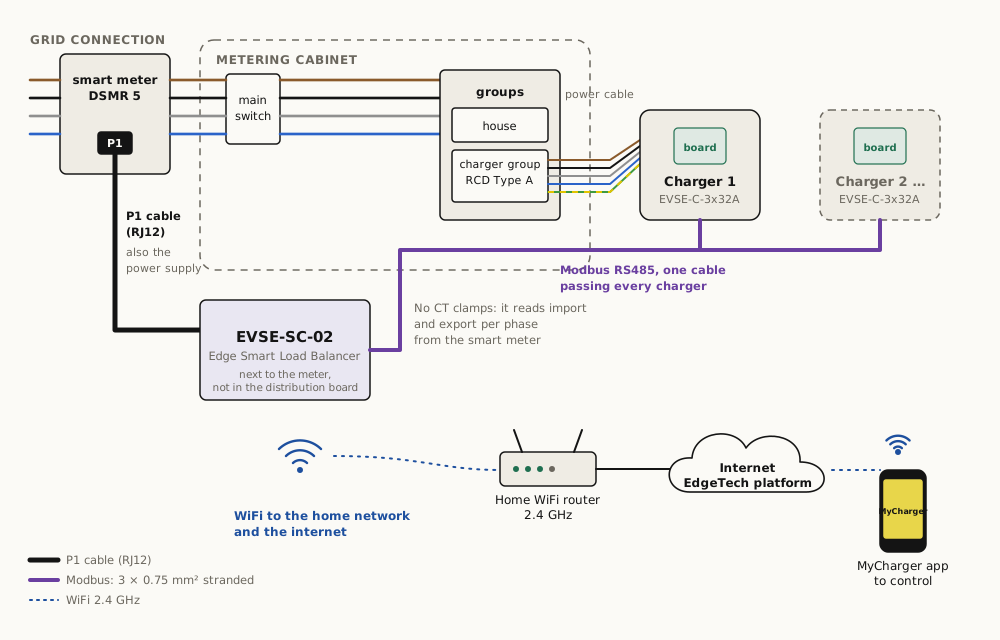
An EdgeTech charger with load balancing has two parts, connected by one Modbus cable:
| Part | Where | What it does |
|---|---|---|
| Charger with the charge controller EVSE-C-3x32A and the RDC-DD EVSE-X-DCD | At the parking space | Talks to the car, switches the power to the car on and off, and stops charging on overheating, a missing earth or a DC residual current above 6 mA |
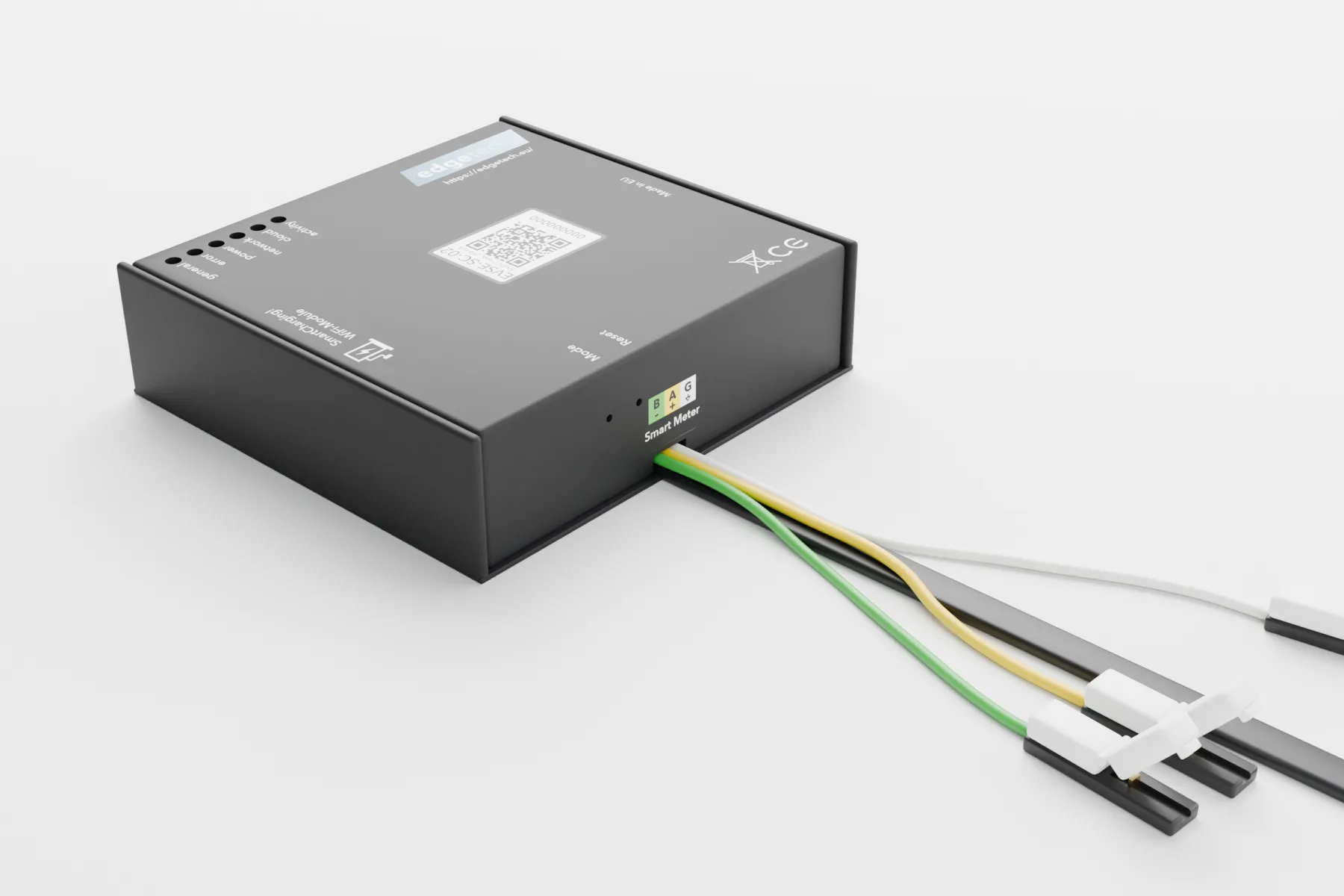
| Site controller EVSE-SC-02 | Next to the smart meter, on its P1 port | Reads what the house uses and returns from the smart meter and tells each charger, every second, how much current it may take, so the main fuse never trips. Connects to the MyCharger app over WiFi |
Two cables run between the metering cabinet and the charger: the power cable and the Modbus cable.
Without a site controller the charger also works on its own: it charges every car that is plugged in, up to the maximum set with its jumper (16 A or 32 A per phase).
This manual is for the EVSE-SC-02 on the P1 port. For a house without a DSMR 5 smart meter, use the EVSE-SC-01 with CT clamps and its manual.
2. Safety
- Installation and maintenance are for qualified electricians who have read this manual and work to IEC 60364 and NEN 1010 (in the Netherlands also NEN 3140).
- Work only on an installation that is switched off and verified dead.
- Do not work in the rain or at a relative humidity above 95 %.
- Size every cable for its current and length, per NEN 1010.
- Protect every charger with its own circuit breaker and an RCD type A (30 mA). The RDC-DD in the charger detects DC residual currents, so a type B RCD is not needed.
- Make sure that all chargers together cannot draw more than the main connection allows. The site controller takes care of this during charging; in larger installations, put all chargers behind one common fuse as well.
- The site controller EVSE-SC-02 belongs indoors, next to the smart meter. Do not open the smart meter: the P1 port is on the outside.
3. Before you start
3.1 The grid connection
Find out the size of the main connection: 1-phase or 3-phase, and the main fuse (for example 3×25 A). It is on the energy bill or available from the network operator. You enter it in the app later (section 8).
3.2 What you need
- An RCD type A and a circuit breaker for the charger circuit, 1-phase or 3-phase to match the charger.
- A smart meter DSMR 5 (or ESMR 5) with a P1 port. Older meters do not supply enough data.
- A free P1 port, or a powered P1 splitter if the port is already in use.
- Room for the EVSE-SC-02 next to the meter; its P1 cable must reach the port without being extended.
- WiFi (2.4 GHz) at the meter. If coverage in the metering cabinet is poor, add a repeater or an access point nearby.
- Up to 10 chargers.
3.3 Cables
| Cable | Requirement |
|---|---|
| Power cable | L1, L2, L3, N, PE (or L1, N, PE for 1-phase), sized for the current and the length per NEN 1010 |
| Modbus cable | 3 cores of at least 0.75 mm², stranded (multi-core). Up to 150 m. No Ethernet cable (Cat5/Cat6) in the terminals: its thin solid cores break |
| Underground | Use armoured underground cable, or lay both cables in a conduit large enough for the two |
4. Install the charger
4.1 The connections of the charge controller
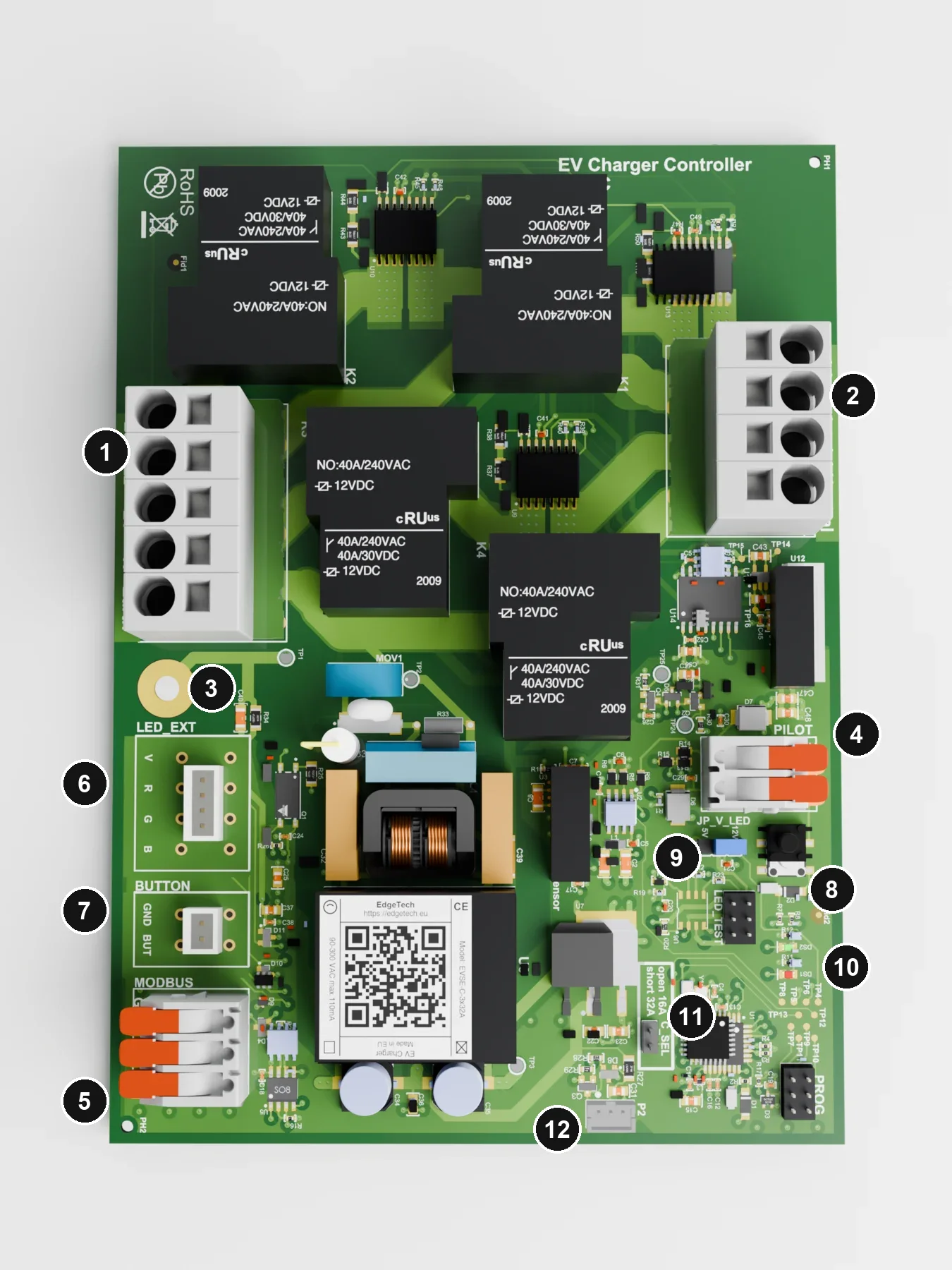
| # | Connection | Use |
|---|---|---|
| 1 | Mains in, 5-pole | L1, L2, L3, N, PE of the power cable |
| 2 | To the car, 4-pole | L1, L2, L3, N to the charging cable or socket, through the RDC-DD ring |
| 3 | Earth | Earth point of the board |
| 4 | Control pilot, terminal with levers | CP: the thin signal wire of the charging cable. PP: only with a Type 2 socket; with a fixed cable leave PP empty |
| 5 | Modbus, terminal with levers | G, A, B of the Modbus cable |
| 6 | External LED | Common-cathode RGB LED or three separate LEDs |
| 7 | External button | Optional push button (GND, BUT) |
| 8 | Test button | Gives the board a state change |
| 9 | JP_V_LED | Voltage for the external LED: 5 V or 12 V |
| 10 | Indicator LEDs | Green: status. Red: error code (section 7) |
| 11 | C_SEL | Maximum current: open = 16 A, jumper fitted = 32 A per phase |
| 12 | RDC-DD and cable lock | Two white connectors side by side: 4-pin for the RDC-DD lead, 3-pin for the cable lock module EVSE-X-CL (Type 2 socket only) |
4.2 Wiring
4.3 Step by step
- Choose the place. Outdoors on a post or a wall, or indoors. A garage or cellar keeps the charger out of the sun; the fixed cable can then hang outside. Check that the charging cable reaches the car.
- Prepare the enclosure. Drill the holes for the cable glands of the power cable and the charging cable with a step drill, and the holes in the back wall for mounting. Seal the screw holes.
- Mount the charge controller in the enclosure, directly or with the brackets.
- Connect the RDC-DD to the 4-pin connector at 12 with the supplied lead.
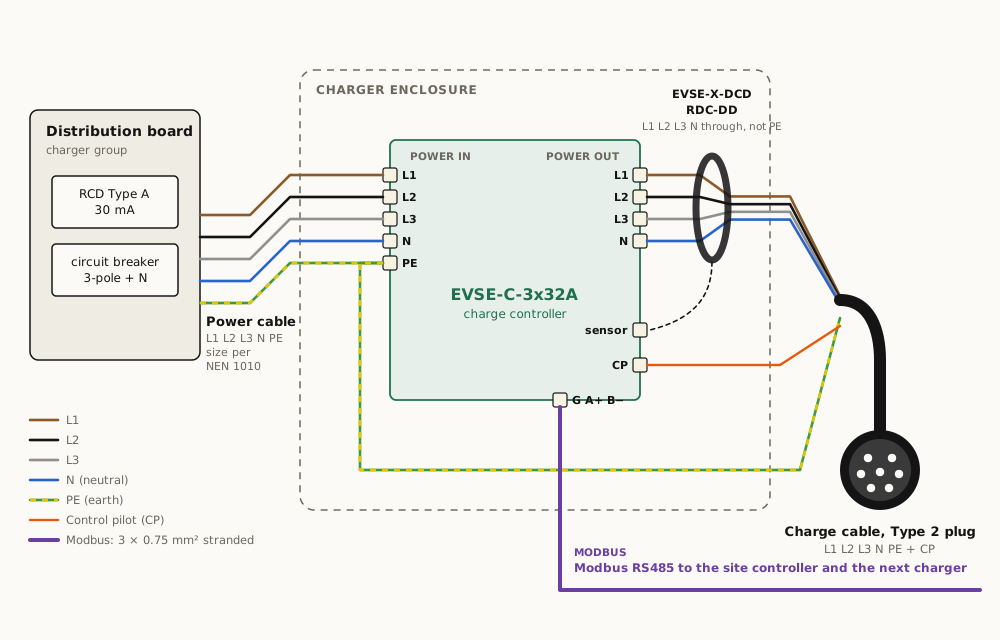
- Earth. All earth wires meet in the supplied push-in connector: PE from terminal 1, PE of the power cable and PE of the charging cable.
- Charging cable. Feed it through its gland. Put L1, L2, L3 and N through the RDC-DD ring and into terminal 2; PE goes to the earth connector, not through the ring. Put the CP wire into the CP input of terminal 4. Lift the lever fully, push the wire in deep, close the lever and pull gently to check.
- Power cable. Mount the enclosure, feed the power cable through its gland and connect L1, L2, L3, N to terminal 1 and PE to the earth connector. Watch the colours: L1 on L1, L2 on L2, L3 on L3.
- Modbus cable. G, A and B to terminal 5: G to G, A to A, B to B at the site controller.
- Check that no strands stick out of any terminal. A loose strand can touch the next terminal and cause a short circuit.
- Maximum current. Set C_SEL (11) to 16 A or 32 A to match the circuit breaker and the cable.
4.4 Chargers with a Type 2 socket
- PP. The socket tells the charger the rating of the cable that is plugged in through the proximity pilot (PP). Connect PP of the socket to the PP input of terminal 4, and check the connection with an ohmmeter from the socket’s PP contact to the PP input.
- Cable lock. The socket’s lock is driven by the cable lock module EVSE-X-CL on the 3-pin connector at 12. Each type of socket lock is tested before supply.
5. Install the site controller EVSE-SC-02
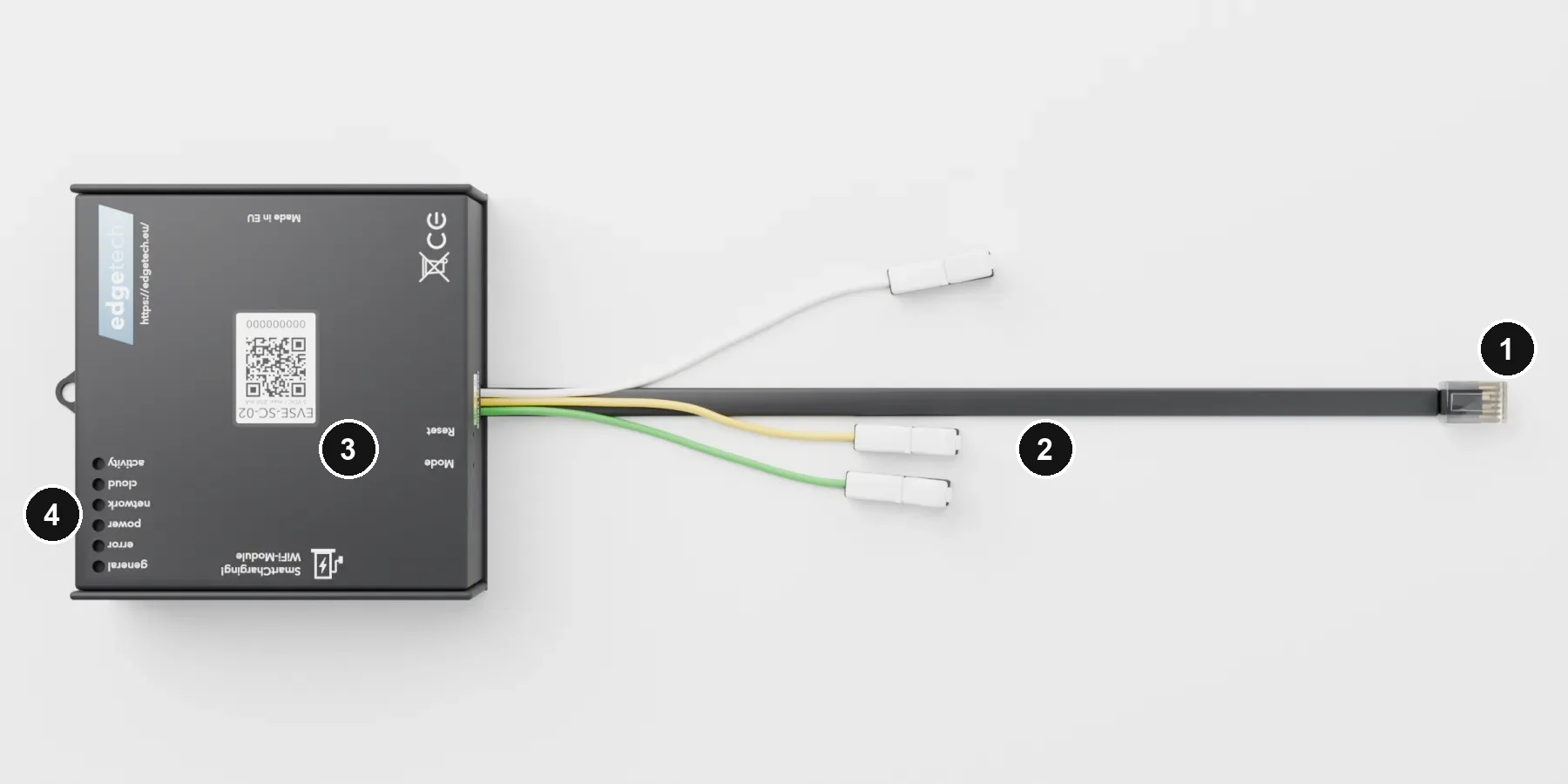
- Place the EVSE-SC-02 next to the smart meter, not in the distribution board.
- P1 (1): plug the fixed cable into the P1 port of the smart meter. Do not extend this cable. If the P1 port is already in use, use a powered P1 splitter.
- Supply: the EVSE-SC-02 is powered by the P1 port. If the meter supplies less than 250 mA, power it with 5 V on its micro-USB port.
- Modbus (2): connect the Modbus cable to the three wires with the splice connectors. Do not strip the wires; the connectors cut through the insulation. G to G, A+ to A, B− to B.
- There are no CT clamps: the EVSE-SC-02 reads import and export per phase from the smart meter, so solar charging works.
6. More than one charger
- All chargers share one Modbus cable that runs from the site controller past every charger. Keep the branch from the cable to each board short.
- Up to 10 chargers on the EVSE-SC-02.
- Every charger leaves the factory at Modbus address 1. The site controller gives each new charger its own address; you do not have to set anything.
7. Switch on and check
7.1 The charger
Switch on the RCD and the circuit breaker. Plug in a car or a test box: the charger switches on and the car starts charging. The indicator LEDs (10) on the charge controller show what it is doing:
| Green LED | Meaning |
|---|---|
| Steady on | Started, ready to charge |
| Short on, short off | Charging cable connected |
| Short on, long off | Charging on 1 phase |
| 2× short on, long off | Charging on 3 phases |
With an external RGB LED (6), blue steady means the charger is charging.
If the red LED is on, there is an error; its blink pattern gives the error code. Check the earth first, both at the charger and at the house.
| Error | Red LED |
|---|---|
| Start-up error | Very long off, very short on |
| High temperature | Short on, short off, short on, long off |
| Temperature too high, charging stopped | Short on, short off, 2× short on, long off |
| No earth connected | Short on, short off, 3× short on, briefly off |
| Relay stays switched on | Short on, short off, 4× short on, short off |
| DC residual current (RDC-DD) | Short on, short off, short on, short off, 2× short on, short off |
| No error | Off |
7.2 The site controller EVSE-SC-02
The site controller has six LEDs (4): four green ones (power, network, cloud, activity), a red error LED and a colour LED (general). In normal operation power, network and cloud are steady green, activity gives a short green flash about once a second, and the general LED is steady cyan.
| LED | Off | Green, blinking | Green, steady |
|---|---|---|---|
| Power | No supply | Waiting for the smart meter (P1 port) | Smart meter found, running |
| Network | No WiFi | Connecting to WiFi | Connected to WiFi |
| Cloud | No WiFi, or no active subscription | Connecting to the EdgeTech server | Connected to the EdgeTech server |
| Activity | A short flash about once a second: all chargers answered in the last control cycle |
| Error LED (red) | Meaning |
|---|---|
| Off | No errors |
| Blinking together with the power LED, at start-up | Waiting for the smart meter. If no DSMR 5 meter answers, the site controller restarts and tries again |
| Short flash instead of the green activity flash | At least one charger did not answer in that control cycle. Check the Modbus cable and the address of the chargers |
| General LED (colour) | Meaning |
|---|---|
| Cyan, steady | Connected to the EdgeTech server. Everything is working |
| Cyan, blinking | Not connected to the EdgeTech server yet. Load balancing keeps working |
| Yellow, blinking | Searching for chargers on the Modbus cable, or loading new firmware into a charger |
| Green | No active subscription. Load balancing keeps working |
| Dark blue, blinking | Setup mode: ready for the app |
| Magenta, blinking | Firmware update of the site controller. Do not unplug |
| Red, blinking fast | Factory reset armed: press once more to confirm (section 8) |
| Red, steady | Factory reset in progress; the site controller then restarts |
All LEDs on at once: factory test mode.
8. Set up with the MyCharger app
- Install MyCharger from the App Store or Google Play.
- Setup mode. Hold the Mode pinhole (3) for 3 seconds, until the general LED blinks dark blue.
- WiFi. In the app, scan the QR code on the site controller and enter the name and password of the WiFi network (2.4 GHz). If there are several networks, choose the one with the strongest signal at the site controller.
- Grid connection. Enter the size of the main connection, for example 3×25 A, or 1×40 A for an older house with a 1-phase connection.
- Pair the chargers. The app finds the chargers on the Modbus cable; give each one a name. More chargers can be added later under Settings › Chargers, also chargers of another installation with an access code.
The site controller may load new firmware during setup. If the app showed an error meanwhile, close the app, open it again, and repeat steps 3 and 4. To restart the EVSE-SC-02, unplug the P1 cable for 3 seconds.
Factory reset. This removes the WiFi settings and the list of chargers, then restarts the site controller; set it up again from step 2.
- Press the Mode pinhole (3) 4 times quickly (short presses, less than a second apart). The general LED blinks red fast.
- Wait 1 to 5 seconds, then press once more. The general LED turns steady red and the site controller restarts.
If you do not press within 5 seconds, nothing is reset.
9. Subscription and support
Load balancing always keeps working, with or without a subscription. With a subscription the app also gives control from anywhere: start and stop, delayed charging for off-peak hours, consumption overviews and notifications, and firmware updates for the site controller and the chargers. See App and subscription and Subscription.
If the main connection changes, set up the site controller again in the app.
Support: support@edgetech.eu, with a photo of the QR code on the site controller. The latest version of this manual is always at edgetech.eu/manual.
10. Disposal
Under normal conditions the equipment lasts at least 10 years. Hand in old equipment at the supplier or at a collection point for electrical waste; do not put it in household waste.
11. Technical data
| Charge controller EVSE-C-3x32A | Site controller EVSE-SC-02 | |
|---|---|---|
| Supply | 90–300 V AC, 50 Hz, 3 W | From the P1 port (≥ 250 mA) or 5 V micro-USB |
| Charging | Mode 3 (IEC 61851-1), 1- or 3-phase, 6–32 A, max 3×32 A (22 kW) | |
| Measurement | P1 port, DSMR 5 / ESMR 5 | |
| Chargers | Up to 10 | |
| Modbus | RS485, 19200 8N1 (set by the site controller) | RS485 master, 19200 8N1 |
| WiFi | 2.4 GHz, 802.11 b/g/n | |
| Size | 168 × 122 × 25 mm | 88 × 90 × 25 mm |
| Protection | IP00, class I, for building into an enclosure | Indoors, next to the meter |
The RDC-DD EVSE-X-DCD trips at a DC residual current above 6 mA and switches off within about 300 ms through the charge controller. Full specifications: charge controller, RDC-DD, EVSE-SC-02.
Edge FS B.V. · Brigittenstraat 11, 3512 KJ Utrecht, the Netherlands · info@edgetech.eu