Products / EDGE-DIY-KIT
DIY smart charging kit
Everything to build one smart, load-balanced charge point: charge controller with 6 mA DC leak detection (RDC-DD), P1 site controller, cabling, brackets and the app. For installers and wholesalers who assemble their own.
- Part number
EDGE-DIY-KIT- Status
- Shipped
- Price
- € 350 excl. VAT · per kit excl. VAT, ask for a quote above 5 kits
Lead time: From stock
Specifications
| Specification | Value |
|---|---|
| Contents | 1× EVSE-C-3x32A, 1× EVSE-X-DCD, 1× EVSE-SC-02, RS485 bus cable (3 × 0.75 mm² multi-core, stranded; length to your installation), P1 cable, 3D-printed mounting brackets, wiring diagram |
| Not included | Enclosure, contactor, MCB, Type A RCD, socket or cable. The wiring diagram lists suitable parts. |
| Power | 1-phase 16/32 A or 3-phase up to 32 A, set by jumper and configuration |
| Load balancing | Dynamic against the main fuse and solar surplus via the P1 port |
| App | MyCharger (iOS, Android) with a free trial of the platform subscription; 60 days |
| Installation | By or under supervision of a qualified electrician; NEN 1010 applies. Dutch manual and a video walk-through are provided. |
What it is
The same boards that go into commercial chargers, packed for one installation, with the brackets, cables and documentation you need to put them in an enclosure of your choice.
The kit exists because the first EdgeTech customers were installers who wanted to build their own charge points instead of buying a black box. The build instructions, brackets and wiring diagram are open on GitHub, and this kit is the fastest way to get the matching hardware.
What you build
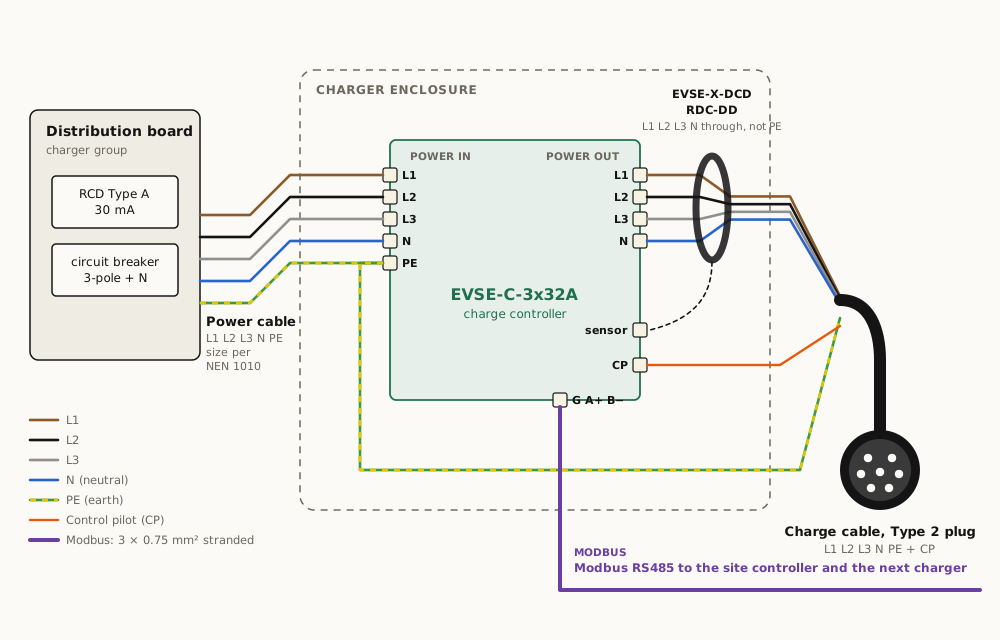
- Mount the charge controller and the RDC-DD in the enclosure with the brackets.
- Wire the contactor, the socket or cable, and the supply. Route N and phases through the DCD toroid.
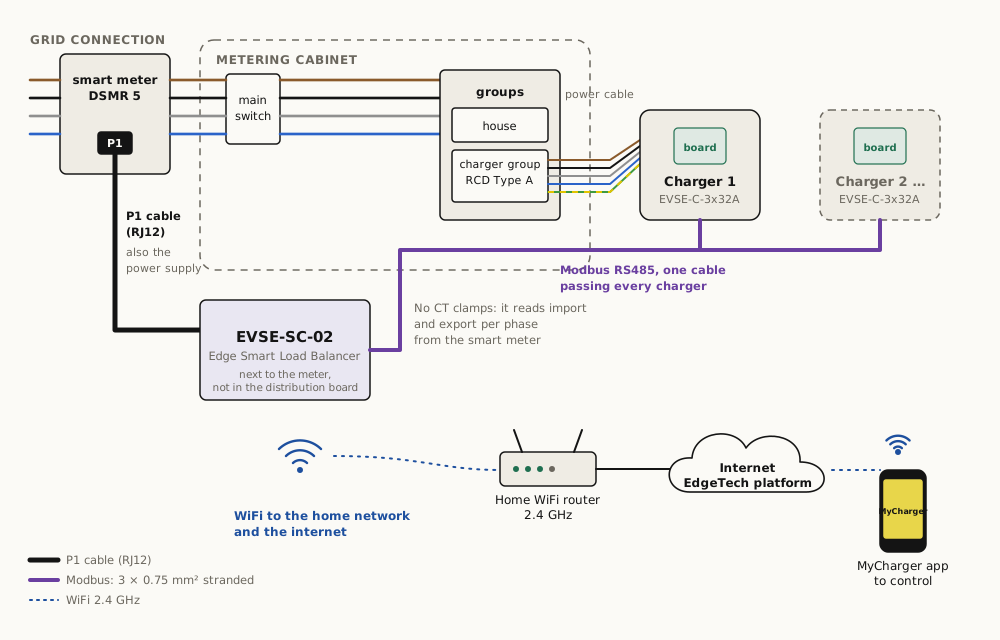
- Mount the SC-02 next to the smart meter, connect the P1 cable and the RS485 cable to the charge controller.
- Set the jumper for 16 A or 32 A. Power up: the controller self-tests earth, neutral and L1 and blinks green.
- Install MyCharger, pair the SC-02 over WiFi, set your main fuse and solar mode.
Installation: Installation and wiring, with the wiring diagrams. The DIY build guide is on GitHub at edge-tech-eu/SmartEVSE.
Installation
Questions
Is this legal to install myself?
In the Netherlands, work in the distribution board and a new circuit for a charge point must be done or checked by a qualified electrician under NEN 1010. The kit is designed to make that job short. It is not a consumer plug-in product.
Which enclosure should I use?
Any IP54 enclosure with room for the 168 × 122 mm controller, a 4-pole contactor and the socket or cable gland. The open-source repository has 3D brackets for common enclosures.
Can I skip the site controller and just use the charge controller?
Yes. The charge controller runs stand-alone at 16 A or 32 A. Without the SC-02 there is no load balancing, no solar mode and no app.